
Introduction
This manual provides essential information for the safe and effective use of your Phonak Sky Q50 M13 Behind-The-Ear (BTE) hearing aid. Please read it thoroughly before using your device.
Product Overview
The Phonak Sky Q50 M13 is a powerful Behind-The-Ear (BTE) hearing aid designed to provide clear sound amplification. It features 12 channels and a fitting range of 0-95 dB, powered by a size 13 battery.
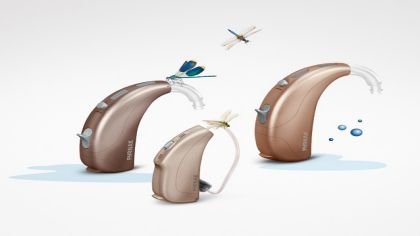
Image: A Phonak Sky Q50 M13 BTE hearing aid, illustrating its compact design and typical appearance.
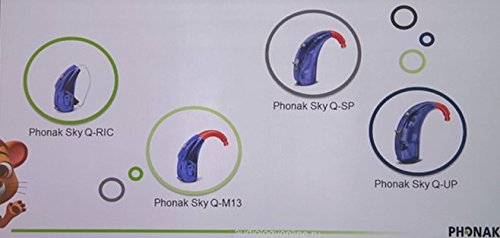
Image: Diagram showing various Phonak Sky Q series models, including the Q-RIC, Q-M13, Q-SP, and Q-UP, highlighting their distinct shapes and sizes. The Q-M13 model is clearly visible.
Setup
1. Battery Insertion
Your Phonak Sky Q50 M13 uses a size 13 battery. To insert the battery:
- Gently open the battery compartment door located at the bottom of the hearing aid.
- Remove the protective tab from the new battery. Wait for 1-2 minutes before inserting to allow the battery to activate fully.
- Insert the battery with the positive (+) side facing upwards (usually indicated by a flat side or a small plus sign).
- Close the battery compartment door firmly until it clicks into place.
2. Initial Placement
Place the hearing aid behind your ear, ensuring the earhook rests comfortably over the top of your ear. Gently insert the earmold or dome into your ear canal. If you experience discomfort or whistling, adjust the placement.
Operating Instructions
1. Turning On/Off
- To Turn On: Close the battery compartment door completely. The hearing aid will typically play a short start-up melody.
- To Turn Off: Open the battery compartment door fully. This conserves battery life when the device is not in use.
2. Volume Control
Your hearing aid may have a rocker switch or button for volume adjustment. Consult your hearing care professional for specific instructions on your device's volume control settings.
- Press the top part of the rocker switch (or specific button) to increase volume.
- Press the bottom part of the rocker switch (or specific button) to decrease volume.
3. Program Selection
Your hearing aid may be programmed with multiple listening programs for different environments (e.g., quiet, noisy, music). A short press on the program button (if available) will cycle through these programs.
Maintenance
1. Daily Cleaning
- Use a soft, dry cloth to wipe the hearing aid and earmold/dome daily to remove earwax and debris.
- Use the provided cleaning tool (brush or wax pick) to clear any wax from the sound outlet and vents.
- Do not use water, solvents, or cleaning fluids directly on the hearing aid.
2. Storage
When not in use, store your hearing aid in its protective case with the battery compartment open to allow air circulation and prevent moisture buildup. Keep it away from heat, humidity, and direct sunlight.
3. Battery Replacement
Replace the battery when you hear a low-battery warning signal or if the sound quality deteriorates. Follow the battery insertion steps outlined in the Setup section.
Troubleshooting
| Problem | Possible Cause | Solution |
|---|---|---|
| No sound | Dead battery, blocked sound outlet, hearing aid turned off. | Replace battery, clean sound outlet, ensure battery door is closed. |
| Weak or distorted sound | Low battery, partially blocked sound outlet, moisture. | Replace battery, clean sound outlet, use a drying kit. |
| Whistling (feedback) | Improper fit, earwax buildup in ear canal, volume too high. | Re-insert hearing aid, consult professional for earwax removal, reduce volume. |
If problems persist, contact your hearing care professional for assistance.
Specifications
- Model: Phonak Sky Q50 M13
- Manufacturer: PHONAK
- Gain: 67 dB
- Number of Channels: 12
- Fitting Range: 0-95 dB
- Battery Size: 13
- Type: Behind-The-Ear (BTE)
Warranty and Support
For warranty information and technical support, please refer to the documentation provided with your purchase or contact your authorized Phonak dealer or hearing care professional. Keep your purchase receipt as proof of purchase.


