
1. Introduction
The Alnor EBT731 Balometer capture hood and Alnor EBT730 micromanometer are advanced modular air balancing tools designed for precise HVAC testing, adjusting, balancing, and commissioning. These instruments are also highly effective for setting up and testing fume hoods. This manual provides essential information for the proper setup, operation, maintenance, and troubleshooting of your TSI Digital Micromanometer.
2. Product Overview
The TSI Digital Micromanometer offers a range of features to enhance measurement accuracy and user convenience:
- Multiple Measurement Tools: Combines several measurement capabilities into one compact package.
- Detachable Design: Can function as a stand-alone meter for increased versatility.
- Auto-Zeroing Pressure Sensor: Automatically zeros the pressure sensor, saving time during operation.
- Automatic Density Correction: Enhances reading accuracy by automatically correcting for air density variations.
- Simultaneous Measurements: Displays up to 5 simultaneous measurements on a large, backlit graphic display.
- Intuitive Menu Structure: Facilitates easy setup and operation.
- Bluetooth Communication: Enables bidirectional communication for data transfer and remote polling.
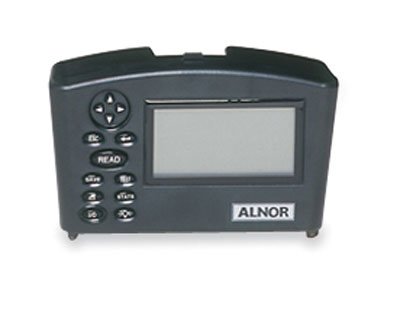
Image of the TSI Alnor Digital Micromanometer, a compact grey device with a rectangular screen on the right and a control panel with buttons and a directional pad on the left. The 'ALNOR' logo is visible below the screen.
3. Setup
Before using your TSI Digital Micromanometer, ensure it is properly prepared:
- Battery Installation/Charging: The device operates on 4 rechargeable AA Ni MH batteries, which are included. Ensure the batteries are fully charged before first use. Connect the appropriate charger to the device and a power outlet.
- Power On: Press the power button (usually marked with a power symbol or 'ON/OFF') to turn on the device.
- Initial Zeroing: For accurate pressure measurements, it is crucial to perform an auto-zeroing procedure. Refer to the device's on-screen prompts or the 'READ' button functionality for initiating this process. Ensure the pressure ports are open to ambient air during zeroing.
- Accessory Connection: If using with the Alnor EBT731 Balometer capture hood or other probes, securely connect them to the designated ports on the micromanometer.
4. Operation
The TSI Digital Micromanometer is designed for intuitive operation. Follow these general guidelines:
- Navigation: Use the directional pad and 'Enter' or 'Select' buttons to navigate through the menu structure displayed on the backlit graphic screen.
- Taking Measurements: Select the desired measurement mode (e.g., pressure, air velocity, volume) from the menu. Position the device or connected probe appropriately for the measurement. Press the 'READ' button to initiate a reading. The device will automatically apply density correction for improved accuracy.
- Data Logging: The device supports data logging with storage for up to 26,500 samples. Access the data logging function through the menu to start, stop, and review recorded data.
- Bluetooth Communication: To transfer data or perform remote polling, activate the Bluetooth function in the device settings. Pair the micromanometer with a compatible device (e.g., computer, tablet) following the on-screen instructions and your device's Bluetooth pairing process.
- Viewing Multiple Measurements: The large display allows for simultaneous viewing of up to 5 different measurements, providing a comprehensive overview of conditions.
5. Maintenance
Proper maintenance ensures the longevity and accuracy of your TSI Digital Micromanometer:
- Cleaning: Wipe the exterior of the device with a soft, damp cloth. Do not use abrasive cleaners or solvents. Ensure no liquid enters the ports or screen area.
- Battery Care: Recharge the Ni MH batteries regularly. If the device will not be used for an extended period, it is recommended to fully charge the batteries before storage and periodically recharge them to maintain battery health.
- Storage: Store the micromanometer in a clean, dry environment, away from extreme temperatures, direct sunlight, and corrosive materials. Use the original packaging or a protective case if available.
- Calibration: While the device features auto-zeroing, periodic professional calibration may be required to maintain optimal accuracy over time. Refer to TSI's recommendations for calibration intervals.
6. Troubleshooting
If you encounter issues with your TSI Digital Micromanometer, consider the following common solutions:
- Device Not Powering On:
- Check battery charge level.
- Ensure batteries are correctly inserted.
- Try charging the device for a few hours.
- Inaccurate Readings:
- Perform an auto-zeroing procedure.
- Ensure probes or connections are secure and free from blockages.
- Verify that the correct measurement units are selected.
- Check for environmental factors affecting readings (e.g., drafts, temperature fluctuations).
- Bluetooth Connectivity Issues:
- Ensure Bluetooth is enabled on both the micromanometer and the pairing device.
- Move devices closer to each other to reduce interference.
- Remove previous pairings and attempt to re-pair.
- Restart both devices.
- Display Not Responding:
- Try a soft reset by holding the power button for 10-15 seconds.
- If unresponsive, allow the battery to fully drain and then recharge.
If problems persist after attempting these steps, please contact TSI customer support.
7. Specifications
| Specification | Value |
|---|---|
| Height | 2.25 in |
| Length | 7.5 in |
| Width | 4.5 in |
| Min Temperature | 14°F (-10°C) |
| Max Temperature | 140°F (60°C) |
| Temperature Accuracy | ±0.5°F (0.3°C) between 32 to 160°F (0 to 71°C); ±2.0°F (1.2°C) outside of that range |
| Temperature Resolution | 0.1°F (0.1°C) |
| Min Dew Point | 5°F (-15°C) |
| Max Dew Point | 120°F (49°C) |
| Min Wet Bulb Temperature | 40°F (4°C) |
| Max Wet Bulb Temperature | 140°F (60°C) |
| Min Air Velocity | 25 ft/min |
| Max Air Velocity | 15000 ft/min |
| Air Velocity Resolution | 1 ft/min (0.01 m/s) |
| Min Air Volume (CFM) | 25 CFM |
| Max Air Volume (CFM) | 2500 CFM |
| Volume Resolution | 1 CFM (1 m³/h) |
| Min RH | 0% RH |
| Max RH | 95% RH |
| RH Accuracy | ±3% |
| RH Resolution | 0.10% RH |
| Barometric Pressure Resolution | 0.00001 in H₂O (0.001 mm of Hg) |
| Number Of Temperature Channels | 1 |
| Battery | 4 rechargeable AA Ni MH (included) |
| Data Logging | Yes |
| Data Storage | 26500 samples |
| Manufacturer | COLE-PARMER |
| ASIN | B00NG2FCYS |
| Date First Available | June 13, 2013 |
8. Warranty and Support
Warranty: The TSI Digital Micromanometer comes with a 2-year universal guarantee, covering defects in materials and workmanship under normal use.
Customer Support: For technical assistance, troubleshooting beyond this manual, or warranty claims, please contact TSI customer support directly. Refer to the official TSI website or product packaging for the most current contact information.

