
Canon 9546B001
Canon PowerShot G7 X Digital Camera User Manual
Model: 9546B001 | Brand: Canon
1. Introduction
The Canon PowerShot G7 X is a high-performance compact digital camera designed for photographers seeking exceptional image quality and advanced features in a portable form factor. It combines a large 1.0-inch, 20.2 Megapixel High-Sensitivity CMOS sensor with Canon's powerful DIGIC 6 Image Processor, delivering stunning results even in challenging lighting conditions. This manual provides essential information for setting up, operating, maintaining, and troubleshooting your PowerShot G7 X camera.

Figure 1.1: Front view of the Canon PowerShot G7 X Digital Camera, showcasing its compact design and lens.
2. Setup
2.1 Unpacking the Camera
Carefully unpack your Canon PowerShot G7 X camera and ensure all components are present. The standard package includes:
- PowerShot G7 X Digital Camera
- Battery Pack NB-13L
- Battery Charger CB-2LH
- Wrist Strap WS-DC12
- One Year Limited Warranty Card
2.2 Battery Installation and Charging
To install the battery, open the battery/card compartment cover located on the bottom of the camera. Insert the Battery Pack NB-13L with the contacts facing inward until it clicks into place. Close the cover securely.
To charge the battery, connect the Battery Charger CB-2LH to a power outlet and insert the battery. The charging indicator will illuminate. A full charge typically takes approximately 2 hours. A fully charged battery provides an average life of 210 photos.

Figure 2.1: The Canon PowerShot G7 X camera alongside its battery and charger, illustrating the charging setup.
2.3 Memory Card Installation
The PowerShot G7 X uses SD, SDHC, or SDXC memory cards (UHS-I compatible). Open the battery/card compartment cover. Insert the memory card into the designated slot with the label facing the correct direction until it clicks. Close the cover.
2.4 Attaching the Wrist Strap
Thread the included Wrist Strap WS-DC12 through the strap mount on the side of the camera, as shown in Figure 2.2. Secure it firmly to prevent accidental drops.
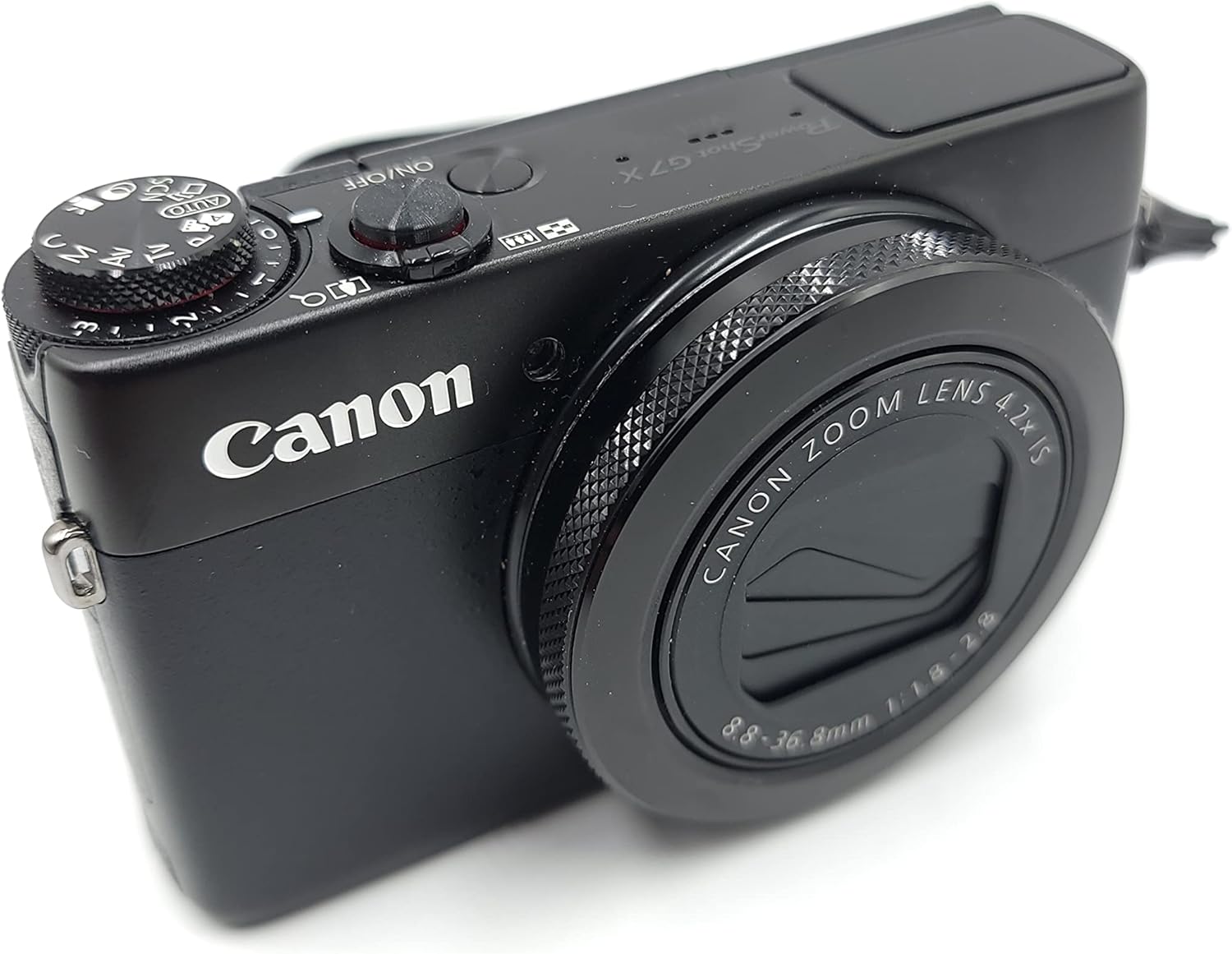
Figure 2.2: Side view of the Canon PowerShot G7 X, highlighting the attachment point for the wrist strap.
3. Operating Your Camera
3.1 Basic Photography
3.1.1 Powering On/Off
Press the ON/OFF button located on the top of the camera to power it on or off. The lens will extend when powered on.

Figure 3.1: Top view of the Canon PowerShot G7 X, illustrating the placement of the power button, mode dial, and shutter button.
3.1.2 Shooting Modes
Rotate the mode dial on the top of the camera to select your desired shooting mode. Available modes include:
- C (Custom)
- M (Manual)
- Av (Aperture Priority)
- Tv (Shutter Priority)
- P (Program AE)
- Hybrid Auto
- Auto
- Creative Shot
- Portrait
- Smart Shutter (Smile, Wink Self-timer, Face Self-timer)
- Handheld Night Scene
- Underwater
- Snow and Fireworks
3.1.3 Focusing
The camera features a 31-point High Speed contrast-detect AF system. You can select focus points using the multi-angle touch panel LCD. Auto Focus Technology includes Center, Selective single-point, Face Detection, Multi-area, Single, Continuous, Live View, Contrast Detection, and Touch AF.
3.1.4 Taking a Photo
Press the shutter button halfway down to focus, then press it fully to capture the image.
3.1.5 Zooming
Use the zoom lever around the shutter button to adjust the 4.2x optical zoom (24mm-100mm equivalent). The camera also features a 4x digital zoom.
3.1.6 Flash Usage
The built-in flash has modes including Auto, On, and Off. Adjust flash settings via the camera's menu or dedicated buttons.
3.2 Advanced Photography Features
3.2.1 High-Sensitivity CMOS Sensor and DIGIC 6 Processor
The 1.0-inch, 20.2 Megapixel High-Sensitivity CMOS sensor captures more light, while the DIGIC 6 Image Processor reduces noise at high ISO speeds (up to 12800) and processes images rapidly, ensuring high-quality results even in low light.
3.2.2 Lens Features
The PowerShot G7 X features a bright f/1.8 (wide) to f/2.8 (telephoto) lens with a 4.2x optical zoom (24mm-100mm). Its 9-blade iris diaphragm allows for beautiful background blur. The lens is equipped with Optical Image Stabilization.
3.2.3 Multi-Angle Touch Panel LCD
The 3.0-inch capacitive touch panel LCD can tilt up 180 degrees, making it ideal for selfies and creative low-angle or high-angle shots. You can use the touch screen for quick control settings, focusing, and shutter release.

Figure 3.2: The multi-angle LCD screen of the PowerShot G7 X tilted upwards, facilitating self-portraits and unique shooting angles.

Figure 3.3: Rear view of the Canon PowerShot G7 X with the LCD screen fully articulated, demonstrating its flexibility for various shooting positions.

Figure 3.4: Rear view of the Canon PowerShot G7 X, displaying the control buttons and the LCD screen in its standard position.
3.2.4 Continuous Shooting
The camera supports high-speed continuous shooting up to 6.5 frames per second (fps) at full resolution, allowing you to capture fast-moving subjects with ease.
3.2.5 Wi-Fi and NFC Connectivity
Built-in Wi-Fi and NFC (Near Field Communication) technology enable seamless sharing and transferring of images and videos to compatible mobile devices. Use the Canon CameraWindow app for remote shooting and quick uploads to social media or cloud services.
3.3 Video Recording
3.3.1 Full HD Video with Manual Control
Record incredibly realistic 1080p Full HD video at 60 frames per second (fps) with stereo sound in convenient MP4 format. The camera also offers Manual movie mode, allowing adjustment of aperture (Av), shutter speed (Tv), and ISO speed during recording.
3.3.2 Intelligent IS (Image Stabilization)
Canon's Intelligent IS system automatically analyzes camera movement and applies the best shake correction method for both stills and video. For video, it selects from Dynamic IS, Powered IS, Macro (Hybrid) IS, and Active Tripod IS modes to ensure smooth, steady footage.
4. Maintenance
4.1 Cleaning the Camera
- Camera Body: Use a soft, dry cloth to wipe the camera body. For stubborn dirt, lightly dampen the cloth with water.
- Lens: Use a lens brush or a blower to remove dust. For smudges, use a lens cleaning cloth with a small amount of lens cleaning fluid. Avoid touching the lens surface directly.
- LCD Screen: Gently wipe the screen with a soft, lint-free cloth.
4.2 Storage
When not in use, store the camera in a cool, dry, and well-ventilated place, away from direct sunlight and high humidity. Remove the battery if storing for extended periods.
4.3 Battery Care
To prolong battery life, avoid fully discharging the battery frequently. Charge the battery in temperatures between 5°C and 40°C (41°F and 104°F). If the battery will not be used for a long time, charge it once every six months.
5. Troubleshooting
This section addresses common issues you might encounter with your Canon PowerShot G7 X.
| Problem | Possible Cause | Solution |
|---|---|---|
| Camera does not power on. | Battery is depleted or incorrectly inserted. | Charge the battery fully. Ensure the battery is inserted correctly with contacts aligned. |
| Images are blurry. | Camera shake, incorrect focus, or low light. | Hold the camera steady. Ensure the camera is properly focused. Use Intelligent IS. Increase ISO or use flash in low light. |
| Wi-Fi connection fails. | Incorrect settings, out of range, or app issue. | Ensure Wi-Fi is enabled on both camera and device. Move closer to the device. Restart the CameraWindow app. |
| Memory card error. | Card is full, corrupted, or incompatible. | Delete unnecessary files or use a new card. Format the card (this will erase all data). Ensure the card type is SD/SDHC/SDXC. |
| Video recording stops unexpectedly. | Memory card speed is too slow or card is full. | Use a high-speed memory card (UHS-I recommended). Ensure sufficient free space on the card. |
6. Specifications
| Feature | Specification |
|---|---|
| Model Name | Canon PowerShot G7 X Mark II |
| Model Number | 9546B001 |
| Photo Sensor Resolution | 20.2 MP |
| Photo Sensor Size | 1-inch |
| Image Processor | DIGIC 6 |
| Optical Zoom | 4.2x |
| Focal Length | 24mm - 100mm (equivalent) |
| Maximum Aperture | f/1.8 (W) - f/2.8 (T) |
| Image Stabilization | Optical (Intelligent IS) |
| ISO Sensitivity | Expanded ISO Minimum: 125, Expanded ISO Maximum: 12800 |
| Screen Size | 3 Inches |
| Display Type | LCD, Tilting, Touch Screen |
| Memory Card Type | SD/SDHC/SDXC (UHS-I compatible) |
| Video Resolution | FHD 1080p (60fps) |
| Video Capture Format | MPEG-4, H.264 |
| Connectivity | Wi-Fi, NFC, HDMI, USB 2.0 |
| Battery Type | Lithium Ion (NB-13L) |
| Battery Average Life | 210 Photos |
| Item Weight | 0.32 Kilograms |
| Dimensions (H x W x D) | Approx. 2.36 inches (Height) |
7. Warranty and Support
7.1 Warranty Information
The Canon PowerShot G7 X comes with a 1-year limited warranty covering parts and labor. Please refer to the warranty card included in your package for full terms and conditions.
7.2 Customer Support
For further assistance, technical support, or service inquiries, please visit the official Canon support website or contact Canon customer service. You can also refer to the comprehensive User Manual (PDF) for more detailed information.
Related documents9546B001


Ask a question about this manual
Ask about setup, troubleshooting, compatibility, parts, safety, or missing instructions. Manuals+ will review the question and use this page’s manual context to help answer it.