
1. Product Introduction
The CHUNGHOP K-2012E Universal A/C Remote Controller is designed to provide convenient control for a wide range of air conditioner brands and models. It combines multiple functions into one device, offering ease of use with its large LCD screen and intuitive button layout. This remote is an ideal replacement or spare for your air conditioner's original remote.
Key features include:
- Compatibility with various air conditioner brands and models.
- Large LCD screen for clear display of settings.
- Built-in LED light for easy operation in low-light conditions.
- Fast cooling and heating functions for quick temperature adjustments.
- Timing ON/OFF functions for scheduled operation.
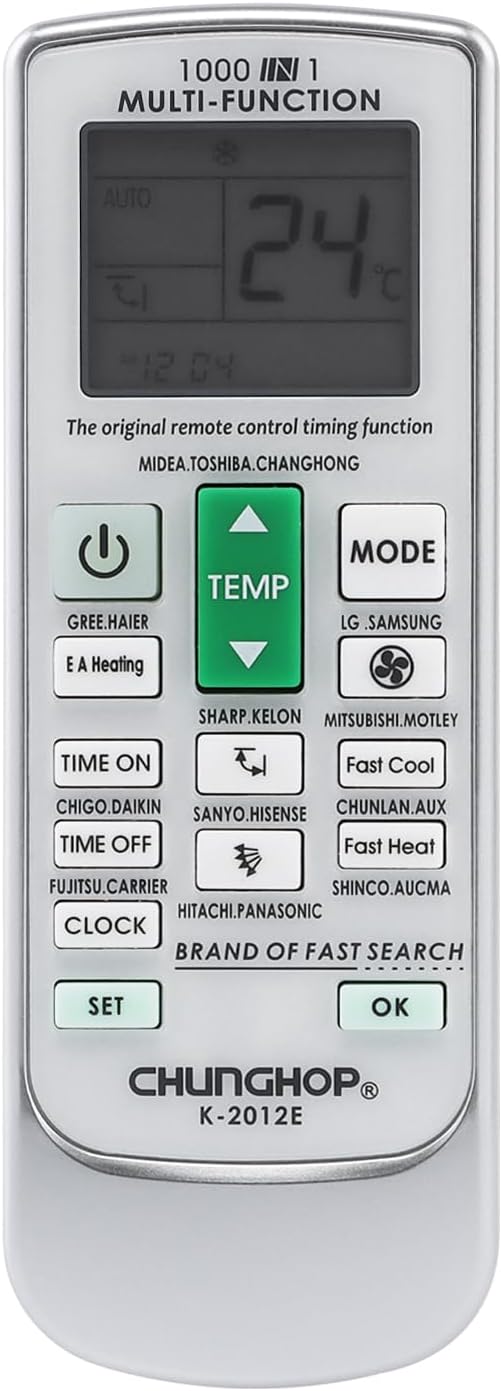
Figure 1.1: Front view of the CHUNGHOP K-2012E Universal A/C Remote Control, showing the LCD display and various function buttons.
2. Components and Display
The remote control features a clear LCD display and a well-organized button layout for easy navigation and control. Below is a description of the main components and display indicators.

Figure 2.1: Diagram illustrating the various parts and display indicators of the remote control.
2.1. Panel Description
- Signal Sending Display
- Fan Display
- Temperature Display
- EA Heating Indicator
- Temperature "Up" Key
- Mode Key
- Wind Direction Blowing Indicator
- Direction Control Key
- Blowing Direction Control Key
- Timing ON Key
- SET Key
- Clock Function Key
- Run Mode Display
- Wind Speed Display
- Mode Code
- Power Key
- Fan Key
- Temperature "Down" Key
- Fast Cool Key
- Fast Heat Key
- Confirmation Button (OK)
3. Battery Installation
Proper battery installation is crucial for the remote control's functionality. Please follow these steps:
- Remove the battery cover located on the back of the remote control.
- Insert two new AAA (7#) batteries, ensuring correct polarity (+/-).
- Replace the battery cover securely.
Upon successful installation, the current time should appear in the left corner of the LCD display.

Figure 3.1: Back view of the remote control, indicating the battery compartment.
4. Setting Up the Remote Control
The CHUNGHOP K-2012E remote controller offers three primary methods for setting up and connecting to your air conditioner. Choose the method that best suits your needs.
4.1. Method A: Brand Corresponding Point-to-Point Fast Searching
This method allows for quick setup if your air conditioner's brand is listed on the remote's dedicated brand keys.
- Ensure your air conditioner is manually plugged in and powered on.
- Aim the remote control directly at the receiving window (infrared sensor) of your air conditioner.
- Press and hold the specific brand code key on the remote that corresponds to your air conditioner's brand (e.g., GREE.HAIER, LG.SAMSUNG, SHARP.KELON, MITSUBISHI.MOTLEY, etc.).
- Continue holding the key until the air conditioner starts and emits a sound signal.
- Release the key. The setting is now complete.
4.2. Method B: Manually Input Code
This method requires you to find your air conditioner's code from the provided code table and input it manually.
- Manually plug in and power on your air conditioner.
- Refer to the "Code Table" (usually found in the included manual or on the back of the remote) to find the corresponding code for your air conditioner's brand and model. Note the first code listed for your brand (e.g., for Haier).
- Press and hold the SET button for approximately three seconds until the conditioner type code starts flickering in the remote's display window.
- While the code is flickering, press the Temperature "Up" (▲) or "Down" (▼) buttons to cycle through the codes until the desired code for your air conditioner appears and the air conditioner starts.
- Once the air conditioner starts, press the OK button. The selected conditioner type code will stop flickering.
- Test whether all remote control buttons function correctly. If yes, the setting is complete. If not, repeat steps 2-3.
4.3. Method C: Digital Automatic Search Type
This method allows the remote to automatically search for the correct code for your air conditioner.
- Manually plug in and power on your air conditioner.
- Aim the remote control directly at the receiving window (infrared sensor) of your air conditioner.
- Press and hold the SET button for approximately six seconds. The conditioner type code in the remote's display window will begin to change, indicating that the remote has entered the high-speed conditioner type search status.
- Once your air conditioner automatically starts, immediately press the OK button to stop the search.
- Test whether the functions of the remote control buttons (excluding Temperature buttons, timed ON/OFF buttons, and SET button) are correct. If yes, the code is effectively set. If not, press the SET button again to continue the search from where it left off.

Figure 4.1: Example of a code table and additional setting instructions.

Figure 4.2: Partial list of compatible air conditioner brands.
5. Operating Functions
Once the remote control is successfully set up, you can use its various functions to control your air conditioner.
5.1. Basic Operations
- Power On/Off: Press the Power button to turn the air conditioner on or off.
- Mode Selection: Press the MODE button to cycle through different operating modes (e.g., Cool, Heat, Fan, Dry, Auto).
- Temperature Adjustment: Use the Temperature "Up" (▲) and "Down" (▼) buttons to adjust the desired temperature.
- Fan Speed: Press the FAN button to adjust the fan speed.
- Swing/Direction: Use the Direction Control keys to adjust the airflow direction.
5.2. Set Time Function
To set the current time on the remote's display:
- Press and hold the CLOCK button for three seconds to enter the clock setting status. The clock display will start flickering.
- Use the Temperature "Up" (▲) or "Down" (▼) buttons to adjust the current time.
- Press the CLOCK button again to exit the setting mode.
5.3. Timing ON/OFF Function
To schedule your air conditioner to turn on or off at a specific time:
- Press the TIME ON or TIME OFF buttons. The air conditioner timer light will illuminate, indicating that the air conditioner has entered the timed status.
- Adjust the desired ON/OFF time using the Temperature "Up" (▲) or "Down" (▼) buttons.
- Note: The timed ON function for some air conditioner types is only valid when the air conditioner is in the Power Off status.
5.4. Fast Cooling and Heating
- Fast Cool: Press the Fast Cool key to automatically set the air conditioner to refrigerating mode, 21°C, with middle wind and automatic blowing direction.
- Fast Heat: Press the Fast Heat key to automatically set the air conditioner to heating mode, 27°C, with middle wind and automatic blowing direction.
- In 'Fast Heat' mode, you can press the EA Heating key to enter EA Heating mode for enhanced heating.
6. Maintenance
To ensure the longevity and proper functioning of your CHUNGHOP K-2012E remote control, please observe the following maintenance guidelines:
- Battery Replacement: Replace batteries when the remote's display becomes dim or it fails to respond. Always use two new AAA (7#) batteries.
- Long-Term Storage: If the remote control will not be used for an extended period, remove the batteries to prevent leakage and potential damage to the device.
- Cleaning: Wipe the remote control with a soft, dry cloth. Do not use liquid cleaners or abrasive materials.
- Avoid Exposure: Keep the remote away from direct sunlight, high temperatures, and high humidity.
7. Troubleshooting
If you encounter issues with your remote control, consider the following common solutions:
- Remote Not Responding: Ensure the air conditioner receiver is working normally. Check if the batteries are correctly installed and have sufficient power. Replace batteries if necessary.
- Incorrect Operation/Program Disorder: If the remote control is not operated correctly or experiences internal program disorder, remove the batteries and wait for approximately 35 minutes before reinstalling them. This can help reset the remote's internal program.
- Air Conditioner Not Responding to Code: Re-attempt the setting procedure (Method A, B, or C) carefully. Ensure the remote is aimed directly at the air conditioner's infrared receiver. Verify that you have selected the correct code for your specific air conditioner model.
- Limited Functionality After Setup: If some buttons do not work after setup, it might indicate that the selected code is not fully compatible. Try another code from the code table for your brand, or re-run the automatic search.
8. Specifications
| Feature | Detail |
|---|---|
| Product Dimensions | 8.7 x 4.3 x 0.8 inches |
| Item Weight | 3.52 ounces |
| Model Number | K-2012E |
| Batteries Required | 2 AAA batteries (not included) |
| Connectivity Technology | Infrared |
| Max Number of Supported Devices | 1 (Universal A/C) |
| Compatible Devices | Air Conditioner |
| Special Feature | Universal, LED Light, LCD Screen |
9. Warranty and Support
For any questions, concerns, or support regarding your CHUNGHOP K-2012E Universal A/C Remote Control, please do not hesitate to contact us. We are committed to resolving any issues you may encounter.
You can visit the official CHUNGHOP store for more information and support:


