
1. Introduction and Overview
The My Tot Clock MTC02 is an all-in-one device designed to assist families with small children in establishing healthy sleep routines. It combines a toddler sleep clock, alarm clock, white noise machine, timeout timer, and activity timer into a single unit. The clock utilizes a color-coded illumination system to visually communicate different times of the day to children, aiding in their understanding of sleep and wake cycles.
This device offers configurable sound features, including bedtime stories, lullabies, and fun wake-up music, alongside white noise options. It also features changeable faceplates for personalization, an energy-saver mode, weekend wake time settings, a night light with adjustable illumination, hidden parent controls, and both analog and digital clock displays.
2. Key Features
- 10-in-1 Functionality: Combines toddler sleep clock, alarm clock, white noise, timeout timer, and activity timer.
- 5 Color Illumination: Blue for BedTime, Yellow for WakeTime, Cyan for NapTime, Green for FunTime, and Red for Thinking Time/Timeout.
- Configurable Sound Features: Plays bedtime stories, lullabies, fun wake music, and white noise. Includes the "It's Night Night Time" Tot Clock Treasure (other Treasures sold separately).
- Changeable Faceplates: Allows customization to match child's interests or room decor. Ships with Moon & Stars faceplate (others sold separately).
- Energy-Saver Mode: Optimizes power consumption.
- Weekend WakeTime: Allows for different wake-up schedules on weekends.
- Night Light: Features 5 levels of illumination.
- Hidden Parent Controls: Prevents children from altering settings.
- Analog & Digital Clock Displays: Provides both visual formats for time-telling.
3. Setup
To begin using your My Tot Clock MTC02, follow these initial setup steps:
- Power Connection: Connect the AC power adapter to the clock and plug it into a standard electrical outlet.
- Battery Installation (Backup): The device requires 3 AA batteries for backup power (batteries not included). Install them in the designated compartment to ensure settings are retained during power outages.
- Initial Time Setting: Use the control buttons on the back of the unit to set the current time. Refer to the detailed instructions in the operating section for precise steps.
- Faceplate Attachment: Ensure the desired faceplate (e.g., Moon & Stars) is securely attached to the front of the clock.

Figure 1: Front view of the My Tot Clock MTC02, featuring a blue-lit analog clock face with a digital display showing 2:00 AM. The clock is adorned with a moon and stars design, indicating nighttime.
Video 1: This video provides a step-by-step guide on how to set up your My Tot Clock MTC02, including initial power connection and basic time settings.
4. Operating Instructions
The My Tot Clock MTC02 offers various functions to help manage your child's daily routine. Familiarize yourself with the control buttons located on the back of the unit (Figure 2).
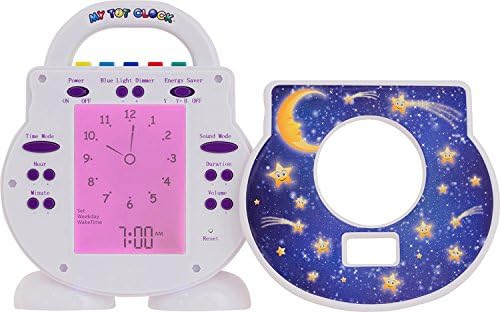
Figure 2: The back panel of the My Tot Clock MTC02, revealing various control buttons for setting time, alarm, sound modes, volume, and other functions. A removable faceplate is shown next to it.
4.1 Setting Current Time
- Locate the 'Time Mode' button on the back panel.
- Press 'Time Mode' to enter time setting. Use the 'Hour' and 'Minute' buttons to adjust the current time.
- Press 'Time Mode' again to confirm and exit.
4.2 Programming Bedtime and Wake Time
The core function of My Tot Clock is its color-coded system to indicate when it's okay to sleep and when it's okay to wake up.
- Blue (BedTime): Indicates it's time to sleep.
- Yellow (WakeTime): Indicates it's time to wake up.
- Cyan (NapTime): Indicates it's time for a nap.
- Green (FunTime): Indicates it's time for quiet play or activity.
- Red (Thinking Time/Timeout): Indicates a timeout period.
To set these times, refer to the specific instructions in your detailed user manual for navigating the 'Time Mode' and 'Alarm' settings. The clock allows for separate weekday and weekend wake times.

Figure 3: A visual guide demonstrating the My Tot Clock MTC02's color-coded system: blue for bedtime, yellow for wake-up, cyan for nap time, green for encouragement/play, and red for timeout. Each color is paired with an image of a child engaged in the corresponding activity.
4.3 Sound Features
The My Tot Clock MTC02 includes various sound options to enhance sleep and wake routines:
- Bedtime Stories/Lullabies: Activate these sounds during bedtime to help your child relax.
- Wake Music: Set a cheerful tune to play when it's time to wake up.
- White Noise: Use continuous white noise to mask distracting sounds and promote sleep.
- Volume Control: Adjust the volume using the dedicated buttons on the back panel.
4.4 Night Light Function
The integrated night light offers 5 levels of illumination. Use the 'Blue Light Dimmer' button to cycle through brightness levels or turn the night light off.
4.5 Hidden Parent Controls
The My Tot Clock MTC02 features hidden parent controls to prevent accidental changes by children. Consult your full manual for instructions on how to activate and deactivate these controls.
Video 2: An overview video explaining the various functionalities of the My Tot Clock MTC02, such as its color-changing lights, sound options, and sleep training capabilities.
5. Maintenance
To ensure the longevity and proper functioning of your My Tot Clock MTC02, follow these maintenance guidelines:
- Cleaning: Wipe the clock with a soft, dry cloth. Avoid using abrasive cleaners or solvents, as they may damage the surface.
- Placement: Place the clock on a stable, flat surface away from direct sunlight, heat sources, and moisture.
- Battery Replacement: If using backup batteries, replace them periodically to ensure continuous functionality during power interruptions.
6. Troubleshooting
If you encounter any issues with your My Tot Clock MTC02, consider the following common troubleshooting steps:
- Clock Not Powering On: Ensure the AC adapter is securely plugged into both the clock and a working electrical outlet. Check if the outlet is functional.
- Incorrect Time Display: Re-enter the time setting mode and adjust the current time as per the operating instructions.
- Light Not Changing Colors: Verify that the bedtime and wake time settings are correctly programmed. Check if the hidden parent controls are active and preventing changes.
- Sound Not Working: Check the volume settings and ensure a sound mode is selected.
- Settings Not Saving: Ensure backup batteries are installed and functional.
If problems persist after attempting these steps, please refer to the support section for further assistance.
7. Specifications
| Brand | My Tot Clock |
| Model | MTC02 |
| Display Type | Digital |
| Product Dimensions | 5.5"W x 7"H |
| Power Source | AC Power |
| Batteries | 3 AA batteries required (for backup) |
| Item Weight | 1 Pounds |
| Material | Plastic |
| Manufacturer | White Dove Innovations |
| UPC | 896699001028 |
8. Warranty Information
The My Tot Clock MTC02 comes with a manufacturer warranty for 1 year from the manufactured date. Please retain your proof of purchase for warranty claims.
9. Support
For further assistance, technical support, or warranty inquiries regarding your My Tot Clock MTC02, please contact White Dove Innovations directly. Refer to the product packaging or the official My Tot Clock website for current contact information.