
Samsung SHS-5230
Samsung Biometric Digital Door Lock SHS-5230 User Manual
Model: SHS-5230
Introduction
This manual provides comprehensive instructions for the installation, operation, and maintenance of your Samsung Biometric Digital Door Lock SHS-5230. Please read this manual thoroughly before using the product to ensure proper function and safety.
Product Overview
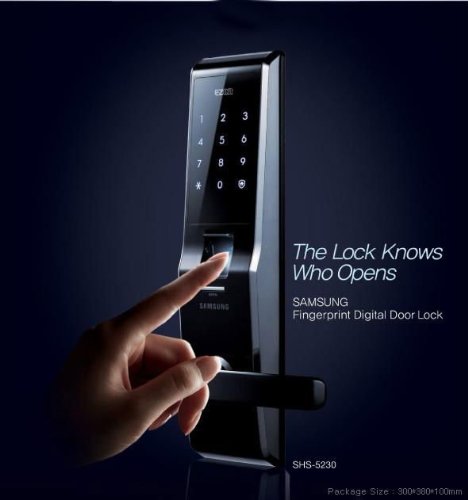
Figure 1: The Samsung SHS-5230 Digital Door Lock, showcasing its sleek design and the prominent fingerprint sensor. A hand is shown interacting with the sensor, highlighting the biometric access feature.
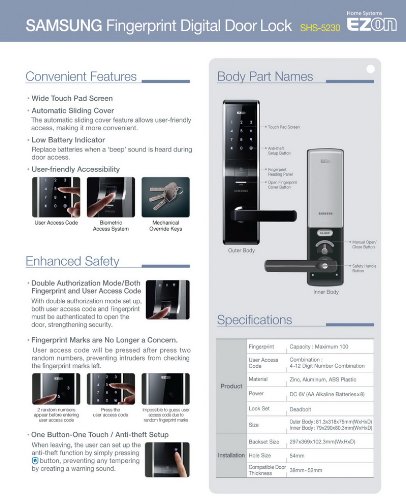
Figure 2: A detailed diagram illustrating the convenient features, body part names, and specifications of the Samsung SHS-5230 Digital Door Lock. This includes the wide touch pad screen, automatic sliding cover, low battery indicator, and various safety enhancements.
Key Features
- Biometric Fingerprint Scanning: Offers state-of-the-art personal fingerprint scanning for secure access.
- Dual Authentication Mode: Supports both password and fingerprint scanning for enhanced security.
- Assurance Knob: A secure door knob designed to prevent forced entry.
- Sound Adjustment: Allows for neat sound adjustment of lock operations.
- Emergency Power Supply: Includes a feature for emergency power supply.
- Battery Replacement Reminder: Notifies users when batteries need replacement.
- High Voltage Surge Protection: Advanced circuit design to withstand electrical surges.
- Fire Detection Alarm: Automatically sounds an alarm and unlocks the door if temperatures exceed 60°C inside.
- Manual Open Feature: Allows manual unlocking in case of electronic malfunction.
Installation
Professional installation is recommended for the Samsung SHS-5230 Digital Door Lock to ensure optimal performance and security. Refer to the detailed installation guide provided in the product packaging for step-by-step instructions.
Pre-Installation Checklist
- Verify door thickness (compatible with 38mm - 52mm).
- Ensure proper backset (60mm or 70mm).
- Confirm all components are present in the package.
Door Preparation
Accurate drilling and mortising are crucial. Use the provided template for precise measurements. Ensure the door frame is prepared for the strike plate.
Mounting the Lock
Carefully mount the outer and inner body of the lock, connecting the necessary cables. Secure all screws firmly but do not overtighten.
Operating Instructions
Registering Fingerprints
- Access the registration mode (refer to the specific button sequence in the full manual).
- Place your finger on the sensor as instructed.
- Repeat the process until registration is complete. Up to 100 fingerprints can be registered.
Setting User Codes
- Enter the master code to access the settings menu.
- Select the user code registration option.
- Input your desired 4-12 digit user code.
- Confirm the user code.
Unlocking the Door
- By Fingerprint: Place your registered finger on the sensor. The lock will disengage upon successful recognition.
- By User Code: Touch the keypad to activate, enter your user code, and press the '*' or '#' key (refer to specific model instructions).
- Dual Authentication Mode: If enabled, both a registered fingerprint and a valid user code are required for entry.
- Mechanical Key: In emergencies, use the provided mechanical key to unlock the door.
Locking the Door
The lock typically auto-locks after the door closes. You can also manually lock it by pressing the lock button on the inner unit or by closing the door from the outside.
Maintenance
Battery Replacement
The lock uses 8 AA batteries. Replace all batteries when the low battery indicator activates or when a "beep" sound is heard during door access. To replace, open the battery cover on the inner unit and insert new batteries, ensuring correct polarity.
Cleaning
Wipe the lock's surface with a soft, dry cloth. Avoid using abrasive cleaners or solvents, which can damage the finish or electronic components.
Emergency Power Supply
If batteries are completely drained, connect a 9V battery to the emergency power terminal on the outer unit to temporarily power the lock and gain access.
Troubleshooting
| Problem | Possible Cause | Solution |
|---|---|---|
| Lock does not respond. | Dead batteries. | Replace all 8 AA batteries or use emergency 9V battery. |
| Fingerprint not recognized. | Finger not placed correctly; unregistered fingerprint; dirty sensor. | Ensure proper finger placement; register fingerprint; clean sensor. |
| Keypad unresponsive. | Keypad not activated; electronic malfunction. | Touch the keypad to activate; if persistent, use mechanical key and contact support. |
| Alarm sounds unexpectedly. | High temperature detected (fire alarm); tampering attempt. | Check for fire hazards; ensure lock is securely installed. |
Specifications
| Feature | Detail |
|---|---|
| Model Number | SHS-5230 |
| Fingerprint Capacity | Maximum 100 |
| User Access Code | 4-12 Digit Number Combination |
| Material | Zinc, Aluminum, ABS Plastic |
| Power | DC 6V (AA Alkaline Batteries x 8) |
| Lock Set | Deadbolt |
| Outer Body Dimensions | 81.3 x 318 x 75 mm (WxHxD) |
| Inner Body Dimensions | 104 x 290 x 62.2 mm (WxHxD) |
| Backset Size | 297-309 x 122.3 mm (WxHxD) |
| Hole Size | 54mm |
| Compatible Door Thickness | 38mm - 52mm |
Warranty and Support
For warranty information and technical support, please refer to the warranty card included with your product or visit the official Samsung support website. Keep your purchase receipt as proof of purchase.
Official Samsung Support: www.samsung.com/support/