
Logitech M280
Logitech M280 Wireless Mouse User Manual
Model: M280 (910-004287)
1. Product Overview
The Logitech M280 Wireless Mouse is designed for comfort and efficiency, featuring contoured grips made of soft rubber for extended use. Its energy-efficient engineering provides an impressive 18-month battery life, with an automatic sleep function when not in use. Experience ultra-precise and responsive tracking with Logitech Advanced Optical Tracking. The included Nano receiver offers convenient and reliable wireless connectivity.

Figure 1: Logitech M280 Wireless Mouse
2. What's in the Box
- Logitech M280 Wireless Mouse
- Nano Receiver
- 1 AA Battery (pre-installed or included)
3. Setup Guide
3.1. Installing the Battery
- Locate the battery compartment cover on the underside of the mouse.
- Slide the cover off to open the compartment.
- Insert the provided AA battery, ensuring correct polarity (+/-).
- Replace the battery compartment cover until it clicks securely into place.
3.2. Connecting the Nano Receiver
- Remove the Nano receiver from its storage slot inside the battery compartment (if applicable).
- Plug the Nano receiver into an available USB port on your computer.
- Turn on the mouse using the On/Off switch located on the underside. The mouse should automatically connect to the receiver.

Figure 2: Mouse features and receiver storage
4. Operating the Mouse
4.1. Basic Functions
- Left Click: Primary selection and activation.
- Right Click: Accesses contextual menus.
- Scroll Wheel: Scroll up or down through documents and web pages. The scroll wheel is designed for precise, quiet operation.

Figure 3: Precise Scrolling with the M280
4.2. Advanced Optical Tracking
The Logitech M280 utilizes advanced optical tracking technology, providing smooth and precise cursor control on a variety of surfaces. This technology ensures high responsiveness and accuracy for daily tasks.

Figure 4: Smooth Navigation and Precise Scrolling on Most Operating Systems
4.3. Ergonomic Design
The mouse features a contoured shape with soft rubber grips, specifically crafted for the right hand to provide enhanced comfort during prolonged use. This ergonomic design helps reduce strain and fatigue.

Figure 5: Contoured Shape & Grips for Enhanced Comfort
5. Maintenance
5.1. Battery Replacement
When the mouse's performance degrades or the indicator light (if present) signals low battery, replace the AA battery by following the steps in Section 3.1. The M280 is designed for energy efficiency, offering up to 18 months of battery life.
5.2. Cleaning
To maintain optimal performance, regularly clean the mouse's optical sensor and the surface of the mouse with a soft, dry cloth. Avoid using harsh chemicals or abrasive materials.
6. Troubleshooting
6.1. No Cursor Movement or Unresponsive Mouse
- Ensure the mouse is turned ON using the switch on the underside.
- Check the battery. Replace it if it's low or depleted.
- Ensure the Nano receiver is securely plugged into a working USB port on your computer. Try a different USB port.
- Restart your computer.
6.2. Lag or Intermittent Connectivity
- Move the mouse closer to the Nano receiver. The wireless range is approximately 10 meters (33 feet).
- Avoid using the mouse on metallic surfaces, which can interfere with the wireless signal.
- Remove any large metal objects between the mouse and the receiver.
- If using a USB hub, try plugging the receiver directly into the computer.
7. Specifications
| Feature | Specification |
|---|---|
| Model | M280 (910-004287) |
| Connectivity | Wireless (RF 2.4 GHz) via Nano USB Receiver |
| Movement Detection Technology | Advanced Optical Tracking |
| Battery Type | 1 x AA Battery |
| Battery Life | Up to 18 months |
| Wireless Range | Up to 10 meters (33 feet) |
| Dimensions (LxWxH) | 105.4 mm x 67.9 mm x 38.4 mm (4.15 x 2.67 x 1.51 inches) |
| Weight | 91 g (3.21 ounces) |
| Operating System Compatibility | Windows, macOS, ChromeOS, Linux |
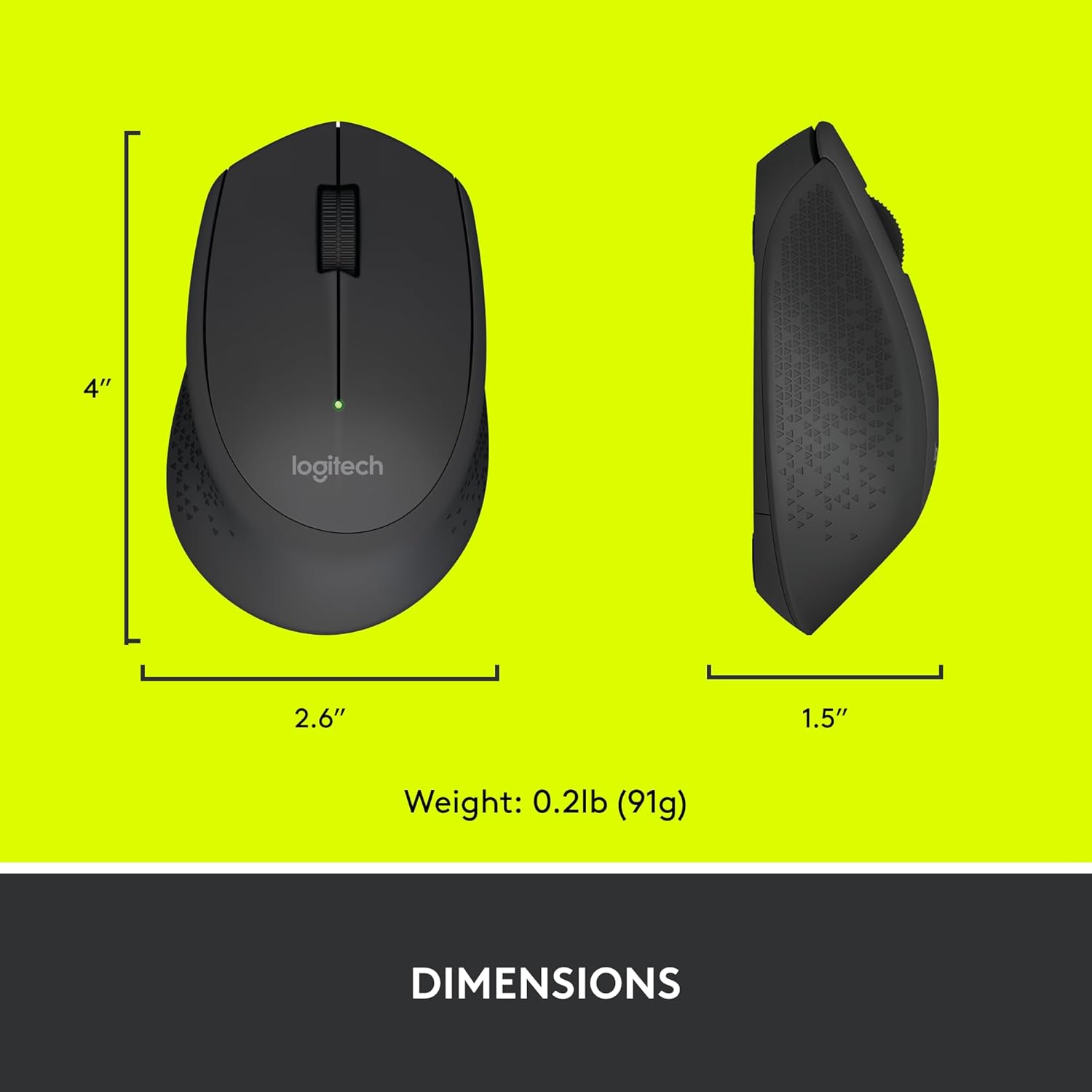
Figure 6: Logitech M280 Dimensions
8. Warranty and Support
For warranty information and technical support, please visit the official Logitech support website or refer to the warranty card included with your product. You can also find frequently asked questions and troubleshooting tips online.
For additional resources, visit the Logitech Store on Amazon.
Related documentsM280


Ask a question about this manual
Ask about setup, troubleshooting, compatibility, parts, safety, or missing instructions. Manuals+ will review the question and use this page’s manual context to help answer it.