
1. Introduction
Thank you for choosing the Microlife BP A80 Semi-automatic Upper Arm Blood Pressure Monitor. This device is designed for accurate and reliable measurement of blood pressure in adults. Please read this instruction manual thoroughly before using the device to ensure safe and correct operation. Keep this manual for future reference.
2. Important Safety Information
- Consult your doctor before using this device if you have any medical conditions.
- Do not self-diagnose or self-medicate based on blood pressure measurements. Always consult a healthcare professional.
- This device is not suitable for use on infants, children, or pregnant women without medical advice.
- Do not use the device in a moving vehicle or on an airplane.
- Keep the device and its components out of reach of children.
- Use only Microlife-approved cuffs and accessories.
- Avoid strong electromagnetic fields, such as those near mobile phones or microwave ovens, during use.
3. Product Overview
Familiarize yourself with the components of your Microlife BP A80 blood pressure monitor:

Figure 1: Microlife BP A80 Blood Pressure Monitor showing the main unit, display, power button, cuff, and inflation bulb.
- Main Unit: Contains the electronics and display.
- Display: Shows blood pressure readings (systolic, diastolic, pulse) and other indicators.
- Power Button: Used to turn the device on and off.
- Cuff: Applied to the upper arm for measurement.
- Inflation Bulb: Used to manually inflate the cuff.
- Cuff Connector: Port on the main unit for connecting the cuff tube.
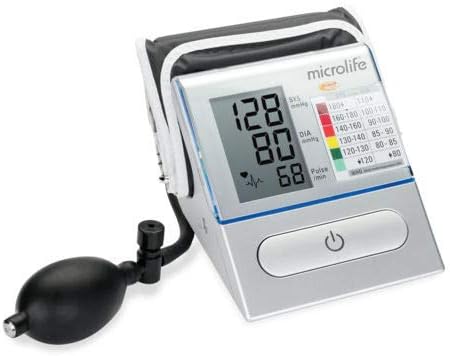
Figure 2: Detailed view of the Microlife BP A80 display, highlighting the blood pressure values (systolic, diastolic, pulse) and the integrated WHO blood pressure classification indicator.
4. Setup
4.1. Battery Installation
- Open the battery compartment cover located on the bottom or back of the device.
- Insert four 1.5V AA batteries, ensuring correct polarity (+/-) as indicated inside the compartment.
- Close the battery compartment cover securely.
- If the battery symbol appears on the display, replace all batteries.
4.2. Connecting the Cuff
- Insert the air tube connector of the cuff firmly into the cuff socket on the left side of the monitor.
- Ensure the connection is secure to prevent air leakage during measurement.
5. Operating Instructions
5.1. Before Measurement
- Avoid eating, smoking, or exercising for at least 30 minutes before measurement.
- Rest for 5-10 minutes in a quiet environment before taking a measurement.
- Sit comfortably with your back supported and feet flat on the floor. Do not cross your legs.
- Place your arm on a flat surface so the cuff is at heart level.
- Remove tight-fitting clothing from your upper arm.
5.2. Applying the Cuff
- Place the cuff on your bare upper arm, approximately 2-3 cm above the elbow joint.
- Ensure the artery mark on the cuff aligns with your brachial artery (on the inside of your arm).
- Wrap the cuff snugly around your arm, but not too tightly. You should be able to insert two fingers between the cuff and your arm.
5.3. Taking a Measurement
- Press the ON/OFF button to turn on the monitor. The display will show all segments briefly.
- Once the display shows "0", begin inflating the cuff by repeatedly squeezing the inflation bulb.
- Inflate the cuff until the pressure displayed is about 30 mmHg higher than your usual systolic pressure. If you don't know your usual pressure, inflate to 180-200 mmHg.
- Stop inflating. The device will automatically deflate the cuff slowly and measure your blood pressure.
- Once the measurement is complete, your systolic pressure, diastolic pressure, and pulse rate will be displayed.
- Press the ON/OFF button to turn off the device. If you forget, it will automatically shut off after approximately 1 minute.
6. Understanding Your Readings
Your blood pressure monitor displays three values:
- Systolic Pressure (SYS): The top number, indicating the pressure when your heart beats.
- Diastolic Pressure (DIA): The bottom number, indicating the pressure when your heart rests between beats.
- Pulse Rate: Your heart rate per minute.
The Microlife BP A80 also features a WHO (World Health Organization) blood pressure classification indicator on the display, which uses a color scale to help you interpret your readings:
| Category | Systolic (mmHg) | Diastolic (mmHg) | Indicator Color |
|---|---|---|---|
| Optimal | < 120 | < 80 | Green |
| Normal | 120-129 | 80-84 | Light Green |
| High Normal | 130-139 | 85-89 | Yellow |
| Grade 1 Hypertension | 140-159 | 90-99 | Orange |
| Grade 2 Hypertension | 160-179 | 100-109 | Red |
| Grade 3 Hypertension | ≥ 180 | ≥ 110 | Dark Red |
Note: This classification is a general guideline. Always consult your doctor for interpretation of your blood pressure readings.
7. Maintenance
7.1. Cleaning
- Clean the monitor and cuff gently with a soft, dry cloth.
- If necessary, use a cloth lightly dampened with water or a mild detergent. Do not use abrasive cleaners or solvents.
- Do not immerse the device or cuff in water.
7.2. Storage
- Store the device and cuff in a clean, dry place, away from direct sunlight and extreme temperatures.
- If the device will not be used for an extended period, remove the batteries to prevent leakage.
- Avoid dropping or subjecting the device to strong impacts.
8. Troubleshooting
If you encounter any issues with your Microlife BP A80, please refer to the following table:
| Problem | Possible Cause | Solution |
|---|---|---|
| Device does not turn on. | Batteries are depleted or incorrectly inserted. | Replace batteries with new ones, ensuring correct polarity. |
| "E1" or "Error" displayed. | Cuff not properly connected or air leakage. | Check cuff connection. Re-apply cuff snugly. |
| "E2" displayed. | Movement during measurement or irregular pulse. | Remain still and quiet during measurement. Repeat measurement after a few minutes. |
| Inconsistent readings. | Improper cuff placement, incorrect body position, or external factors. | Ensure correct cuff placement and body posture. Avoid talking or moving. Take multiple readings at different times. |
If the problem persists, contact Microlife customer support.
9. Specifications
- Model: BP A80
- Measurement Method: Oscillometric
- Measurement Range:
- Blood Pressure: 20-280 mmHg
- Pulse: 40-200 beats per minute
- Accuracy:
- Blood Pressure: ±3 mmHg
- Pulse: ±5% of reading
- Power Source: 4 x 1.5 V AA batteries
- Display Type: LCD
- Dimensions: Approximately 16.5 x 16 x 10 cm (as per package dimensions, actual device may vary slightly)
- Weight: Approximately 600 grams (including batteries, as per package weight)
- Operating Conditions: 10-40 °C (50-104 °F), 15-95% relative humidity non-condensing
- Storage Conditions: -20-55 °C (-4-131 °F), 15-95% relative humidity non-condensing
- International Article Code (EAN): 04719003310080
10. Warranty and Support
Microlife products are manufactured to the highest quality standards. For detailed warranty information specific to your region, please refer to the warranty card included with your product or visit the official Microlife website.
For technical support, troubleshooting assistance, or to inquire about replacement parts, please contact Microlife customer service. Contact details can typically be found on the Microlife website or on the product packaging.
Website: www.microlife.com


