1. Important Safety Instructions
When using electrical appliances, basic safety precautions should be followed, including the following:
- Read all instructions before using the appliance.
- Do not attempt to operate this oven with the door open as this can result in harmful exposure to microwave energy.
- Do not place any object between the oven front face and the door or allow soil or cleaner residue to accumulate on sealing surfaces.
- Do not operate the oven if it is damaged. It is particularly important that the oven door closes properly and that there is no damage to the: (1) door (bent), (2) hinges and latches (broken or loosened), (3) door seals and sealing surfaces.
- The oven should not be adjusted or repaired by anyone except properly qualified service personnel.
- Ensure proper ventilation around the microwave. Do not block air vents.
- Do not heat liquids or other foods in sealed containers since they are liable to explode.
- Never use metal utensils or foil in the microwave, as this can cause arcing and damage the oven.
2. Product Overview
The Summit Appliance SCM853 is a stainless steel countertop microwave oven designed for efficient and convenient food preparation. It features digital touch controls for precise cooking and a rotating turntable for even heating.
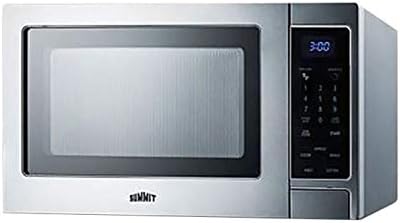
Image: Front view of the Summit Appliance SCM853 Stainless Steel Microwave Oven, showing the door, control panel, and digital display.
3. Setup and Installation
3.1 Unpacking
- Carefully remove all packaging materials from the microwave oven and its accessories.
- Inspect the oven for any damage during transit. If damage is found, do not operate the oven and contact your retailer or Summit Appliance customer service.
- Remove any protective film from the exterior surfaces.
3.2 Placement
- Place the microwave oven on a flat, stable surface strong enough to support its weight.
- Ensure there is adequate space for ventilation: at least 4 inches (10 cm) of clearance on the top, sides, and rear of the oven. Do not block the air vents.
- Keep the oven away from heat sources, strong magnetic fields, and areas with high humidity.
3.3 Electrical Requirements
- The oven must be plugged into a properly grounded 3-prong outlet.
- Ensure the voltage and frequency match the specifications on the rating label of the oven.
- Do not use extension cords or adapters with this appliance.
3.4 Turntable Installation
- Place the turntable ring inside the oven cavity.
- Position the glass turntable plate securely on top of the turntable ring, ensuring it sits properly on the center hub.
4. Operating Instructions
4.1 Control Panel Overview
The digital touch control panel allows for easy selection of cooking functions and settings. Refer to the labels on your specific unit for exact button functions.
4.2 Setting the Clock
- Press the 'Clock' button.
- Use the number pad to enter the current time (e.g., 1-2-3-0 for 12:30).
- Press the 'Clock' button again to confirm.
4.3 Basic Microwave Cooking (Time Cook)
- Place food in a microwave-safe container on the turntable. Close the door.
- Enter the desired cooking time using the number pad (e.g., 1-0-0 for 1 minute).
- Press the 'Start' button.
4.4 Adjusting Power Level
- After entering the cooking time, press the 'Power Level' button.
- Use the number pad to select a power level from 1 to 10 (10 being 100% power).
- Press 'Start'.
4.5 Defrosting
The microwave offers defrosting by weight or by time.
- Defrost by Weight: Press 'Defrost Weight', enter the food weight using the number pad, then press 'Start'.
- Defrost by Time: Press 'Defrost Time', enter the desired defrosting time, then press 'Start'.
4.6 Child Lock Function
To activate the child lock, press and hold the 'Stop/Cancel' button for 3 seconds. The display will show a lock indicator. To deactivate, press and hold 'Stop/Cancel' again for 3 seconds.
5. Maintenance and Cleaning
5.1 Cleaning the Interior
- Unplug the microwave before cleaning.
- Wipe the interior cavity with a damp cloth after each use to prevent food buildup.
- For stubborn stains, place a bowl of water with lemon slices inside and microwave for 2-3 minutes. The steam will loosen the grime, making it easier to wipe away.
- Do not use abrasive cleaners or scouring pads.
5.2 Cleaning the Exterior
- Wipe the exterior surfaces with a soft, damp cloth.
- For stainless steel surfaces, use a specialized stainless steel cleaner and polish in the direction of the grain.
- Clean the control panel with a soft, damp cloth. Avoid excessive moisture.
5.3 Turntable Care
- The glass turntable plate and turntable ring can be removed for cleaning.
- Wash them in warm, soapy water or in the dishwasher.
- Ensure they are completely dry before placing them back in the oven.
6. Troubleshooting
Before contacting service, please check the following common issues and solutions:
| Problem | Possible Cause / Solution |
|---|---|
| Oven does not start | Check if the power cord is plugged in securely. Ensure the door is closed properly. Check for a blown fuse or tripped circuit breaker. |
| Food not heating | Ensure cooking time and power level are set correctly. Check if the door is fully closed. Avoid using metal containers. |
| Turntable not rotating | Ensure the turntable is correctly placed on the roller ring and center hub. Check for any obstructions beneath the turntable. |
| Display shows an error code | Unplug the oven for a few minutes, then plug it back in. If the error persists, contact customer service. |
| Light bulb not working | The interior light bulb is not user-serviceable. Contact qualified service personnel for replacement. |
7. Specifications
Detailed technical specifications for the Summit Appliance SCM853 Microwave Oven:
| Feature | Detail |
|---|---|
| Brand Name | Summit Appliance |
| Model Info | SCM853 |
| Item Weight | 40 pounds |
| Product Dimensions (W x D x H) | 21 x 17 x 13 inches |
| Energy Use | 800 Watts |
| Installation Type | Countertop |
| Part Number | M852 |
| Special Features | Turntable |
| Color | Stainless Steel |
| Material Type | Glass, Stainless Steel |
| Included Components | Turntable |
| Controller Type | Button, Touch |
| Human Interface Input | Buttons |
| Timer Function | Timer Function Available |
8. Warranty and Support
Summit Appliance products are manufactured to high-quality standards. For specific warranty information regarding your SCM853 microwave oven, please refer to the warranty card included with your purchase or visit the official Summit Appliance website.
For technical assistance, troubleshooting beyond this manual, or to inquire about service, please contact Summit Appliance customer support:
- Website: www.summitappliance.com
- Customer Service: Refer to the website for contact numbers and email support.
When contacting support, please have your model number (SCM853) and serial number ready.