1. Introduction
The ASUS Xonar U5 is a compact 5.1-channel USB sound card designed to enhance audio quality for PC gamers, music enthusiasts, and movie watchers. It provides clear and impactful sound through headphones and speakers, offering a significant upgrade over integrated onboard audio solutions. Its USB connectivity allows for easy plug-and-play installation without needing to open your PC case.
2. Product Overview
2.1 Features
- A compact audio solution for incredible sound
- Take complete control of your audio with Sonic Studio
- Incredible input-noise reduction from Perfect Voice
- Enjoy powerful audio quality from a compact and portable device
- Pumps up every sound detail with the integrated headphone amplifier
2.2 What's in the Box
- ASUS Xonar U5 Sound Card

This image shows the top-down view of the ASUS Xonar U5 external sound card, featuring the large volume knob and indicator lights for Headphone, Speaker, and SPDIF outputs.
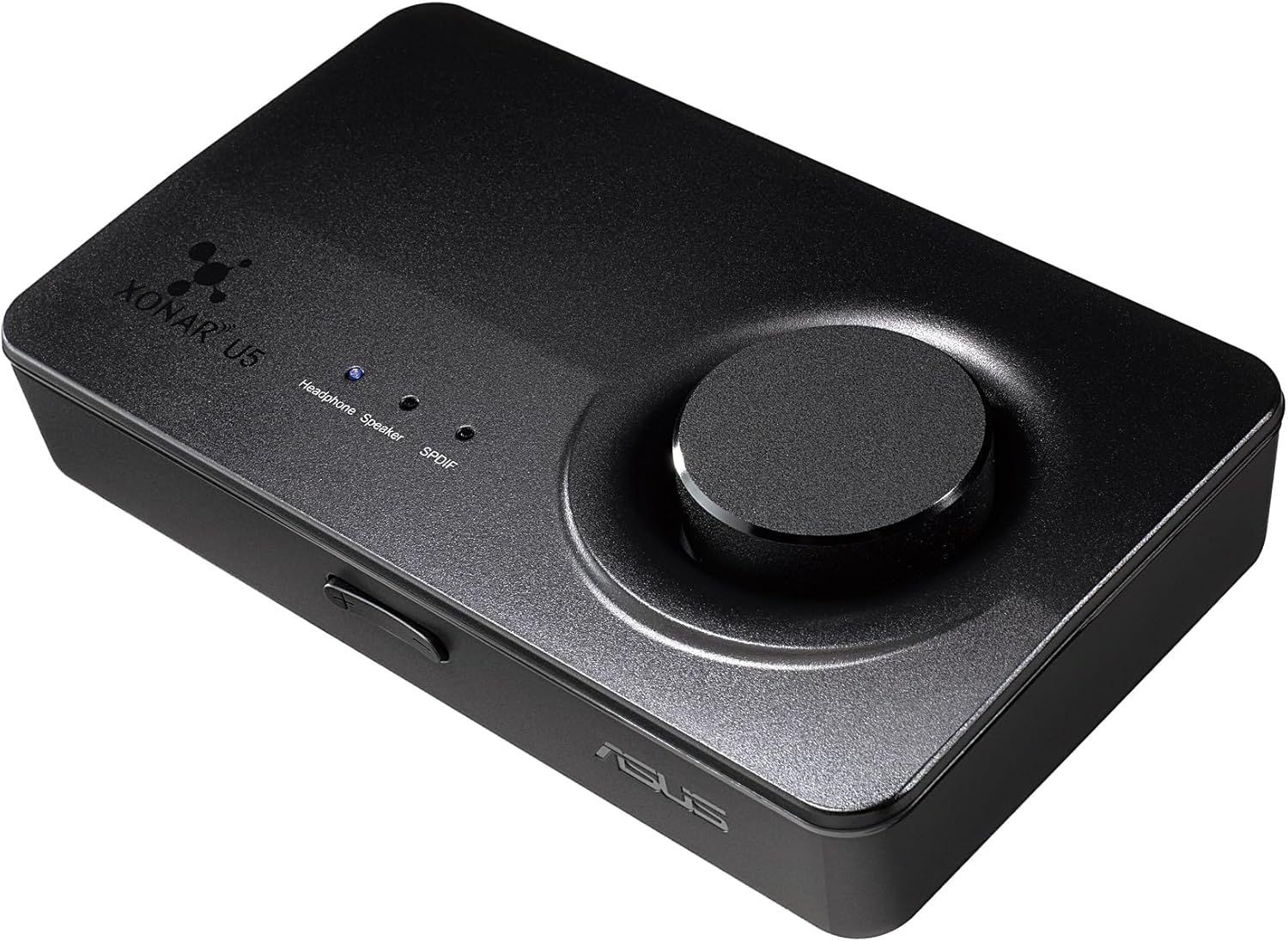
This image displays the ASUS Xonar U5 from an angled perspective, highlighting its compact design and the prominent volume control dial on the top surface.

This image illustrates the rear panel of the ASUS Xonar U5, detailing its various audio ports including microphone input, headphone output, front, center, rear speaker outputs, SPDIF digital output, and the USB connection port.
3. Setup
3.1 System Requirements
- Compatible Operating Systems: Windows, Windows 8, Linux, Mac
- Hardware Interface: USB 2.0 port
- Personal Computer
3.2 Installation
- Connect the ASUS Xonar U5 to your computer using a standard USB cable. The device is powered via USB, so no external power adapter is needed.
- For optimal performance and access to advanced features, download and install the latest drivers and utility software (e.g., Sonic Studio) from the official ASUS support website.
- After the driver installation is complete, restart your computer if prompted to ensure all changes take effect.
4. Operating Instructions
4.1 Basic Operation
The large knob on the top of the Xonar U5 controls the master volume for all connected audio outputs. Pressing the knob allows you to cycle through and select the active audio output: Headphone, Speaker, or SPDIF. The currently selected output will be indicated by an illuminated LED light next to its label.
4.2 Using Sonic Studio Software
The included Sonic Studio software provides comprehensive control over your audio settings. Key functionalities include:
- Equalizer: Customize sound profiles to your preference.
- Bass Boost: Enhance low-frequency audio for a more impactful sound.
- Virtual Surround: Create an immersive audio experience, even with stereo headphones or speakers.
- Perfect Voice: Utilize advanced noise reduction for clear microphone input, ideal for gaming and communication.
- Input/Output Switching: Manage and switch between various audio inputs and outputs directly from the software interface.
5. Maintenance
5.1 Cleaning
To maintain the device's appearance and functionality, gently wipe the exterior with a soft, dry, lint-free cloth. Avoid using harsh chemicals, abrasive cleaners, or solvents, as these can damage the surface.
5.2 Storage
When not in use for extended periods, store the Xonar U5 in a cool, dry place away from direct sunlight, extreme temperatures, and excessive dust. Disconnect all cables before storing.
6. Troubleshooting
6.1 No Sound Output
- Ensure all audio cables (speakers, headphones) are securely connected to the correct ports on the Xonar U5.
- Verify that the Xonar U5 is properly connected to your computer via USB and is recognized by the operating system.
- Check that the correct output (Headphone, Speaker, or SPDIF) is selected on the Xonar U5 by pressing the volume knob.
- Confirm that the Xonar U5 is set as the default audio playback device in your computer's sound settings.
- Increase the master volume on both the Xonar U5 and your operating system.
6.2 Poor Sound Quality
- Ensure you have installed the latest drivers and Sonic Studio software from the ASUS support website.
- Check for potential electromagnetic interference from other electronic devices placed too close to the Xonar U5.
- Adjust audio settings within the Sonic Studio software, such as the equalizer or virtual surround options.
- Test with different audio sources or media files to rule out source-specific issues.
6.3 Microphone Issues
- Verify the microphone is properly connected to the dedicated microphone input port on the Xonar U5.
- Check microphone levels and ensure the Xonar U5 is selected as the default recording device in your computer's sound settings.
- Utilize the Perfect Voice feature within Sonic Studio to reduce background noise and improve clarity.
- Test the microphone with different applications or communication software.
7. Specifications
| Brand | ASUS |
| Model | Xonar U5 |
| Hardware Platform | USB |
| Audio Output Mode | 5.1-channel |
| Interface | USB 2.0 |
| Dimensions (LxWxH) | 5.4 x 3.14 x 1 inches |
| Item Weight | 1.36 pounds |
| Compatible Devices | Personal Computer |
| Supported Platforms | Linux, Windows 8, Windows, Mac |
8. Warranty and Support
For detailed warranty information, technical support, and service inquiries regarding your ASUS Xonar U5 sound card, please refer to the official ASUS website or contact ASUS customer service directly. It is recommended to keep your proof of purchase for any warranty claims or support requests.


