
1. Introduction
This manual provides essential information for the safe and efficient operation of your GE Profile PT9800SHSS 30-inch Built-in Combination Wall Oven. This appliance integrates a microwave and a convection oven, offering versatile cooking options. Please read all instructions thoroughly before installation and use.

Figure 1: Front view of the GE Profile PT9800SHSS 30-inch Built-in Combination Wall Oven.

Figure 2: The oven seamlessly integrated into a kitchen cabinet.
2. Safety Information
Always follow basic safety precautions when using electrical appliances to reduce the risk of fire, electric shock, burns, or injury to persons.
- Proper Installation: Ensure the oven is correctly installed and grounded by a qualified technician.
- Keep Area Clear: Keep the oven area clear and free from combustible materials, gasoline, and other flammable vapors and liquids.
- Use Oven Mitts: Always use dry oven mitts when removing items from the oven.
- Supervise Children: Do not leave children unattended in an area where the oven is in use.
- Avoid Aluminum Foil: Do not line oven racks or any part of the oven with aluminum foil.
- Microwave Safety: Do not operate the microwave oven if the door is damaged or if the seals are not working properly.
3. Setup
3.1 Installation
This is a built-in wall oven designed for permanent installation into cabinetry. Refer to the detailed installation instructions provided with the appliance for specific cutout dimensions and electrical requirements. Professional installation is recommended.
3.2 Initial Power-Up
After installation, connect the appliance to the power supply. The interactive touch screen will guide you through initial setup, including setting the clock and language preferences.
4. Operating Instructions
4.1 Interactive Touch Screen
The oven features a bright, interactive touch screen for easy programming. Navigate through menus by touching the screen or using the central dial to select options.
4.2 Oven Functions (Lower Oven)
- Bake: For standard baking.
- Broil: For intense top-down heat.
- Convection Bake: Uses a fan to circulate heat for even baking and browning.
- Convection Roast: Ideal for roasting meats with even heat distribution.
- Keep Warm: Maintains food at serving temperature.

Figure 3: Convection cooking ensures even heat distribution for optimal results.

Figure 4: The powerful broil element for quick searing and browning.
4.3 Microwave Functions (Upper Oven)
The upper oven functions as a microwave with additional capabilities:
- Microwave: Standard microwave heating.
- Speed Cook: Combines microwave and convection heat for faster cooking.
- Defrost: Automatically defrosts food based on weight or time.
- Convection Bake: Allows for baking in the upper cavity using convection heat.
- Broil: For broiling in the upper cavity.

Figure 5: The spacious interior of the microwave oven with its glass turntable.
4.4 Wireless Control
The oven can be wirelessly controlled from your smartphone. Download the GE Appliances app and follow the instructions to connect your oven. This allows for remote preheating, setting cooking modes, and monitoring progress.
5. Maintenance
5.1 Self-Clean Feature
Both oven cavities are equipped with a self-clean feature. To activate, select the self-clean option from the menu and follow the on-screen prompts. Ensure the oven is empty before starting a self-clean cycle.
5.2 General Cleaning
Wipe down the exterior stainless steel surfaces with a soft cloth and mild detergent. For the interior of the microwave, use a damp cloth and mild soap. Avoid abrasive cleaners or scouring pads.
6. Troubleshooting
If you encounter any issues with your oven, refer to the following common troubleshooting tips:
- Oven Not Heating: Check the circuit breaker or fuse box. Ensure the oven is properly plugged in.
- Display Not Working: Verify power supply. If the issue persists, contact customer support.
- Uneven Cooking: Ensure proper rack placement and avoid overcrowding the oven. For convection, ensure the fan is not obstructed.
- Microwave Not Operating: Check if the door is fully closed. Ensure no metal objects are inside.
For more complex issues, please consult the full service manual or contact GE customer support.
7. Specifications
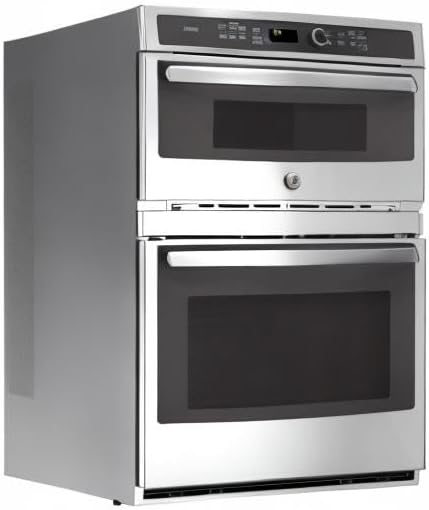
Figure 6: Side profile illustrating the oven's dimensions.
| Feature | Detail |
|---|---|
| Brand Name | GE |
| Model Info | PT9800SHSS |
| Item Weight | 215 pounds |
| Product Dimensions | 26.8 x 29.8 x 43.4 inches |
| Installation Type | Wall Mount |
| Special Features | Double Wall, Self-clean, Self-cleaning |
| Oven Cooking Mode | Convection |
| Color | Solid Black (Exterior Trim: Stainless Steel) |
| Voltage | 240 Volts |
| Wattage | 2850 watts |
| Fuel type | Electric |
| Defrost | Auto Defrost |
| Certification | Star-K, UL |
| Material Type | Stainless Steel |
| Included Components | Combination Wall Oven |
| Size | 7 cu. ft. |
| Heating Method | Convection |
| Finish Type | Stainless Steel |
8. Warranty and Support
For warranty information, please refer to the warranty card included with your appliance or visit the official GE Appliances website. For technical support, service requests, or to order parts, please contact GE customer service through their official channels.
Online resources and FAQs may also be available on the GE Appliances support page.