
Introduction
The Mediasonic ProBox HDL-SU3 is a USB 3.0 SuperSpeed external enclosure designed to convert any 3.5-inch SATA I/II/III hard drive into a portable external storage solution. It offers high-speed data transfer rates up to 5 Gbps via USB 3.0 and is compatible with both PC and Mac operating systems. The aluminum body aids in heat dissipation, ensuring optimal performance for your hard drive.
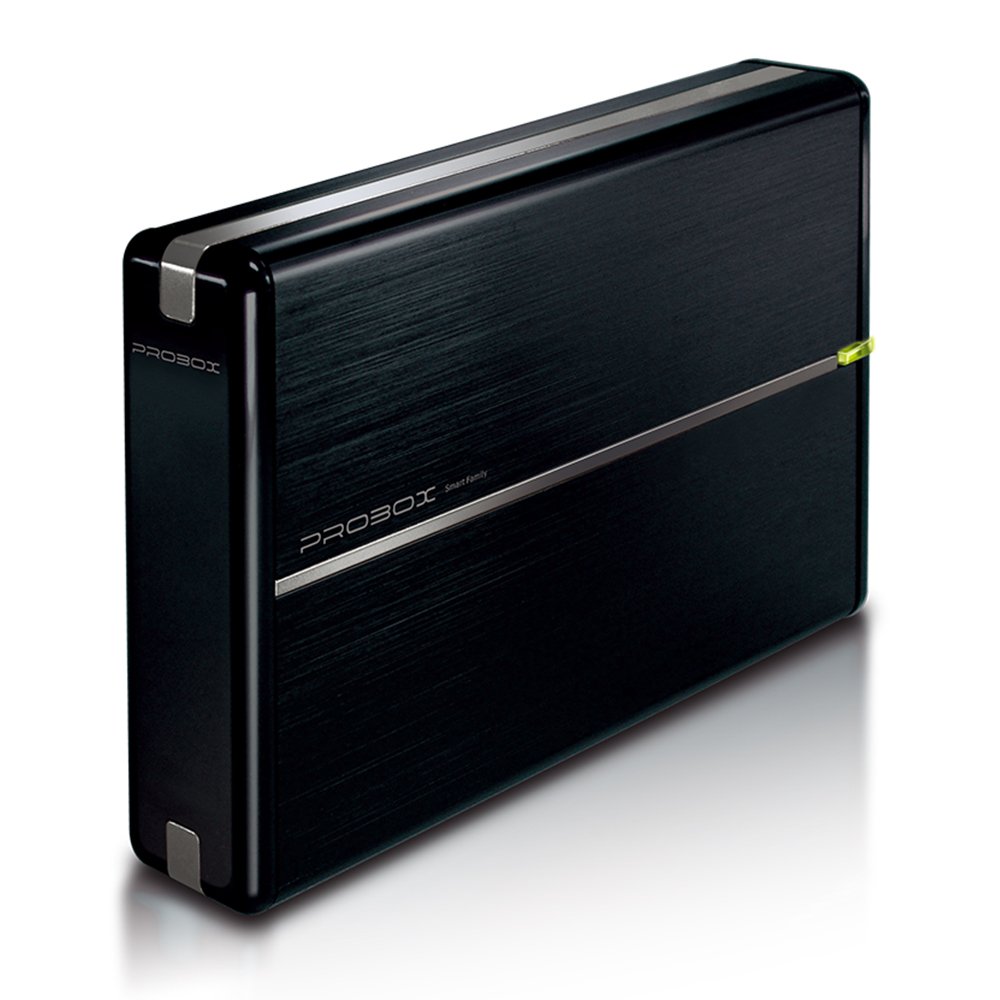
Figure 1: Mediasonic HDL-SU3 3.5" SATA HDD Enclosure (Front View)
This image displays the sleek black aluminum casing of the Mediasonic HDL-SU3 enclosure, highlighting its compact design and the LED indicator light.
Package Contents
Please verify that all items listed below are included in your package:
- Mediasonic HDL-SU3 3.5" SATA HDD Enclosure
- USB 3.0 Cable
- Power Adapter
- Screws for HDD Installation
- User Manual (this document)

Figure 2: Included Components
This image shows the Mediasonic HDL-SU3 enclosure alongside its retail packaging, USB 3.0 cable, power adapter, and a small bag of screws, illustrating all items typically found in the product box.
Setup: Hard Drive Installation
Follow these steps to install a 3.5-inch SATA hard drive into the enclosure:
- Prepare the Enclosure: Gently slide open the enclosure casing to reveal the internal tray.
- Connect the Hard Drive: Align your 3.5-inch SATA I/II/III hard drive with the SATA connector inside the enclosure. Carefully push the hard drive firmly into the connector until it is securely seated.
- Secure the Hard Drive: Use the provided screws to fasten the hard drive to the internal tray. This prevents movement and ensures proper connection.
- Close the Enclosure: Slide the enclosure casing back into place until it clicks or is fully closed.
- Secure the Enclosure (Optional): Some models may include small screws to secure the outer casing. If provided, use them to prevent accidental opening.
Note: Ensure the hard drive is properly aligned to avoid damaging the SATA connector pins. A small electronics screwdriver may be required for installation.
Operating Instructions
Once the hard drive is installed, follow these steps to operate the enclosure:
- Connect Power: Plug the power adapter into the DC IN port on the back of the enclosure, then connect it to a power outlet.
- Connect to Computer: Connect one end of the USB 3.0 cable to the USB 3.0 port on the back of the enclosure and the other end to an available USB 3.0 port on your computer (PC or Mac).
- Power On: Locate the ON/OFF switch on the back of the enclosure and slide it to the "ON" position.
- LED Indicator: The LED indicator light on the front of the enclosure will illuminate, typically green, indicating power. It may flash or change color during data activity.
- Drive Recognition: Your operating system (Windows XP/Vista/7/8/8.1/10 or Mac OSX) should automatically detect the new external drive. If it's a new hard drive, you may need to initialize and format it through your operating system's disk management utility before use.

Figure 3: Rear Panel Connections
This image shows the rear panel of the Mediasonic HDL-SU3, clearly labeling the DC IN port, ON/OFF switch, and the USB 3.0 port for connecting to a computer.
UASP Support: For optimal performance with SATA 3 (6.0 Gbps) hard drives, ensure your computer's USB 3.0 port and operating system support UASP (USB Attached SCSI Protocol).
Maintenance
To ensure the longevity and optimal performance of your Mediasonic HDL-SU3 enclosure and the installed hard drive, consider the following maintenance tips:
- Cleaning: Use a soft, dry cloth to clean the exterior of the enclosure. Avoid liquid cleaners or abrasive materials.
- Ventilation: Ensure the enclosure is placed in a well-ventilated area to facilitate heat dissipation, especially during prolonged use. The aluminum body is designed to help with this.
- Temperature: Avoid exposing the enclosure to extreme temperatures or direct sunlight.
- Safe Ejection: Always safely eject the external drive from your operating system before disconnecting the USB cable or powering off the enclosure to prevent data corruption.
- Cable Management: Keep cables organized and free from kinks or excessive bending to prevent damage.
Troubleshooting
If you encounter issues with your Mediasonic HDL-SU3 enclosure, refer to the following common problems and solutions:
| Problem | Solution |
|---|---|
| Drive not detected by computer. |
|
| Slow data transfer speeds. |
|
| Enclosure feels warm. |
|
| Drive disconnects randomly. |
|
Specifications
| Feature | Detail |
|---|---|
| Model Number | HDL-SU3 |
| Supported Drive Type | 3.5-inch SATA I/II/III HDD |
| Interface | USB 3.0 (backward compatible with USB 2.0/1.1) |
| Max Data Transfer Rate | Up to 5 Gbps (USB 3.0), 480 Mbps (USB 2.0) |
| UASP Support | Yes, optimized for SATA 3 6.0 Gbps HDD speed |
| Material | Aluminum body for heat dissipation |
| Supported Operating Systems | Windows XP / Vista / 7 / 8 / 8.1 / 10, Mac OSX |
| Max Drive Capacity | Up to 16 TB (as per latest specifications, older packaging may state 10TB or 14TB) |
| LED Indicator | Power and Activity LED |
| Power Supply | External AC Power Adapter |
| GTIN / UPC | 629329001248 |
Warranty and Support
For warranty information and technical support, please refer to the official Mediasonic website or contact their customer service directly. Details regarding specific warranty periods and support procedures are typically provided with your purchase documentation or on the manufacturer's website.
Note: Keep your purchase receipt as proof of purchase for warranty claims.