
1. Introduction
This manual provides detailed instructions for the installation, operation, and maintenance of your Euroset 2025C Corded Phone. Please read this manual thoroughly before using the phone to ensure proper functionality and to familiarize yourself with its features. Keep this manual for future reference.
2. Package Contents
Verify that your package contains the following items:
- Euroset 2025C Phone Unit
- Handset
- Coiled Handset Cord
- Telephone Line Cord
- User Manual (this document)
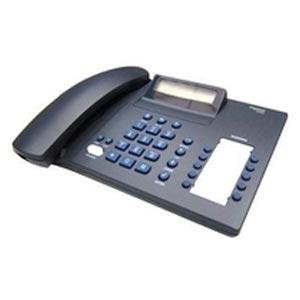
Figure 2.1: The Euroset 2025C Corded Phone as packaged in its box.
3. Product Overview
The Euroset 2025C is a corded telephone designed for reliable communication. It features a clear display, an alphanumeric keypad, and various functions to enhance your calling experience.

Figure 3.1: Front view of the Euroset 2025C Corded Phone. This image displays the alphanumeric keypad, the LCD screen, and the handset cradle.
Key Components:
- LCD Display: Shows caller ID, time, and menu options.
- Alphanumeric Keypad: For dialing numbers and entering text.
- Function Keys: Dedicated buttons for features like speakerphone, redial, mute, and menu navigation.
- Handset: For private conversations.
- Speakerphone: Allows hands-free communication.
4. Setup
Follow these steps to set up your Euroset 2025C Corded Phone:
- Connect the Handset: Plug one end of the coiled handset cord into the handset and the other end into the jack labeled "HANDSET" on the side or back of the phone unit.
- Connect the Telephone Line: Plug one end of the telephone line cord into the jack labeled "LINE" on the back of the phone unit. Plug the other end into your telephone wall jack.
- Placement: Place the phone on a flat, stable surface or mount it on a wall using the integrated wall-mount slots (if applicable). Ensure it is away from heat sources and moisture.
Once connected, the phone should power on automatically. The display will show the current time or prompt for initial setup if required.
5. Operating Instructions
5.1 Making a Call
- Lift the Handset or press the SPEAKER button.
- Listen for a dial tone.
- Dial the desired phone number using the alphanumeric keypad.
- The call will connect automatically.
5.2 Answering a Call
- When the phone rings, lift the Handset or press the SPEAKER button to answer.
- To end the call, replace the handset or press the SPEAKER button again.
5.3 Using Caller ID
- When a call comes in, the caller's number (and name, if available and subscribed to service) will appear on the LCD display.
- Use the UP/DOWN arrow keys to scroll through the caller ID log.
5.4 Speakerphone Function
- During a call, press the SPEAKER button to switch to speakerphone mode. The speakerphone indicator will light up.
- To switch back to the handset, simply lift the handset.
- To end a speakerphone call, press the SPEAKER button again.
5.5 Redialing the Last Number
- Lift the handset or press SPEAKER.
- Press the REDIAL button to automatically dial the last number called.
5.6 Phonebook Entries
- The phone supports up to 30 phonebook entries.
- Refer to the on-screen menu for instructions on how to add, edit, or delete phonebook entries. Typically, this involves pressing a MENU or PHONEBOOK button and navigating with arrow keys.
5.7 Mute Function
- During a call, press the MUTE button to temporarily disable your microphone. The other party will not hear you.
- Press MUTE again to resume conversation.
5.8 Volume Adjustment
- During a call, use the VOLUME UP/DOWN buttons (often integrated with arrow keys) to adjust the handset or speakerphone volume.
- Ringer volume can usually be adjusted via the phone's menu settings.
5.9 Conference Calls
- The phone supports conference calls. This feature typically requires a subscription from your telephone service provider.
- Consult your service provider for instructions on initiating a 3-way conference call. The phone's interface will facilitate this once the service is active.
5.10 Speed Dialing
- The phone supports speed dialing. Numbers can be assigned to specific keys for quick dialing.
- Refer to the phone's menu or a dedicated SPEED DIAL button for programming and using this feature.
6. Features
The Euroset 2025C Corded Phone offers a range of features for convenient communication:
- Corded phone with 1 line support
- Caller ID support (requires subscription from service provider)
- Speakerphone for hands-free communication
- DECT, analogue phone compatibility
- 30 phonebook entries for storing contacts
- Alphanumeric keypad for dialing and text input
- Conference call capability (requires service provider support)
- Speed dialing for frequently called numbers
- Missed call notification on the display
- Mute function with melody
- Adjustable ringer volume and tone sequence
- Last 5 numbers redial
- Pre-dialing function
- Call back function
- Notebook function
- Call duration display
- Real Time Clock
- 50 entries for CLIP (Caller Line Identification Presentation)

Figure 6.1: Packaging detail highlighting key features of the Euroset 2025C Corded Phone.
7. Maintenance
To ensure the longevity and optimal performance of your Euroset 2025C Corded Phone, follow these maintenance guidelines:
- Cleaning: Wipe the phone unit and handset with a soft, damp cloth. Do not use harsh chemicals, abrasive cleaners, or solvents.
- Avoid Liquids: Keep the phone away from water and other liquids. If liquid enters the phone, disconnect it immediately and contact customer support.
- Temperature: Operate and store the phone within normal room temperatures. Avoid extreme heat or cold.
- Dust: Keep the phone free from dust accumulation, especially around the keypad and speaker areas.
- Cords: Periodically check the handset and line cords for any signs of damage. Replace if necessary.
8. Troubleshooting
If you encounter issues with your Euroset 2025C Corded Phone, try the following solutions before contacting support:
| Problem | Possible Cause / Solution |
|---|---|
| No Dial Tone |
|
| Cannot Hear Caller / Caller Cannot Hear Me |
|
| Display is Blank or Unresponsive |
|
| Caller ID Not Working |
|
9. Specifications
Key technical specifications for the Euroset 2025C Corded Phone:
- Brand: Euroset
- Model: 2025C
- Telephone Type: Corded, Analogue
- Display Type: LCD
- Power Source: Corded Electric (Line Powered)
- Dialer Type: Single Keypad
- Item Weight: Approximately 454 g
- Mounting Type: Desk or Wall Mount
- Phonebook Capacity: 30 entries
- Caller ID: FSK & DTMF Dual Mode—Type I, 50 entries for CLIP
- Features: Speakerphone, Redial, Mute, Conference Calls, Speed Dialing, Missed Call Notification, Real Time Clock, Call Duration Display
10. Warranty and Support
The Euroset 2025C Corded Phone comes with a 1-year manufacturer warranty from the date of purchase.
This warranty covers defects in materials and workmanship under normal use. It does not cover damage caused by misuse, accidents, unauthorized modifications, or external causes such as power surges.
For warranty claims or technical support, please contact your retailer or the Euroset customer service department. Keep your purchase receipt as proof of purchase.
For further assistance, please visit the official Euroset website or refer to the contact information provided with your purchase documentation.