
Euroset 2005
Euroset 2005 Corded Phone User Manual
Model: 2005
1. Introduction
This manual provides comprehensive instructions for the setup, operation, and maintenance of your Euroset 2005 Corded Phone. Please read this manual thoroughly before using the device to ensure proper functionality and safety.
2. Safety Information
- Do not expose the phone to water or excessive moisture.
- Avoid placing the phone near heat sources or direct sunlight.
- Use only the provided power and telephone cords.
- Do not attempt to open or repair the phone yourself. Refer to qualified service personnel.
- Keep the phone away from strong magnetic fields.
3. Package Contents
Verify that all items are present in the package:
- Euroset 2005 Corded Phone Unit
- Handset
- Handset Cord
- Telephone Line Cord
- User Manual (this document)
4. Product Overview
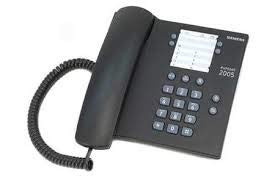
Figure 4.1: Top-down view of the Euroset 2005 Corded Phone, showing the handset, coiled cord, alphanumeric keypad, and display area.
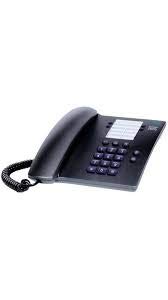
Figure 4.2: Angled view of the Euroset 2005 Corded Phone, highlighting the ergonomic design of the handset and the layout of the keypad.
Key Components:
- Handset: Used for speaking and listening during calls.
- Alphanumeric Keypad: For dialing numbers and entering characters.
- Function Buttons: Dedicated buttons for features like conference calls, speed dialing, and missed call notification.
- Display (if applicable): Shows call information, menu options, and time.
5. Setup
5.1 Connecting the Phone
- Connect the Handset: Plug one end of the coiled handset cord into the handset and the other end into the designated port on the phone base unit.
- Connect the Telephone Line: Plug one end of the telephone line cord into the "LINE" port on the back of the phone base unit. Plug the other end into your wall telephone jack.
- Power Connection (if applicable): This model is a corded phone and typically draws power directly from the telephone line. No separate power adapter is usually required.
5.2 Placing the Phone
Place the phone on a flat, stable surface, such as a desk or table. Ensure it is within reach of a telephone wall jack and away from direct sunlight, heat sources, or areas with high humidity.
6. Operating Instructions
6.1 Making a Call
- Lift the handset. You should hear a dial tone.
- Dial the desired telephone number using the alphanumeric keypad.
- Wait for the call to connect.
- To end the call, replace the handset on the phone base.
6.2 Receiving a Call
- When the phone rings, lift the handset to answer the call.
- To end the call, replace the handset on the phone base.
6.3 Adjusting Volume
The Euroset 2005 typically has a physical switch or buttons on the side or bottom of the handset or base unit to adjust the ringer and earpiece volume. Locate these controls and adjust as needed during a call or when idle.
6.4 Using Features
- Conference Calls: To initiate a conference call, consult your telephone service provider's instructions for three-way calling. Typically, you would dial the first party, press a flash/recall button, dial the second party, and then press the flash/recall button again to connect all parties.
- Speed Dialing: The phone supports speed dialing. Refer to the specific instructions for programming speed dial numbers, usually involving pressing a "Store" or "Program" button followed by a memory location and the number.
- Missed Call Notification: The phone provides missed call notification. This may be indicated by a light, a message on the display, or a specific tone. To view missed calls, press the designated "Missed Call" or "Log" button.
7. Maintenance
- Cleaning: Wipe the phone's surface with a soft, damp cloth. Do not use abrasive cleaners or solvents.
- Cord Care: Avoid tangling or stretching the handset and line cords excessively to prevent damage.
- Storage: If storing the phone for an extended period, disconnect it from the telephone line and store it in a cool, dry place.
8. Troubleshooting
| Problem | Possible Cause | Solution |
|---|---|---|
| No dial tone | Telephone line cord is disconnected or faulty. | Ensure the telephone line cord is securely connected to both the phone and the wall jack. Test with another phone if available. |
| Cannot hear caller / Caller cannot hear me | Handset cord is loose or faulty; volume is too low. | Check handset cord connections. Adjust the earpiece volume. |
| Phone does not ring | Ringer volume is off or too low. | Adjust the ringer volume. Ensure the phone is connected to an active line. |
9. Specifications
| Feature | Description |
|---|---|
| Model Number | 2005 |
| Brand | Euroset |
| Telephone Type | Corded |
| Colour | Black |
| Power Source | Corded Electric (Line Powered) |
| Dialer Type | Single Keypad |
| Call Conference | Basic support |
| Other Display Features | Wireless |
| Features | Alphanumeric keypad, conference calls, speed dialing, missed call notification |
10. Warranty and Support
The Euroset 2005 Corded Phone comes with a 1-year manufacturer warranty from the date of purchase. This warranty covers manufacturing defects under normal use.
For warranty claims, technical support, or service inquiries, please contact Euroset customer service through their official website or the contact information provided with your purchase receipt.
Please retain your purchase receipt as proof of purchase for warranty purposes.
Ask a question about this manual
Ask about setup, troubleshooting, compatibility, parts, safety, or missing instructions. Manuals+ will review the question and use this page’s manual context to help answer it.