
Introduction
This manual provides detailed instructions for the proper use, care, and maintenance of your Zenith Captain Moonphase Automatic Men's Watch. Please read this guide thoroughly to ensure optimal performance and longevity of your timepiece.

Front view of the Zenith Captain Moonphase Automatic Watch, showcasing the silver dial, date window, small seconds sub-dial, and moonphase indicator.
Setup and Initial Operation
Your Zenith Captain Moonphase watch is equipped with an automatic mechanical movement. It is powered by the motion of your wrist. If the watch has stopped or its power reserve is low, it requires manual winding to initiate operation.
1. Initial Winding
- Gently unscrew the crown (if it is a screw-down crown) by turning it counter-clockwise until it springs out to position 0.
- In position 0, turn the crown clockwise approximately 30-40 times. This will build up sufficient power reserve to start the movement.
- The watch should begin running.
2. Setting the Time
- Pull the crown out to position 2 (the outermost position). The seconds hand will stop.
- Turn the crown to set the hour and minute hands. To avoid confusion between AM and PM for the date change, advance the hands past 12 o'clock until the date changes. This indicates midnight. Then set the correct time.
- Once the time is set, push the crown back into position 0. If it is a screw-down crown, gently push and screw it back in clockwise to ensure water resistance.
3. Setting the Date and Moonphase
The watch features a quick-set function for the date and moonphase. Avoid setting the date or moonphase between 9 PM and 3 AM, as this is when the movement's date-change mechanism is engaged, and manual adjustment can cause damage.
- Pull the crown out to position 1 (the middle position).
- Turn the crown counter-clockwise to adjust the date.
- Turn the crown clockwise to adjust the moonphase display. Align the moonphase indicator with the current phase of the moon.
- Once the date and moonphase are set, push the crown back into position 0 and screw it down if applicable.
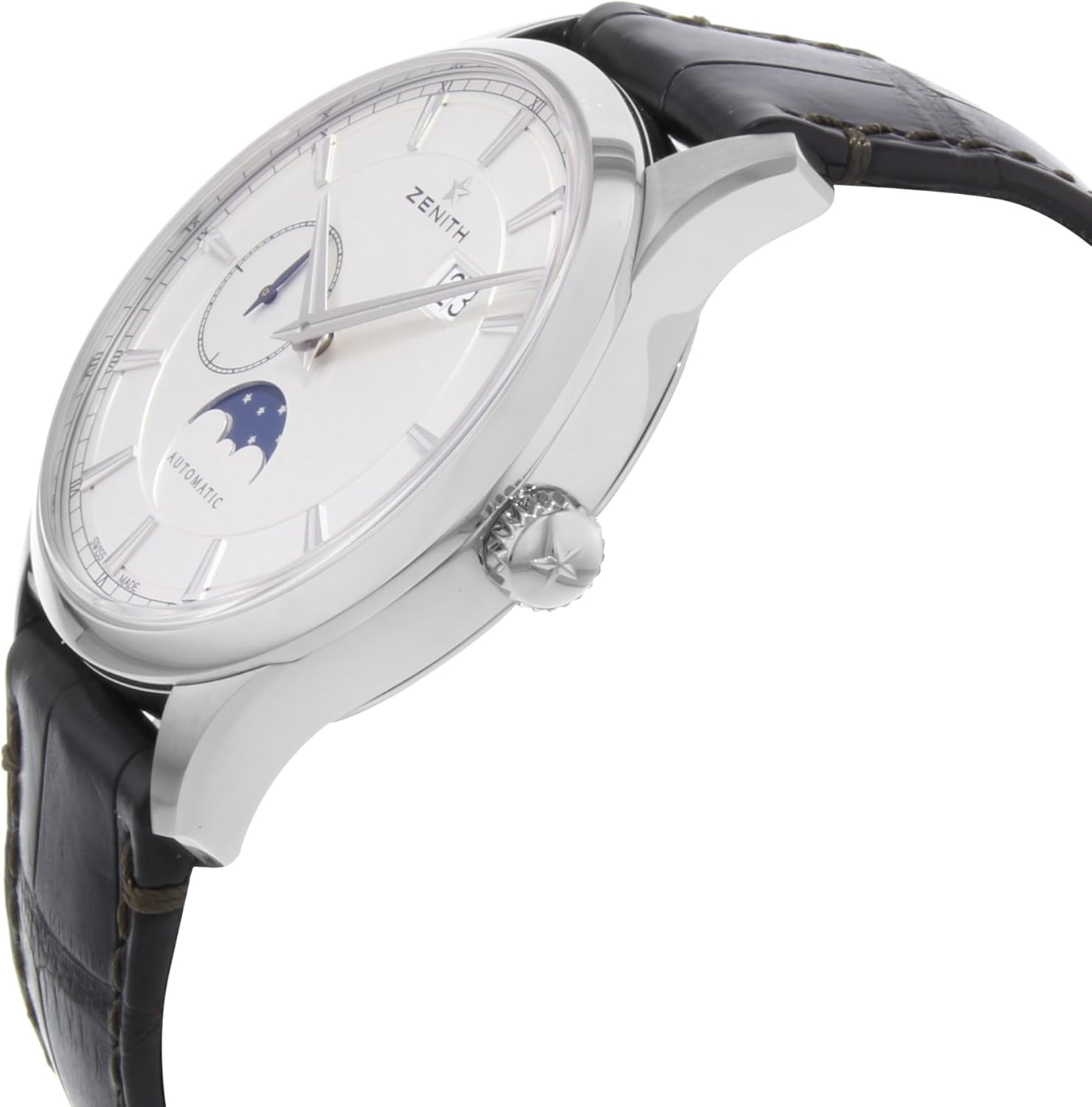
Side view of the watch, highlighting the crown used for winding and setting the time, date, and moonphase.
Operating Your Automatic Watch
Automatic Movement
Your Zenith watch is powered by an automatic mechanical movement, which means it winds itself with the natural motion of your wrist. When worn regularly (approximately 8-12 hours a day), it should maintain its power reserve. If the watch is not worn for an extended period, it will stop and require manual winding as described in the 'Initial Winding' section.
Moonphase Display
The moonphase complication accurately tracks the lunar cycle. It typically requires adjustment only once every few years, provided the watch runs continuously. If the watch stops, you will need to reset the moonphase as per the 'Setting the Date and Moonphase' instructions.
Water Resistance
This watch has a water resistance rating of 50 meters (5 ATM). This means it is suitable for short periods of recreational swimming. It is not suitable for diving, snorkeling, or high-impact water sports. Always ensure the crown is fully pushed in and screwed down (if applicable) before any contact with water.
- Do not operate the crown or pushers while the watch is wet or submerged.
- Avoid exposing the watch to sudden temperature changes, which can affect its water resistance.
Care and Maintenance
Cleaning
To clean your watch, use a soft, dry cloth. For more thorough cleaning, especially after exposure to saltwater or perspiration, gently wipe the case and bracelet with a soft cloth dampened with fresh water, then dry thoroughly. Avoid using chemical cleaners or abrasive materials.
Leather Strap Care
The leather strap is a natural material and is susceptible to wear and tear. Avoid prolonged exposure to water, direct sunlight, and harsh chemicals, which can cause the leather to dry out, crack, or discolor. Clean the strap with a damp cloth and allow it to air dry naturally.
Service
Mechanical watches require periodic servicing to maintain accuracy and ensure longevity. Zenith recommends a full service every 3-5 years. This service should be performed by an authorized Zenith service center to ensure genuine parts and proper calibration.
Storage
When not wearing your watch, store it in its original box or a watch winder to keep the movement running and prevent dust accumulation. Keep it away from strong magnetic fields (e.g., speakers, refrigerators, certain electronic devices) as these can affect the watch's accuracy.
Troubleshooting
- Watch Not Running: If the watch has stopped, manually wind it using the crown (30-40 clockwise turns in position 0). If it still does not start, the power reserve might be completely depleted, or it may require servicing.
- Inaccurate Timekeeping: Minor variations in timekeeping are normal for mechanical watches. However, if the watch is consistently gaining or losing significant time, it may be magnetized or require regulation/servicing.
- Date/Moonphase Not Advancing: Ensure the time is set correctly, passing midnight for the date to advance. If the issue persists, avoid manual adjustment between 9 PM and 3 AM. If the problem continues, professional servicing is recommended.
- Condensation Under Crystal: If you notice condensation inside the watch, this indicates a loss of water resistance. Immediately take the watch to an authorized service center to prevent further damage to the movement.
Specifications
| Model Name | Captain Moonphase |
| Model Number | 03214369101C498 (also 45984e1f-33f9-4a9b-ae6c-176aa7bf54c1) |
| Movement Type | Automatic |
| Case Material | Stainless Steel |
| Case Diameter | 40 Millimeters |
| Case Thickness | 10 Millimeters |
| Band Material | Leather |
| Band Width | 20 Millimeters |
| Dial Color | Silver |
| Crystal | Sapphire Crystal |
| Water Resistance Depth | 50 Meters (5 ATM) |
| Clasp Type | Tang Buckle |

View of the watch's transparent case back, revealing the automatic mechanical movement.
Warranty Information
Your Zenith Captain Moonphase Automatic Watch comes with an International Warranty. The specific terms and duration of the warranty are detailed in the warranty card provided with your watch. Please retain this card and your proof of purchase for any warranty claims.

Example of a Zenith International Warranty Card, which contains important warranty details and serial numbers.
The warranty typically covers manufacturing defects under normal use. It does not cover damage resulting from accidents, improper use, unauthorized repairs, or normal wear and tear of the case, crystal, or strap.
Customer Support
For any questions, service requests, or warranty claims, please contact an authorized Zenith retailer or a Zenith service center. You can find contact information and locations on the official Zenith website. When contacting support, please have your watch's model number and warranty card details available.