
1. Introduction
Thank you for choosing the iSwag Xtreme Cam IS-XC100. This compact and versatile camera is designed to capture your moments in high definition, whether through video recording or still photography. It features a 1.77-inch color display and anti-shake technology to ensure clear and stable footage. Please read this manual carefully to understand the camera's functions and ensure proper operation.
2. Product Overview
The iSwag Xtreme Cam IS-XC100 is equipped with various features for capturing your adventures.
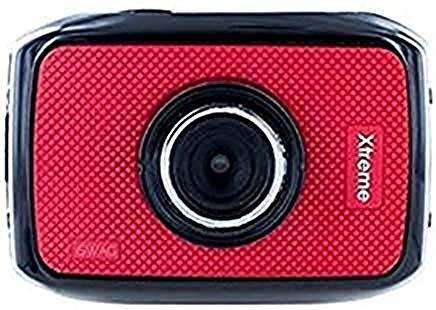
Image 1: Front view of the iSwag Xtreme Cam, showcasing its compact design and lens.
Key Features:
- 720P Video Resolution: Records videos at 1280x720 pixels at 30 frames per second.
- 5.0 MP Still Image Resolution: Captures photos at 2592x1944 pixels.
- 1.77-inch Color Display: For easy viewing and menu navigation.
- Anti-Shake Technology: Helps stabilize footage during recording.
- Built-in Microphone: For audio recording with videos.
- PC Camera Function: Can be used as a webcam when connected to a computer.
- Playback Function: Review captured videos and photos directly on the device.
3. Setup
3.1 Charging the Battery
The iSwag Xtreme Cam comes with a built-in battery. Before first use, fully charge the camera using the provided USB cable connected to a power source (e.g., computer USB port or USB wall adapter). The charging indicator light will typically show the charging status and turn off or change color when fully charged.
3.2 Inserting a Memory Card
Locate the memory card slot on the camera. Insert a compatible microSD card (not included) with the gold contacts facing down until it clicks into place. Ensure the card is formatted within the camera's settings before recording.
3.3 Powering On/Off
Press and hold the Power button (usually located on the top or side) for a few seconds to turn the camera on. Repeat the action to turn it off.
4. Operating Instructions
4.1 Navigating the Menu
Use the mode button to switch between video, photo, and playback modes. Use the up/down or navigation buttons to scroll through menu options on the 1.77-inch display. Press the OK/Shutter button to confirm selections.
4.2 Video Recording
- Switch the camera to video mode.
- Frame your shot using the display.
- Press the Shutter/Record button to start recording. A red indicator or timer on the screen will confirm recording is active.
- Press the Shutter/Record button again to stop recording.
- The camera supports up to 2 hours of continuous recording, depending on battery life and memory card capacity.
- Video resolution is 720p (1280x720) at 30 frames per second.
4.3 Still Photography
- Switch the camera to photo mode.
- Frame your shot.
- Press the Shutter button to capture a photo.
- The camera captures still images at 5.0 MP (2592x1944).
- Utilize features like Anti-Shake Technology, Electronic Shutter Control, Fixed Focus, EV Compensation, Sensitivity, White Balance, and various Scenes settings for optimal photo quality.
4.4 PC Camera Function
Connect the iSwag Xtreme Cam to your computer using the USB cable. The camera may prompt you to select a mode; choose "PC Camera" or "Webcam" mode. Your computer should recognize it as a standard webcam for video conferencing or streaming applications.
4.5 Playback
In playback mode, you can review your recorded videos and photos. Use the navigation buttons to browse through your files. Press the OK/Play button to view videos or full-screen photos.
5. Maintenance
- Cleaning: Use a soft, dry cloth to clean the camera body. For the lens, use a specialized lens cleaning cloth and solution. Avoid harsh chemicals.
- Storage: Store the camera in a cool, dry place away from direct sunlight and extreme temperatures.
- Battery Care: For prolonged storage, ensure the battery is partially charged (around 50%). Avoid fully discharging the battery for extended periods.
- Firmware Updates: Check the manufacturer's website periodically for any available firmware updates to improve performance and add features.
6. Troubleshooting
| Problem | Possible Solution |
|---|---|
| Camera does not power on. | Ensure the battery is fully charged. Try connecting to a power source and attempting to power on. |
| Cannot record videos/photos. | Check if a memory card is inserted and properly formatted. Ensure there is sufficient space on the memory card. |
| Poor image/video quality. | Clean the camera lens. Ensure adequate lighting. Check camera settings (e.g., resolution, white balance, scene modes). |
| Camera freezes or becomes unresponsive. | Press and hold the Power button for an extended period (10-15 seconds) to force a shutdown. If possible, remove and reinsert the battery (if accessible). |
7. Specifications
- Model Number: IS-XC100
- Video Resolution: 720p (1280 x 720) at 30fps
- Still Image Resolution: 5.0 MP (2592 x 1944)
- Display: 1.77-inch Color Screen
- Key Features: Digital Zoom, Anti-Shake Technology, Electronic Shutter Control, Fixed Focus, EV Compensation, Sensitivity, White Balance, Scenes, Built-in Microphone
- Recording Time: Up to 2 hours (video)
- PC Camera Function: Yes
- Dimensions: Approximately 25.2 x 14.2 x 7.5 cm
- Weight: Approximately 519 g
- Batteries: Included (Built-in)
8. Warranty and Support
For warranty information, please refer to the documentation provided at the time of purchase or contact your retailer. For technical support, please visit the official iSwag website or contact their customer service department. Keep your proof of purchase for any warranty claims.