
1. Introduction
This manual provides essential information for the safe and effective installation, operation, and maintenance of the Carling Technologies LRA911-RS-B/125N Illuminated Rocker Switch. Please read this manual thoroughly before use and retain it for future reference.
2. Safety Information
Always observe the following safety precautions to prevent injury or damage to the product:
- Ensure power is disconnected from the circuit before installation or maintenance.
- Installation should be performed by qualified personnel familiar with electrical wiring and safety standards.
- Do not exceed the specified voltage and current ratings of the switch.
- Protect the switch from moisture, dust, and extreme temperatures unless specifically rated for such environments.
- Verify all connections are secure and correct before restoring power.
3. Product Overview
The Carling Technologies LRA911-RS-B/125N is a single-pole, single-throw (SPST) illuminated rocker switch designed for ON-OFF functionality. It features a red rocker actuator and red LED illumination, making it suitable for various industrial and electrical applications. The switch utilizes quick connect terminals for straightforward wiring.
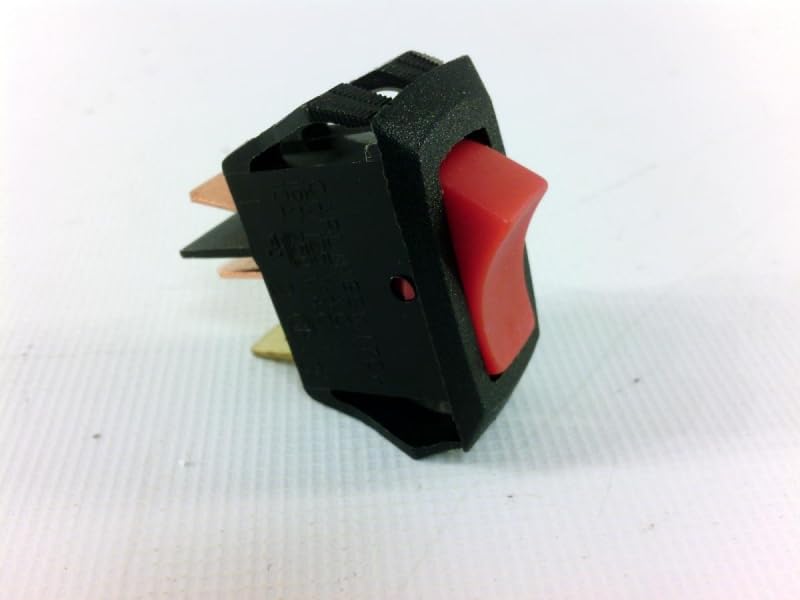
Figure 1: Carling Technologies LRA911-RS-B/125N Illuminated Rocker Switch. This image displays the black body of the rocker switch with a red rocker actuator. Three quick connect terminals are visible at the rear of the switch, designed for electrical connections. The switch is shown from a slightly elevated side angle, highlighting its compact design and the red illumination window.
4. Specifications
| Feature | Detail |
|---|---|
| Switch Function | ON - OFF (SPST) |
| Current Rating | 16 A |
| Voltage Rating AC | 250 V |
| Termination Style | Quick Connect Terminal |
| Actuator Type | Rocker |
| Actuator Color | Red |
| Illumination | LED |
| Illumination Color | Red |
| Mounting Style | Panel Mount |
| Mounting Hole Size | 28.58 mm x 13.97 mm (Rectangular) |
| Model Number | LRA911-RS-B/125N |
5. Setup and Installation
Follow these steps for proper installation of the rocker switch:
- Prepare Mounting Hole: Create a rectangular opening in the panel with dimensions of 28.58 mm x 13.97 mm. Ensure the panel thickness is suitable for the switch's mounting clips.
- Disconnect Power: Before making any electrical connections, ensure that the power supply to the circuit is completely disconnected at the source.
- Identify Terminals: The LRA911-RS-B/125N switch typically has three quick connect terminals:
- Input (Line): Connects to the power source.
- Output (Load): Connects to the device being powered.
- Ground/Neutral (for illumination): Connects to the neutral or ground for the LED illumination circuit. Refer to the specific wiring diagram for your application.
Important: It is highly recommended to mark your existing wires before disconnecting them from an old switch to ensure correct re-connection.
- Wire Connections: Using appropriate quick connect terminals (spade connectors), securely attach the wires to the corresponding terminals on the switch. Ensure connections are firm to prevent arcing or loose contacts.
- Mount Switch: Gently push the switch into the prepared panel opening until the mounting clips engage and secure the switch in place.
- Restore Power: Once all connections are verified and the switch is securely mounted, restore power to the circuit.
6. Operation
The Carling Technologies LRA911-RS-B/125N is an ON-OFF rocker switch. To operate:
- Press one side of the rocker to the "ON" position to activate the connected device and illuminate the LED.
- Press the opposite side of the rocker to the "OFF" position to deactivate the connected device and turn off the LED.
7. Maintenance
The LRA911-RS-B/125N rocker switch requires minimal maintenance. Follow these guidelines:
- Cleaning: Disconnect power before cleaning. Use a soft, dry cloth to wipe the switch surface. Avoid abrasive cleaners or solvents.
- Inspection: Periodically inspect the switch for any signs of physical damage, loose connections, or discoloration. Address any issues promptly.
- Environmental Protection: Ensure the switch remains within its intended operating environment to prevent premature wear or failure.
8. Troubleshooting
If the switch is not functioning as expected, consider the following common issues:
| Problem | Possible Cause | Solution |
|---|---|---|
| Switch does not activate device. | No power to the circuit; loose wiring; faulty device; incorrect wiring. | Check power supply; verify all wire connections are secure; test the connected device independently; review wiring diagram. |
| Illumination LED does not light up. | Incorrect wiring for illumination; faulty LED; no power to illumination circuit. | Ensure illumination terminal is correctly wired to neutral/ground; check power to illumination circuit. |
| Switch feels loose in panel. | Mounting hole is too large; mounting clips are damaged. | Verify mounting hole dimensions; replace switch if clips are damaged. |
If troubleshooting steps do not resolve the issue, contact Carling Technologies customer support or a qualified electrician.
9. Warranty and Support
For information regarding warranty coverage, technical support, or replacement parts for your Carling Technologies LRA911-RS-B/125N Illuminated Rocker Switch, please refer to the official Carling Technologies website or contact their customer service department directly. Keep your purchase receipt as proof of purchase.
Manufacturer: Carling Technologies