
Braven BRV-1
Braven BRV-1 Portable HD Wireless Bluetooth Speaker User Manual
Model: BRV-1 (BRV1BOG)
Introduction
This manual provides instructions for the proper use and maintenance of your Braven BRV-1 Portable HD Wireless Bluetooth Speaker. The BRV-1 is designed for outdoor use, featuring a waterproof IPX7 rating and a rugged rubberized exterior. It allows for wireless audio streaming and includes a built-in power bank for charging mobile devices.
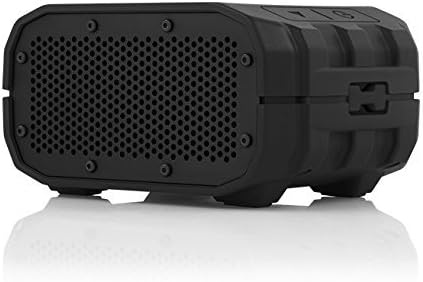
Image: Front view of the Braven BRV-1 Portable HD Wireless Bluetooth Speaker, showcasing its compact, rugged design and speaker grille.
What's in the Box
Verify that all items are present:
- Braven BRV-1 Bluetooth Speaker
- Charging Cable (USB to Micro-USB)
- 3.5mm AUX Cable
- Carrying Strap
- User Manual (this document)
Product Overview
Controls

Image: Top view of the Braven BRV-1 speaker, highlighting the control panel with Power, Play/Pause, Volume Up, and Volume Down buttons.
- Power Button: Press and hold to power on/off.
- Play/Pause Button: Press to play or pause audio.
- Volume Up (+): Press to increase volume.
- Volume Down (-): Press to decrease volume.
Ports and Indicators

Image: Rear view of the Braven BRV-1 speaker with the protective cap removed, revealing the charging port, USB output, audio input, and reset button.
- Battery Indicator: LEDs show current battery level.
- Input (5V 1A): Micro-USB port for charging the speaker.
- Output (5V 1A): USB-A port for charging external devices.
- Audio In: 3.5mm auxiliary input for wired connection.
- Reset Button: Small pinhole button to reset the device.
Setup
1. Charging the Speaker
- Connect the included USB charging cable to the speaker's Micro-USB input port.
- Connect the other end of the cable to a USB power source (e.g., wall adapter, computer USB port).
- The battery indicator LEDs will illuminate to show charging status. A full charge typically takes approximately 3-4 hours.
2. Powering On/Off
- To power on, press and hold the Power Button until the indicator light illuminates.
- To power off, press and hold the Power Button until the indicator light turns off.
3. Bluetooth Pairing
- Ensure the speaker is powered on. The Bluetooth indicator light will flash, indicating it is in pairing mode.
- On your mobile device, enable Bluetooth and search for available devices.
- Select "BRV-1" from the list of devices.
- Once paired, the Bluetooth indicator light on the speaker will glow solid.
4. Using the AUX Input
- Connect one end of the included 3.5mm AUX cable to the speaker's "Audio In" port.
- Connect the other end of the cable to the audio output jack of your device.
- The speaker will automatically switch to AUX mode.
Operating Instructions
Playing Audio
- After pairing via Bluetooth or connecting via AUX, begin playing audio from your source device.
- Press the Play/Pause Button on the speaker to control playback.
Volume Control
- Press the Volume Up (+) button to increase the speaker's volume.
- Press the Volume Down (-) button to decrease the speaker's volume.
- Adjust the volume on your connected device for optimal sound.
Hands-Free Calling
The BRV-1 features a built-in noise-canceling microphone for hands-free calls when connected via Bluetooth.
- When a call comes in, the speaker will ring. Press the Play/Pause Button to answer the call.
- To end a call, press the Play/Pause Button again.
- To reject a call, press and hold the Play/Pause Button.
Charging External Devices (Power Bank Feature)
The BRV-1 can charge your mobile devices using its internal 1400 mAh battery.
- Connect your device's charging cable to the speaker's USB "Output (5V 1A)" port.
- Charging will begin automatically.
Maintenance
Waterproofing (IPX7 Rating)

Image: The Braven BRV-1 speaker being splashed with water, demonstrating its waterproof capability.
The BRV-1 is rated IPX7, meaning it is protected against immersion in water up to 1 meter for 30 minutes. To maintain its waterproof integrity:
- Ensure the rubber port cover on the rear of the speaker is securely closed before exposure to water.
- Do not expose the speaker to saltwater or chlorinated water for extended periods. Rinse with fresh water after exposure.
- Avoid dropping or subjecting the speaker to severe impacts, as this may compromise the waterproof seal.
Cleaning
- Wipe the speaker with a soft, damp cloth.
- Do not use abrasive cleaners or solvents.
- Ensure all ports are dry before charging.
Storage
- Store the speaker in a cool, dry place away from direct sunlight and extreme temperatures.
- If storing for an extended period, charge the battery periodically to maintain its health.
Troubleshooting
| Problem | Solution |
|---|---|
| Speaker does not power on. | Ensure the speaker is charged. Connect it to a power source using the charging cable. |
| Cannot pair via Bluetooth. |
|
| No sound. |
|
| Speaker not charging external device. |
|
Specifications

Image: Side view of the Braven BRV-1 speaker with its dimensions (length, width, height) indicated.
| Model Name | BRV-1 |
| Connectivity | Bluetooth, 3.5mm AUX |
| Wireless Range | Up to 10 meters (33 feet) |
| Battery Capacity | 1400 mAh Lithium-ion |
| Playtime | Up to 12 hours (varies with volume and content) |
| Water Resistance | IPX7 (Waterproof up to 1 meter for 30 minutes) |
| Power Bank Output | 5V, 1A (USB-A) |
| Dimensions (L x W x H) | 4.72" x 2.32" x 3.31" (120mm x 59mm x 84mm) |
| Weight | 12.2 ounces (346 grams) |
| Microphone | Built-in, noise-canceling |
| Material | Rubberized exterior |
Warranty Information
The Braven BRV-1 speaker comes with a Limited Warranty. Please refer to the warranty card included in your product packaging or visit the official Braven website for detailed terms and conditions regarding coverage, duration, and claims process.
Support
For further assistance, technical support, or customer service inquiries, please visit the official Braven support website or contact their customer service department. Contact information can typically be found on the manufacturer's website or in the product packaging.
Related documentsBRV-1


Ask a question about this manual
Ask about setup, troubleshooting, compatibility, parts, safety, or missing instructions. Manuals+ will review the question and use this page’s manual context to help answer it.