
RiteAV RAV-6-F-1583
RiteAV - 3 HDMI 1 Port Shielded Cat6 Ethernet 2 Port Cat6 Ethernet White Wall Plate User Manual
Model: RAV-6-F-1583
Introduction
This manual provides detailed instructions for the installation, operation, and maintenance of your RiteAV 3 HDMI 1 Port Shielded Cat6 Ethernet 2 Port Cat6 Ethernet White Wall Plate. This wall plate is designed to provide a clean and organized solution for connecting multiple audio/video and network cables through a single wall opening.
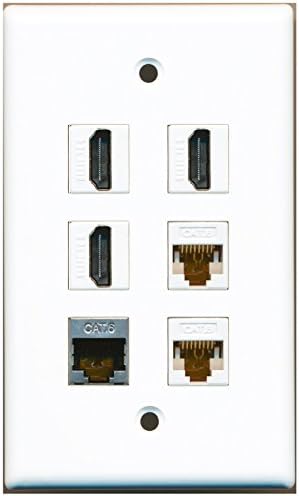
Image: Front view of the RiteAV White Wall Plate, featuring three HDMI ports and three Cat6 Ethernet ports (one shielded, two standard) arranged vertically. The plate is designed for a standard wall outlet box and includes screw holes for mounting.
Setup and Installation
The RiteAV wall plate features a tool-less connection design, simplifying the installation process. Ensure power is off to the area before beginning installation.
Required Tools (Not Included):
- Screwdriver (Phillips head recommended)
- Wire strippers/crimpers (if terminating new Cat6 cables)
Installation Steps:
- Prepare the Wall Opening: Ensure you have a standard electrical outlet box or low-voltage mounting bracket installed in the wall where the plate will be mounted.
- Connect Cables (Front): For each port (HDMI and Cat6), simply plug the corresponding cable into the front of the jack. Ensure a secure connection.
- Connect Cables (Back): Route your in-wall cables (HDMI and Cat6) through the wall opening. For each port, plug the corresponding in-wall cable into the back of the jack on the wall plate. The Cat6 ports are tool-less, meaning no special tools are required for termination; simply insert the stripped wires into the color-coded slots if you are not using pre-terminated cables. For pre-terminated cables, just plug them in.
- Position the Wall Plate: Carefully push any excess cable back into the wall box and align the wall plate with the mounting holes of the outlet box or bracket.
- Secure the Wall Plate: Use the included screws to firmly attach the wall plate to the outlet box or mounting bracket. Do not overtighten.
- Test Connections: Once installed, connect your devices to the front ports of the wall plate and test all HDMI and Ethernet connections to ensure proper functionality.
Operation
Operating the RiteAV wall plate involves simply connecting your devices. The wall plate acts as a pass-through for your HDMI and Ethernet signals.
- HDMI Connections: Connect your HDMI source devices (e.g., Blu-ray player, gaming console, cable box) to the HDMI ports on the front of the wall plate using standard HDMI cables. Connect your display device (e.g., TV, projector) to the corresponding HDMI cable routed from the back of the wall plate.
- Ethernet Connections: Connect your network devices (e.g., computer, smart TV, gaming console) to the Cat6 Ethernet ports on the front of the wall plate using standard Cat6 Ethernet cables. Ensure the other end of the Ethernet cable is connected to your network switch, router, or modem.
Maintenance
The RiteAV wall plate requires minimal maintenance to ensure long-lasting performance.
- Cleaning: Use a soft, dry cloth to wipe the surface of the wall plate. Avoid abrasive cleaners or solvents, as they may damage the finish.
- Inspection: Periodically check the connections to ensure cables are securely plugged into the ports.
- Environmental Conditions: Keep the wall plate in a dry environment. Avoid exposure to excessive moisture or extreme temperatures.
Troubleshooting
If you encounter issues with your RiteAV wall plate, refer to the following common troubleshooting steps:
- No Signal (HDMI):
- Ensure all HDMI cables are securely connected to both the front and back of the wall plate, and to your source and display devices.
- Test the HDMI cables directly, bypassing the wall plate, to confirm they are not faulty.
- Verify that the correct input source is selected on your display device.
- No Network Connection (Ethernet):
- Check that all Ethernet cables are firmly seated in the ports on both sides of the wall plate and connected to your network devices/router.
- Confirm that your network equipment (router, modem, switch) is powered on and functioning correctly.
- Test the Ethernet cables directly, bypassing the wall plate, to rule out cable issues.
- If you terminated the Cat6 cables yourself, re-check the wiring sequence (T568A or T568B) to ensure it matches on both ends.
- Loose Wall Plate:
- Gently tighten the mounting screws. Do not overtighten, as this can crack the plate.
Specifications
| Feature | Detail |
|---|---|
| Model Number | RAV-6-F-1583 |
| Brand | RiteAV |
| Ports | 3 x HDMI, 1 x Shielded Cat6 Ethernet, 2 x Cat6 Ethernet |
| Color | White |
| Connection Type | Tool-less (front and back) |
| Compatibility | Fits standard outlet boxes and mounting brackets |
| Included | Wall plate, mounting screws |
| Date First Available | July 14, 2014 |
Warranty and Support
For information regarding product warranty or technical support, please contact RiteAV customer service directly. Refer to the product packaging or the official RiteAV website for the most current contact details and warranty policy.
Manufacturer: RiteAV
Seller: Ultra Spec Cables (RiteAV®)
Amazon Store: Visit the RiteAV Store on Amazon
Ask a question about this manual
Ask about setup, troubleshooting, compatibility, parts, safety, or missing instructions. Manuals+ will review the question and use this page’s manual context to help answer it.