
BLACK+DECKER GKC1820L20
BLACK+DECKER GKC1820L20 18V Cordless Chainsaw User Manual
Model: GKC1820L20
Introduction
This manual provides essential information for the safe and effective operation, maintenance, and care of your BLACK+DECKER GKC1820L20 18V Cordless Chainsaw. Please read all instructions carefully before using the tool to ensure proper handling and to prevent injury or damage.

Image: The BLACK+DECKER GKC1820L20 18V Cordless Chainsaw, showcasing its compact design and orange and black color scheme.
General Safety Instructions
Always follow basic safety precautions when using electrical tools to reduce the risk of fire, electric shock, and personal injury. Keep this manual for future reference.
- Work Area Safety: Keep the work area clean and well-lit. Cluttered or dark areas invite accidents. Do not operate power tools in explosive atmospheres, such as in the presence of flammable liquids, gases, or dust.
- Electrical Safety: Avoid body contact with earthed or grounded surfaces such as pipes, radiators, ranges, and refrigerators. There is an increased risk of electric shock if your body is earthed or grounded.
- Personal Safety: Always wear eye protection and hearing protection. Use appropriate personal protective equipment such as gloves, non-skid safety shoes, and a hard hat when necessary. Dress properly; avoid loose clothing or jewelry.
- Tool Use and Care: Do not force the power tool. Use the correct power tool for your application. It will do the job better and safer at the rate for which it was designed. Disconnect the battery pack from the power tool before making any adjustments, changing accessories, or storing power tools.
- Battery Tool Use and Care: Recharge only with the charger specified by the manufacturer. A charger that is suitable for one type of battery pack may create a risk of fire when used with another battery pack. Use power tools only with specifically designated battery packs.
Product Overview and Components
Familiarize yourself with the various parts of your BLACK+DECKER GKC1820L20 chainsaw before operation.

Image: Detailed diagram showing key components of the chainsaw, including the Lock-off Button, On/Off Switch, Oil Cap, Oil Reservoir, Front Guard Assembly, Chain, Guide Bar, Chain Cover Assembly, Chain Tension Adjustment Screw, and Battery.
- Lock-off Button: Prevents accidental starting.
- On/Off Switch: Activates the chainsaw.
- Oil Cap: Covers the oil reservoir.
- Oil Reservoir: Holds chain lubricant.
- Front Guard Assembly: Provides protection during operation.
- Chain: The cutting element of the chainsaw.
- Guide Bar: Supports and guides the chain.
- Chain Cover Assembly: Protects the chain and guide bar.
- Chain Tension Adjustment Screw: Used to adjust chain tightness.
- Battery: Provides power to the chainsaw.
Setup
1. Battery Charging
Ensure the battery is fully charged before first use. Use only the BLACK+DECKER charger supplied with your tool.
- Insert the battery pack into the charger.
- Plug the charger into a standard electrical outlet.
- The charging indicator light will show the charging status. Refer to the charger's specific instructions for light indications.
- Once fully charged, disconnect the charger and remove the battery.
2. Chain and Guide Bar Assembly
If the chain and guide bar are not pre-assembled, follow these steps:
- Ensure the battery is removed from the chainsaw.
- Remove the chain cover assembly by loosening the retaining nuts.
- Place the chain around the sprocket and guide bar, ensuring the cutting edges face the correct direction (refer to chain direction indicator on the guide bar).
- Fit the guide bar onto the mounting studs, ensuring the chain is properly seated in the guide bar groove.
- Replace the chain cover assembly and hand-tighten the retaining nuts. Do not fully tighten yet.
3. Filling the Oil Reservoir
The chainsaw requires chain lubricant for proper operation and to extend chain life.
- Place the chainsaw on a flat, stable surface.
- Unscrew the oil cap (3) and fill the oil reservoir (4) with appropriate chain and bar oil. Do not use waste oil or motor oil.
- Monitor the oil level indicator, if present, to avoid overfilling.
- Replace the oil cap securely.

Image: The BLACK+DECKER GKC1820L20 chainsaw disassembled, showing the main unit, battery, charger, guide bar, and chain, illustrating components for setup.
Operating Instructions
1. Starting and Stopping
- To Start: Insert the charged battery. Press and hold the lock-off button (1) with your thumb, then squeeze the on/off switch (2) with your fingers. Release the lock-off button once the chain starts moving.
- To Stop: Release the on/off switch (2). The chain will stop quickly.
2. Cutting Techniques
Always maintain a firm grip with both hands on the chainsaw handles. Stand in a balanced position.
- Pruning Branches: When cutting small branches, support the branch to prevent it from falling unexpectedly. Make relief cuts to avoid pinching the guide bar.
- Cutting Logs: For larger logs, ensure the log is stable and cannot roll. Make a series of cuts, starting from the top, to avoid binding.
- Kickback Prevention: Avoid cutting with the tip of the guide bar. Always be aware of the chain's rotation direction and potential kickback zones.

Image: A person wearing safety gear, including a hard hat and gloves, operating the BLACK+DECKER GKC1820L20 chainsaw to cut a tree branch, demonstrating typical usage.
Maintenance
Regular maintenance ensures optimal performance and extends the life of your chainsaw. Always remove the battery before performing any maintenance.
1. Chain Tension Adjustment
A properly tensioned chain is crucial for safe and efficient cutting.
- Loosen the retaining nuts on the chain cover assembly.
- Turn the chain tension adjustment screw (9) to increase or decrease tension. The chain should be snug against the guide bar but still able to be pulled freely by hand.
- Once tension is correct, tighten the retaining nuts securely.
2. Chain Sharpening
A dull chain will not cut efficiently and can cause kickback. Sharpen the chain regularly or replace it when necessary. Refer to a qualified service center for chain sharpening if you are unsure.
3. Cleaning and Storage
- After each use, clean the chainsaw thoroughly, removing sawdust and debris from the guide bar, chain, and motor housing.
- Store the chainsaw in a dry, secure place, out of reach of children. Ensure the guide bar cover is in place.
- Remove the battery from the tool before storage.
Troubleshooting
| Problem | Possible Cause | Solution |
|---|---|---|
| Chainsaw does not start. | Battery not charged or improperly inserted. Lock-off button not pressed. | Charge battery fully and insert correctly. Ensure lock-off button is pressed before squeezing trigger. |
| Chain does not cut efficiently. | Dull chain. Incorrect chain tension. | Sharpen or replace chain. Adjust chain tension as per instructions. |
| Chainsaw overheats. | Overloading the tool. Blocked ventilation slots. | Reduce cutting pressure. Clear ventilation slots. Allow tool to cool down. |
| Oil is not dispensing. | Empty oil reservoir. Blocked oil port. | Refill oil reservoir. Clean oil port. |
Specifications
Technical details for the BLACK+DECKER GKC1820L20 18V Cordless Chainsaw.
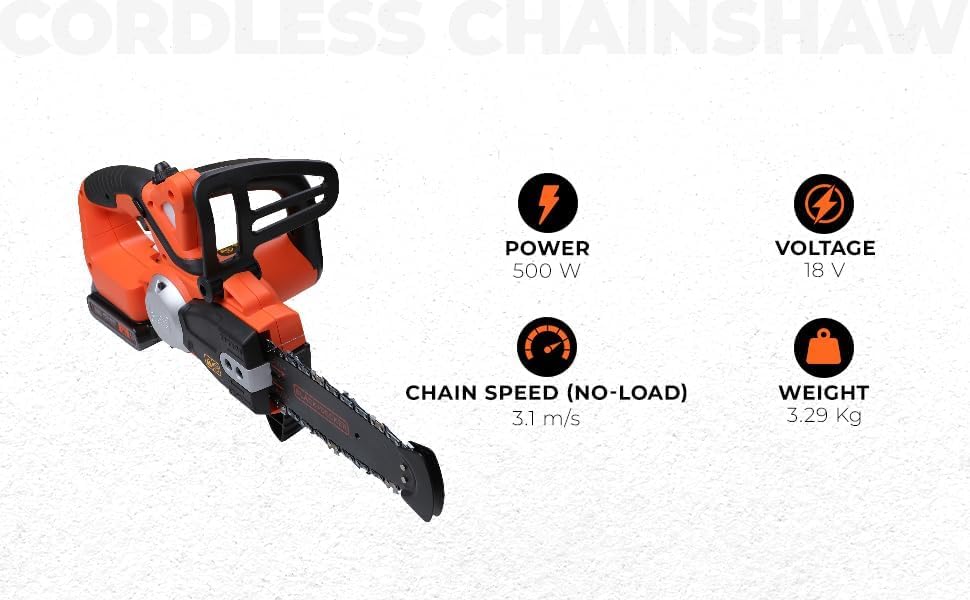
Image: Visual representation of key specifications for the BLACK+DECKER GKC1820L20 chainsaw.
- Model: GKC1820L20
- Voltage: 18 Volts
- Wattage: 500 Watts
- Horsepower: 1800 Watts
- Item Weight: 5.06 pounds (approx. 2.3 Kilograms)
- Product Dimensions: 9.45 x 27.17 x 0.98 inches
- Battery Type: Lithium Ion (1 required, included)
- Chain Speed (No-Load): 3.1 m/s
Warranty and Support
BLACK+DECKER provides comprehensive support for its products. For warranty information, service, or technical assistance, please refer to the contact details below.

Image: BLACK+DECKER Total Care information, detailing sales and after-sales support, service network, warranty, original parts, information, and omnichannel support.
Phone Support
1800-203-0644
Mon-Sat: 09:00 AM - 06:00 PM IST (Except Government Holidays)
Email Support
SBD-CUSTOMERCOMMUNICATIONS@SBDINC.COM
Number of Authorized Service Centers: 500+
Related Documents - GKC1820L20
 |
BLACK+DECKER GKC1825L20 Chainsaw: User Manual & Safety Guide Comprehensive user manual and safety guide for the BLACK+DECKER GKC1825L20 cordless chainsaw. Learn about operation, assembly, maintenance, and safety for pruning, felling, and log cutting. |
 |
BLACK+DECKER 14" Chainsaw (BECS600) Instruction Manual This is the official instruction manual for the BLACK+DECKER 14" Chainsaw, model BECS600. It provides essential safety warnings, operating instructions, assembly guidance, maintenance procedures, and warranty information for safe and effective use. |
 |
BLACK+DECKER CS2040 CS2245 Electric Chainsaw User Manual Comprehensive user manual for BLACK+DECKER CS2040 and CS2245 electric chainsaws, covering intended use, safety instructions, operation, maintenance, and troubleshooting for pruning, felling trees, and cutting logs. |
 |
BLACK+DECKER 18V Pruner BCPP18 User Manual and Safety Guide Comprehensive user manual and safety guide for the BLACK+DECKER 18V Pruner BCPP18, covering operation, maintenance, safety precautions, and technical specifications. |
 |
BLACK+DECKER PS7525 Pole Pruner User Manual & Safety Guide This user manual provides essential safety instructions, operating guidelines, and maintenance procedures for the BLACK+DECKER PS7525 electric pole pruner. Learn how to safely and effectively prune trees with this consumer-grade garden tool. |
 |
BLACK+DECKER 20V MAX* Alligator Lopper Cordless Chainsaw User Manual This user manual provides essential safety guidelines, operating instructions, maintenance procedures, and troubleshooting tips for the BLACK+DECKER 20V MAX* Alligator Lopper Cordless Chainsaw (LLP120B). |
Ask a question about this manual
Ask about setup, troubleshooting, compatibility, parts, safety, or missing instructions. Manuals+ will review the question and use this page’s manual context to help answer it.