1. Introduction
The HiLetgo PAM8403 is a compact, high-efficiency Class D digital power amplifier board designed for various audio applications. It delivers 3W + 3W stereo output power with a 5V power supply, making it suitable for portable speakers, DIY audio projects, and more. This manual provides essential information for proper installation, operation, and maintenance of the amplifier board.
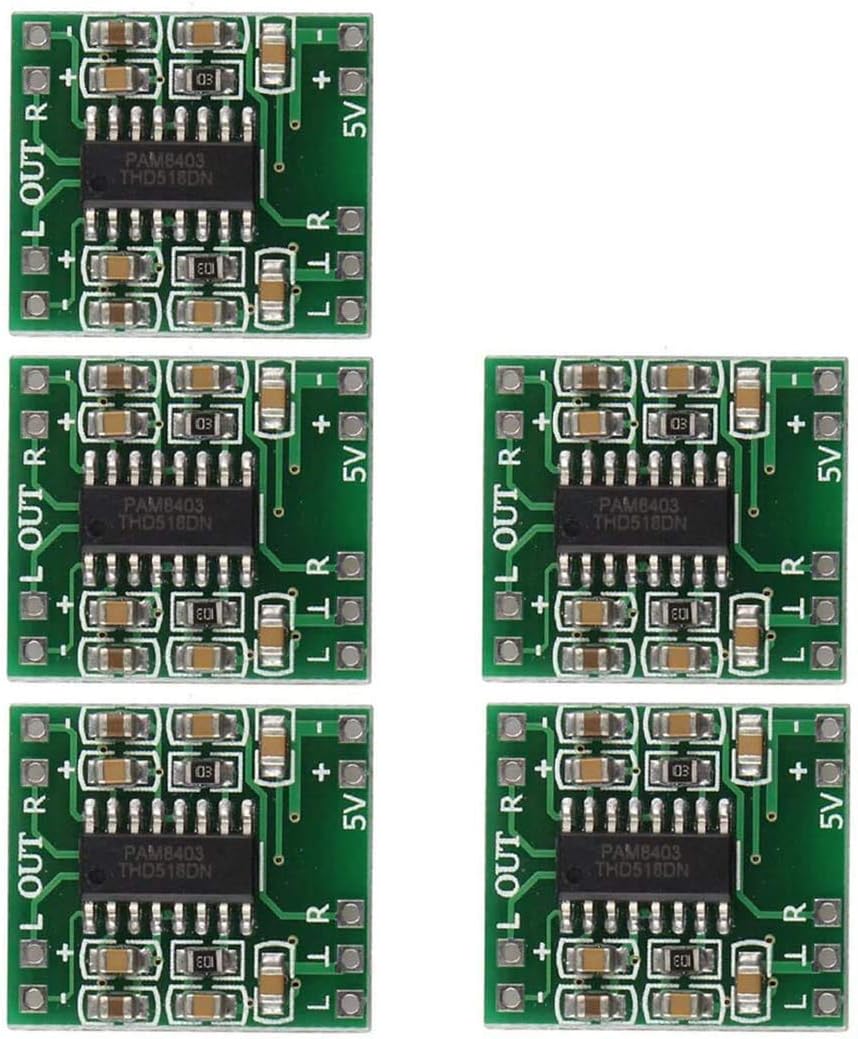
Image 1.1: A set of five HiLetgo PAM8403 mini digital amplifier boards, showcasing their compact size and identical layout.
2. Product Features
- Super Mini Volume: Measuring approximately 1.85 x 2.11 cm, this board is designed for integration into small digital products.
- Dual-Channel Stereo Output: Provides 3W + 3W power output with a 5V supply, capable of driving 4Ω or 8Ω speakers.
- Excellent Noise Suppression: Features a built-in noise canceling circuit, ensuring minimal audible noise even without audio input.
- High Efficiency Class D Design: Achieves approximately 90% efficiency, reducing heat generation and eliminating the need for a heat sink.
- Integrated LC Filter: The unique Class D digital powerless board includes an LC filter, allowing direct power from a computer's USB port.
- Protection Circuits: Equipped with short-circuit current protection and over-temperature protection.
- Optimized Wiring: Double-panel wiring helps to mitigate potential balance and crosstalk issues between channels.
3. Setup and Connections
Careful attention to wiring is crucial for optimal performance and to prevent damage to the amplifier board. Refer to the diagram below for proper connection points.

Image 3.1: A detailed wiring diagram illustrating how to connect the PAM8403 amplifier board to a 5V power source, an audio input jack, and two 3W speakers.
3.1 Power Supply Connection
- Connect the positive (+) terminal of your 2.5V-5.5V DC power supply to the 5V+ pin on the board.
- Connect the negative (-) terminal (Ground) of your power supply to the GND pin on the board.
- The board can be powered by a computer USB port (5V), a mobile phone charger USB port (5V), or a battery within the specified voltage range.
3.2 Audio Input Connection
- Connect the left channel audio input to the L pin.
- Connect the right channel audio input to the R pin.
- Connect the audio input ground to the GND pin.
3.3 Speaker Output Connection
- Connect the left speaker to the L OUT + and L OUT - terminals.
- Connect the right speaker to the R OUT + and R OUT - terminals.
- Important: The negative terminals of the left and right channel outputs (L OUT - and R OUT -) must not be connected together. Doing so will damage the IC.
- Ensure speakers are connected before applying power to the amplifier board.
- Recommended speaker impedance is 4-8 ohms, with 4 ohms being ideal. Speaker power should be 2-8W.
4. Operating Instructions
Once all connections are securely made according to the setup instructions:
- Ensure your audio source is connected to the input.
- Apply power to the amplifier board within the 2.5V to 5.5V range.
- Adjust the volume from your audio source. The PAM8403 board itself does not have a volume control.
- The amplifier will begin to output audio to the connected speakers.
5. Maintenance
The HiLetgo PAM8403 amplifier board requires minimal maintenance due to its robust design. Follow these guidelines for longevity:
- Keep the board clean and free from dust and debris. Use a soft, dry brush if cleaning is necessary.
- Avoid exposing the board to moisture or extreme temperatures.
- Ensure proper ventilation if integrating into an enclosure, although the Class D design generates minimal heat.
- Regularly check connections for looseness or corrosion, especially in portable applications.
6. Troubleshooting
If you encounter issues with your PAM8403 amplifier board, consider the following common problems and solutions:
- No Sound Output:
- Verify power supply connections and ensure the voltage is within 2.5V-5.5V.
- Check speaker connections for correct polarity and ensure they are securely attached.
- Confirm audio input source is active and volume is turned up.
- Ensure the negative terminals of the left and right speaker outputs are not shorted together.
- Distorted Sound:
- Reduce the input volume from your audio source to prevent clipping.
- Check speaker impedance; ensure it is within the 4-8 ohm range.
- Verify power supply stability; a fluctuating power supply can cause distortion.
- Humming or Buzzing Noise:
- Ensure all ground connections are solid and free from interference.
- Try using a different power supply or audio source to isolate the issue.
- Keep audio input cables away from power cables to minimize interference.
- Board Gets Hot:
- While Class D amplifiers are efficient, excessive heat can indicate a short circuit or incorrect speaker impedance. Disconnect power immediately and re-check all connections.
- Ensure the operating voltage does not exceed 5.5V.
7. Technical Specifications
| Specification | Value |
|---|---|
| Model Number | 3-01-0114 |
| Operating Voltage | 2.5V - 5.5V DC |
| Maximum Supply Voltage | 5.5V DC (Limit) |
| Output Power | 3W + 3W (into 4Ω load, 5V supply) |
| Speaker Impedance | 4-8 ohms (4 ohms recommended) |
| Speaker Power | 2-8W |
| Efficiency | Approximately 90% |
| Dimensions (L x W x H) | 21 x 18 x 3.4 mm (0.82 x 0.7 x 0.13 inches) |
| Number of Channels | 2 (Stereo) |
| Mounting Type | Surface Mount |
8. Important Safety Information
- Voltage Limits: Do not exceed the maximum operating voltage of 5.5V. Exceeding this limit can permanently damage the board.
- Speaker Connections: Ensure the negative terminals of the left and right channel outputs are never connected together. This will cause immediate damage to the amplifier IC.
- Connect Speakers First: Always connect speakers to the output terminals before applying power to the amplifier board.
- Input Signal: Ensure your input signal is within -0.3V and +0.3V to prevent damage.
- Polarity: Double-check all power and speaker polarities before powering on. Incorrect polarity can lead to component failure.
- Handling: Handle the board with care to avoid electrostatic discharge (ESD) damage.
9. Warranty and Support
This product is covered by a standard return policy, typically allowing for refund or replacement within 30 days of purchase, subject to seller terms and conditions.
For technical support or any issues encountered with your HiLetgo PAM8403 amplifier board, please contact HiLetgo customer support directly.
Contact Information:
Email: support@hiletgo.com
Website: www.hiletgo.com


