
1. Introduction
This manual provides detailed instructions for the proper use and care of your Nikon 35Ti 35mm Point & Shoot Camera. Please read this manual thoroughly before operating the camera to ensure optimal performance and longevity. The Nikon 35Ti is a high-quality compact film camera designed for ease of use while offering advanced photographic controls.
2. Safety Information
- Water and Moisture: Do not expose the camera to water or high humidity. This can cause damage to internal electronic components.
- Extreme Temperatures: Avoid using or storing the camera in extremely hot or cold environments.
- Impact: Protect the camera from drops and strong impacts, which can damage the lens, body, or internal mechanisms.
- Battery Handling: Use only the specified battery type (Lithium Metal). Ensure correct polarity when inserting. Do not dispose of batteries in fire or attempt to disassemble them.
- Cleaning: Use a soft, lint-free cloth for cleaning. Do not use harsh chemicals or abrasive materials.
3. Package Contents
Verify that your package contains the following items:
- Nikon 35Ti Camera Body
- Lithium Metal Battery (pre-installed or separately included)

Image 3.1: Nikon 35Ti camera shown with its original box and a wrist strap. The camera is a compact silver and black unit.
4. Camera Overview
Familiarize yourself with the main components of your Nikon 35Ti camera.
4.1 Front View
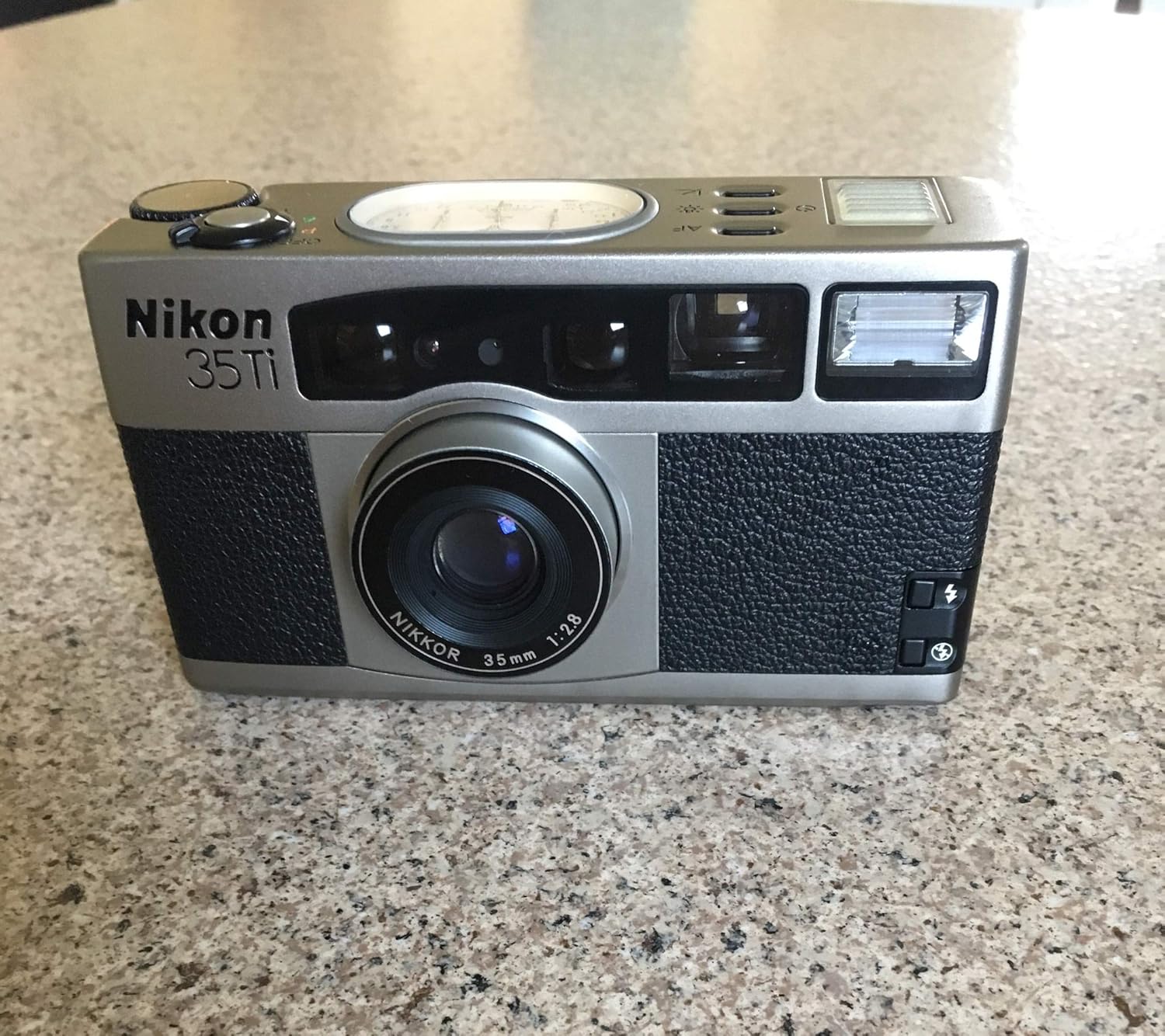
Image 4.1: Front view of the Nikon 35Ti camera. Visible features include the Nikkor 35mm 1:2.8 lens, viewfinder window, flash unit, autofocus assist lamp, and the Nikon 35Ti branding.
- Lens: Nikkor 35mm f/2.8 lens.
- Viewfinder Window: For composing your shots.
- Flash Unit: Integrated flash for low-light conditions.
- Autofocus (AF) Sensor: Detects subject distance for focusing.
4.2 Top View

Image 4.2: Top view of the Nikon 35Ti camera, highlighting the prominent analog display system. This display shows aperture, shutter speed, exposure compensation, and frame count. Also visible are the shutter button, mode dial (OFF, P, A, T), and exposure compensation dial.
- Analog Display System: Displays aperture, shutter speed, exposure compensation, and frame count.
- Shutter Button: Press to take a photograph.
- Mode Dial: Selects camera operation mode (OFF, Program, Aperture Priority, Time).
- Exposure Compensation Dial: Adjusts exposure compensation.
4.3 Back View

Image 4.3: Back view of the Nikon 35Ti camera. Features include the viewfinder eyepiece, a small LCD display, 'MODE SET' buttons, and a 'PANORAMA' switch.
- Viewfinder Eyepiece: For viewing the scene.
- LCD Display: Shows various settings and frame count.
- MODE SET Buttons: For adjusting various camera functions.
- PANORAMA Switch: Activates panorama shooting mode.
4.4 Bottom View

Image 4.4: Bottom view of the Nikon 35Ti camera. The battery compartment cover with an arrow indicating opening direction and a tripod socket are visible.
- Battery Compartment: Houses the Lithium Metal battery.
- Tripod Socket: For mounting the camera on a tripod.
5. Setup
5.1 Battery Installation
- Locate the battery compartment on the bottom of the camera (refer to Image 4.4).
- Turn the battery compartment cover counter-clockwise using a coin or similar flat object until it can be removed.
- Insert one Lithium Metal battery, ensuring the correct polarity (+/-) as indicated inside the compartment.
- Replace the cover and turn it clockwise until securely fastened.
5.2 Film Loading
- Open the camera back by sliding the film door latch (usually on the side or bottom) in the direction indicated.
- Place a 35mm film cartridge into the film chamber on the left side.
- Pull the film leader across to the take-up spool on the right side, ensuring it catches on the spool's teeth.
- Close the camera back firmly until it latches. The camera will automatically advance the film to the first frame. The frame counter on the top analog display or rear LCD will show '1'.
6. Operating the Camera
6.1 Power On/Off
Turn the Mode Dial (refer to Image 4.2) from 'OFF' to 'P' (Program), 'A' (Aperture Priority), or 'T' (Time) to power on the camera. To power off, turn the dial back to 'OFF'.
6.2 Basic Photography (Program Mode)
- Set the Mode Dial to 'P' for Program Auto Exposure.
- Look through the viewfinder and compose your shot.
- Press the Shutter Button halfway down to activate autofocus and exposure metering. A green light in the viewfinder indicates focus lock.
- Press the Shutter Button fully to take the picture. The film will automatically advance to the next frame.
6.3 Flash Usage
The Nikon 35Ti features an integrated flash. The flash mode can typically be cycled through using a dedicated button near the flash unit or via the 'MODE SET' buttons on the back. Common modes include Auto Flash, Fill-in Flash, Flash Off, and Red-eye Reduction.
6.4 Self-Timer
To use the self-timer, press the self-timer button (often indicated by a clock icon) on the camera body. Compose your shot, press the shutter button, and the self-timer lamp on the front of the camera will blink, indicating a delay before the shutter fires (typically 10 seconds).
6.5 Manual Features (Aperture Priority and Time Mode)
- Aperture Priority (A): Set the Mode Dial to 'A'. Use the Exposure Compensation Dial or other controls to select your desired aperture (e.g., f/2.8, f/5.6, f/8). The camera will automatically set the appropriate shutter speed.
- Time Mode (T): Set the Mode Dial to 'T'. This mode allows for long exposures where the shutter remains open until you press the shutter button a second time. Consult the camera's specific controls for setting the aperture in this mode.
6.6 Panorama Mode
To activate panorama mode, slide the 'PANORAMA' switch on the back of the camera (refer to Image 4.3). This will mask the top and bottom of the film frame, producing a wider aspect ratio image. Remember to switch it off for standard format photos.
6.7 Film Rewinding
Once all frames on the film roll have been exposed, the camera will typically rewind the film automatically. Some models may have a manual rewind button for mid-roll rewinding. Wait until the rewinding process is complete before opening the camera back.
7. Maintenance
- Cleaning the Lens: Use a lens brush or a blower to remove dust. For smudges, use a specialized lens cleaning solution and a microfiber cloth. Avoid touching the lens surface with your fingers.
- Cleaning the Camera Body: Wipe the camera body with a soft, dry cloth. For stubborn dirt, slightly dampen the cloth with water.
- Storage: When not in use, store the camera in a cool, dry place, away from direct sunlight and extreme temperatures. Remove the battery if the camera will not be used for an extended period to prevent leakage.
8. Troubleshooting
- Camera Does Not Power On: Check if the battery is correctly inserted and fully charged. Replace the battery if necessary.
- Film Not Advancing: Ensure the film is properly loaded and the leader is securely attached to the take-up spool. Close the camera back firmly.
- Blurry Photos: Ensure the autofocus system has locked onto the subject before fully pressing the shutter. Check for sufficient lighting.
- Flash Not Firing: Check the flash mode settings. Ensure the flash is not set to 'Flash Off' mode. Allow time for the flash to recharge if it has just been used.
9. Specifications
- Model Name: 35Ti
- Brand: Nikon
- Film Format Type: 35mm
- Lens: Nikkor 35mm f/2.8
- Batteries: 1 Lithium Metal battery (included)
- Item Weight: 1.15 pounds
- Package Dimensions: 6.34 x 5.08 x 2.95 inches
- Date First Available: July 10, 2014
- Included Components: Camera Body Only
10. Warranty and Support
For information regarding warranty coverage or technical support, please refer to the warranty card included with your product or visit the official Nikon website. Keep your proof of purchase for warranty claims.


