Introduction
The A&D Medical UA-651CN is an upper arm blood pressure monitor designed for home use, providing quick and accurate measurements with simple one-button operation. This device is equipped with features such as AFib detection and memory storage to help track blood pressure trends over time. This manual provides essential information for the proper setup, operation, and maintenance of your blood pressure monitor.
What's in the Box
Upon opening your A&D Medical UA-651CN package, please ensure all the following components are present:
- 1 x A&D Medical UA-651CN Upper Arm Blood Pressure Monitor
- 1 x Wide Range Blood Pressure Cuff (8.6-16.5" / 22-42 cm)
- 1 x Instruction Manual
- 1 x Quick Start Guide
- 4 x AA Batteries
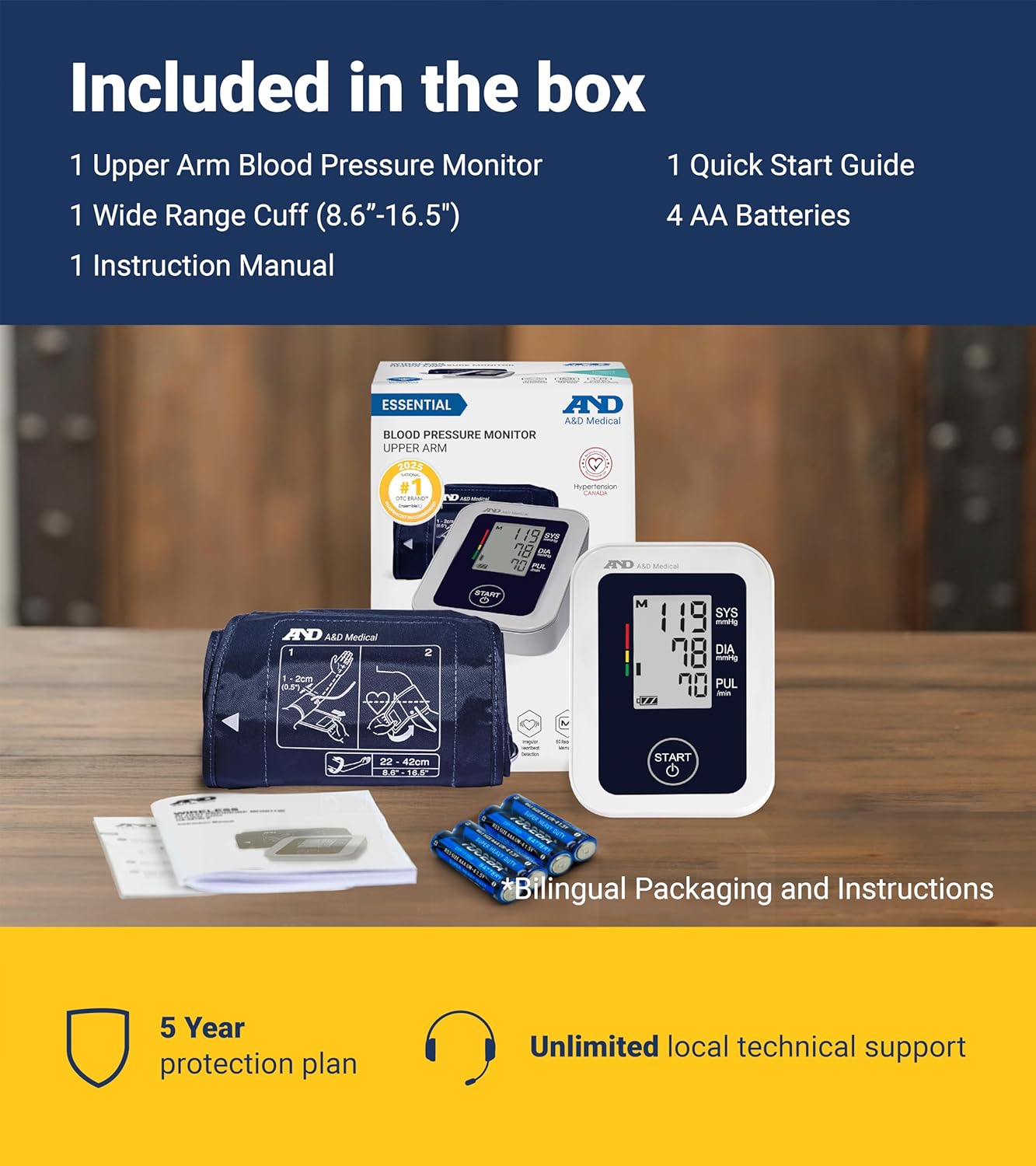
Image: The A&D Medical UA-651CN blood pressure monitor, wide range cuff, instruction manual, quick start guide, and four AA batteries are shown neatly arranged, indicating the complete contents of the product box.
Setup
1. Install Batteries
Open the battery compartment on the back of the monitor. Insert the four AA batteries, ensuring correct polarity (+/-). Close the battery compartment securely.
2. Connect the Cuff
Insert the air plug of the cuff firmly into the air jack on the side of the monitor.
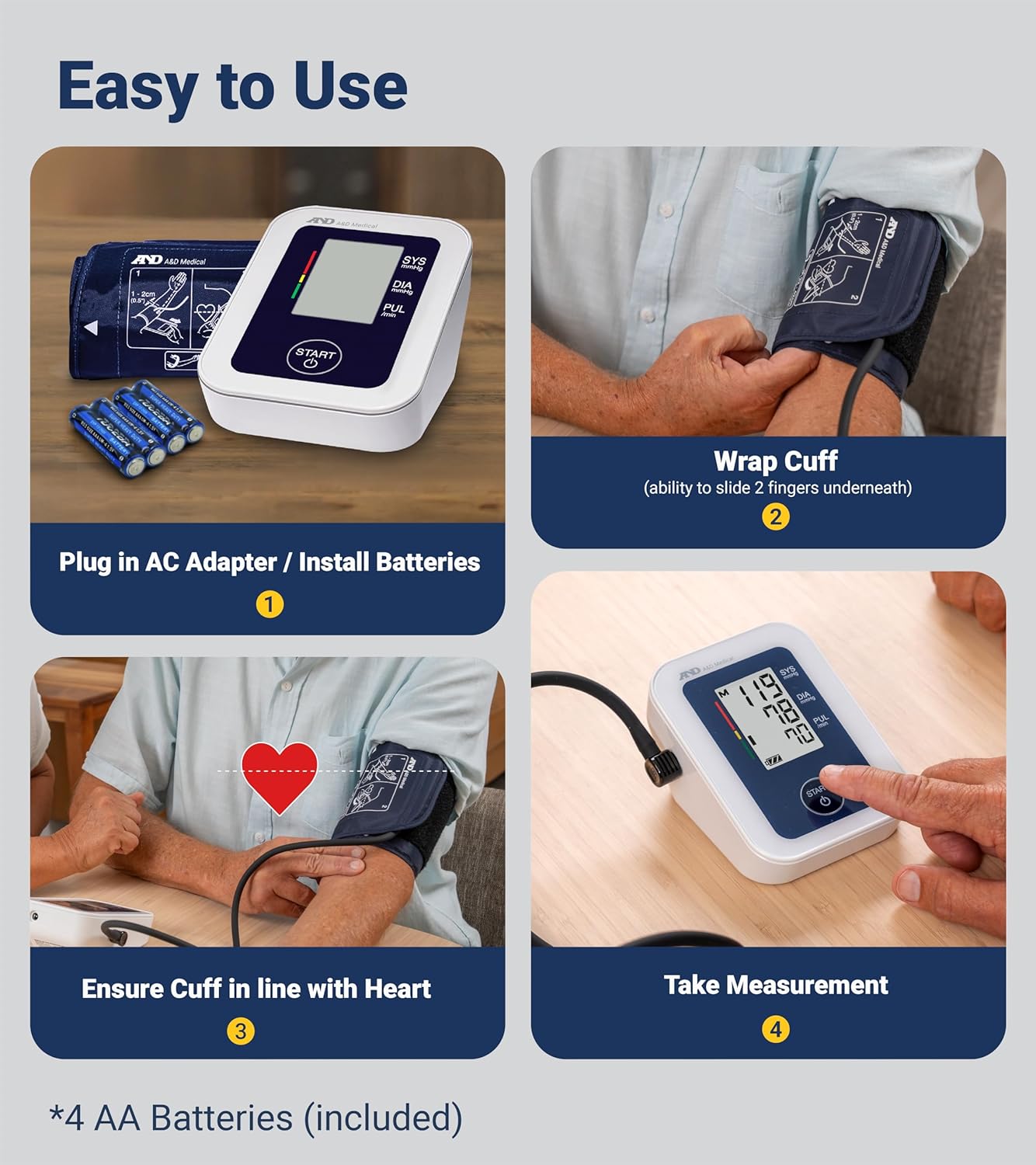
Image: A visual guide demonstrating the initial setup steps for the blood pressure monitor, including battery installation and cuff attachment, followed by proper cuff placement and measurement initiation.
Cuff Sizing and Placement
Accurate blood pressure readings depend significantly on using the correct cuff size and proper placement. The UA-651CN includes a wide range cuff (8.6-16.5" / 22-42 cm).
Measuring Your Arm Circumference
- Allow your arm to hang naturally at your side.
- Locate the midpoint between your elbow and shoulder.
- Measure the circumference of your upper arm at this midpoint to confirm your fit.

Image: A diagram showing the correct method to measure the upper arm circumference to ensure the appropriate cuff size is used for accurate blood pressure monitoring.
Cuff Placement
- Wrap the cuff on the bare skin of your left upper arm, 1-2 cm above the elbow, with your palm facing up.
- Secure the cuff snugly, ensuring there is enough room to fit two fingers underneath.
- Position the cuff so that the air tube runs down the center of your arm, aligning the cuff with your heart level.

Image: A sequence of three images illustrating the correct steps for placing the blood pressure cuff on the arm, from initial wrapping to final positioning for measurement.
Operating Instructions
For accurate readings, follow these guidelines before and during measurement:
- Avoid smoking, drinking caffeinated beverages, and exercising for 30 minutes prior to taking your blood pressure.
- Sit with your back straight and supported, and place your feet flat on the ground.
- Ensure your arm is resting comfortably on a flat surface, with the cuff at heart level.

Image: A visual guide detailing the recommended posture and activities to avoid before taking a blood pressure measurement to ensure accuracy.
Taking a Measurement
- Once the cuff is correctly placed and you are in the proper position, press the START/STOP button.
- The cuff will automatically inflate, and the measurement will begin.
- Remain still and silent during the measurement.
- The monitor will display your systolic, diastolic, and pulse readings upon completion.
Video: This video demonstrates the simple one-touch operation of the A&D Medical blood pressure monitor, showing how to initiate a measurement and view the results on the display.
Understanding Your Readings
The large digital LCD screen displays your readings clearly:
- SYS (Systolic Pressure): The top number, indicating the pressure in your arteries when your heart beats.
- DIA (Diastolic Pressure): The bottom number, indicating the pressure in your arteries between beats.
- PUL (Pulse Rate): Your heart rate, measured in beats per minute.
- Irregular Heartbeat (AFib) Detection: The UA-651CN can detect atrial fibrillation (AFib) during measurement. If an irregular heartbeat is detected, a corresponding symbol will appear on the display. Consult your physician if this symbol appears frequently.
- Blood Pressure Rating Indicator: A color-coded bar on the left side of the display provides a visual indication of your blood pressure category according to established guidelines.

Image: The main product image of the A&D Medical UA-651CN monitor, clearly displaying a sample blood pressure reading and pulse rate, along with the blood pressure rating indicator.
Memory Function
The UA-651CN monitor can store up to 60 measurements. This allows you to track your blood pressure trends over time, compare past readings, and monitor your progress. To access stored readings, press the M button. Repeated presses will cycle through the stored measurements.
A&D Heart Track App
Enhance your health tracking with the free A&D Heart Track App, available for iOS (10.0 or above) and Android (5.0 or above) devices. This app allows you to manually log and track an unlimited number of measurements, share data, view trends, take notes, and set reminders.

Image: A visual representation of the A&D Heart Track App, highlighting its features for logging, tracking, and managing blood pressure measurements on a mobile device.
Maintenance
Cleaning
Wipe the monitor and cuff with a soft, dry cloth. If necessary, use a cloth lightly dampened with water or a mild detergent, then wipe dry. Do not use abrasive cleaners or immerse the unit in water.
Storage
Store the monitor and cuff in a clean, dry place away from direct sunlight, extreme temperatures, and humidity. Do not store the cuff tightly rolled or folded for extended periods.
Troubleshooting
If you encounter issues with your blood pressure monitor, refer to the following common problems and solutions:
- No Display/Power On: Check if batteries are correctly installed and have sufficient charge. Replace with new AA batteries if needed.
- Error Message on Display: Ensure the cuff is correctly attached and wrapped snugly. Remain still and avoid talking during measurement. If errors persist, consult the full instruction manual or contact customer support.
- Inconsistent Readings: Ensure proper cuff placement and body posture. Avoid activities like smoking or caffeine before measurement. Take multiple readings with a few minutes in between.
Specifications
| Model Name | UA-651CN |
| Power Source | Battery Powered (4 AA batteries required) |
| Display Type | LCD |
| Cuff Size | Wide Range Cuff (22-42 cm / 8.6-16.5 inches) |
| Memory Storage | 60 measurements |
| Item Weight | 0.38 Kilograms |
| Product Dimensions | 9.91 x 13.03 x 19.38 cm |
| Age Range (Description) | Adult |
Warranty and Support
The A&D Medical UA-651CN Blood Pressure Monitor is backed by an industry-leading 5-year warranty on the monitor and a 2-year warranty on the cuff. For technical assistance, troubleshooting, or warranty claims, please contact A&D Medical customer service. Local customer service is available to provide support and peace of mind.
For further assistance, please visit the A&D Medical Store.