
Bugera V22HDINFINIUM
Bugera V22HD INFINIUM Amplifier Head User Manual
Model: V22HDINFINIUM
1. Introduction
This manual provides essential information for the safe and effective operation of your Bugera V22HD INFINIUM 22-Watt Vintage 2-Channel Amplifier Head. Please read this manual thoroughly before using the amplifier to ensure proper setup, operation, and maintenance.
The Bugera V22HD INFINIUM is a hand-built 22-Watt guitar amplifier head, featuring a classic 2-channel preamp design from the 1960s, driven by 2 x EL84 power tubes and 3 x 12AX7 preamp tubes. It incorporates the revolutionary INFINIUM Tube Life Multiplier technology, significantly extending the lifespan of your tubes. An integrated high-definition reverb with a dedicated control is also included.
2. Important Safety Instructions
Always observe the following basic precautions when using electrical products:
- Read these instructions.
- Keep these instructions.
- Heed all warnings.
- Follow all instructions.
- Do not use this apparatus near water.
- Clean only with dry cloth.
- Do not block any ventilation openings. Install in accordance with the manufacturer’s instructions.
- Do not install near any heat sources such as radiators, heat registers, stoves, or other apparatus (including amplifiers) that produce heat.
- Do not defeat the safety purpose of the polarized or grounding-type plug. A polarized plug has two blades with one wider than the other. A grounding type plug has two blades and a third grounding prong. The wide blade or the third prong are provided for your safety. If the provided plug does not fit into your outlet, consult an electrician for replacement of the obsolete outlet.
- Protect the power cord from being walked on or pinched particularly at plugs, convenience receptacles, and the point where they exit from the apparatus.
- Only use attachments/accessories specified by the manufacturer.
- Use only with the cart, stand, tripod, bracket, or table specified by the manufacturer, or sold with the apparatus. When a cart is used, use caution when moving the cart/apparatus combination to avoid injury from tip-over.
- Unplug this apparatus during lightning storms or when unused for long periods of time.
- Refer all servicing to qualified service personnel. Servicing is required when the apparatus has been damaged in any way, such as power-supply cord or plug is damaged, liquid has been spilled or objects have fallen into the apparatus, the apparatus has been exposed to rain or moisture, does not operate normally, or has been dropped.
3. Setup and Connections
Before connecting your amplifier, ensure all equipment is powered off. The V22HD INFINIUM is designed to be paired with a suitable speaker cabinet.
3.1 Unpacking
Carefully remove the amplifier from its packaging. Retain the original packaging for future transport or storage.
3.2 Rear Panel Connections
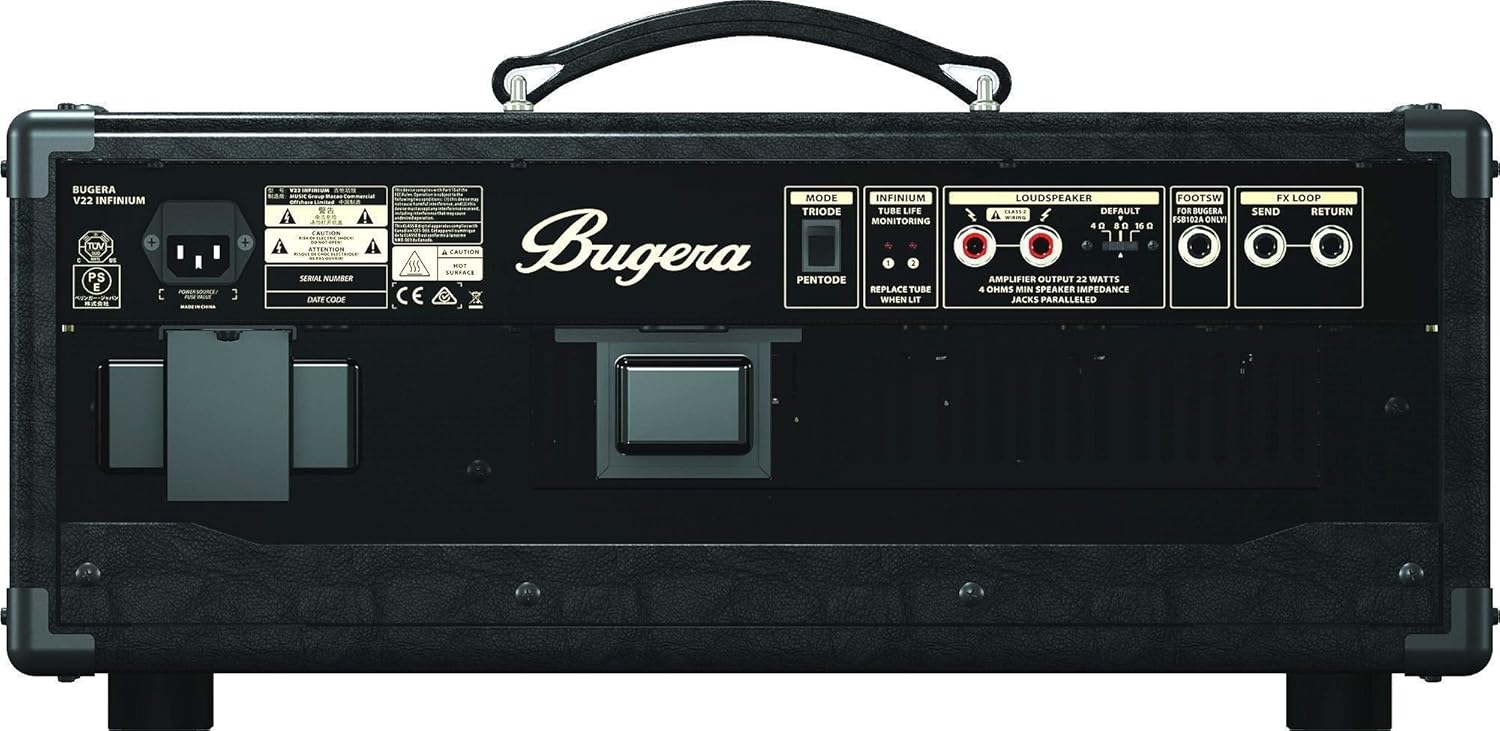
The rear panel of the V22HD INFINIUM provides all necessary connections for your speaker cabinet, footswitch, and effects loop. Ensure all connections are secure before powering on the unit.
3.2.1 Speaker Output
Connect the amplifier to a speaker cabinet using a high-quality speaker cable. The V22HD INFINIUM offers multiple speaker outputs to match various impedance loads (4, 8, or 16 Ohms). Ensure the impedance setting on the amplifier matches your speaker cabinet's impedance for optimal performance and to prevent damage.
3.2.2 Footswitch Input
Connect the included footswitch to the dedicated footswitch input. This allows remote switching between channels and activating/deactivating the reverb effect.

The dual footswitch allows for convenient control of channel switching and reverb activation during live performance or practice.
3.2.3 FX Loop (Send/Return)
The integrated effects loop allows you to connect external effects pedals or processors. Connect the 'Send' jack to the input of your effects unit and the 'Return' jack to the output of your effects unit.
3.3 Power Connection
Connect the supplied power cord to the amplifier's AC inlet and then to a grounded power outlet. Ensure the correct voltage for your region is used.
4. Operating the Amplifier
The Bugera V22HD INFINIUM features intuitive controls for shaping your tone.

4.1 Front Panel Controls
- INPUTS (NORMAL/BRIGHT): Two input jacks. The 'Normal' input provides a standard signal path, while the 'Bright' input offers a brighter, more articulate tone, suitable for darker-sounding guitars or for adding sparkle.
- CLEAN CHANNEL:
- CLEAN GAIN: Adjusts the input sensitivity and gain for the clean channel.
- CLEAN VOLUME: Controls the overall output volume of the clean channel.
- LEAD CHANNEL:
- LEAD GAIN: Adjusts the input sensitivity and amount of overdrive/distortion for the lead channel.
- LEAD VOLUME: Controls the overall output volume of the lead channel.

- EQUALIZATION (BASS, MID, TREBLE): These three controls shape the tonal characteristics of both channels. Adjust them to achieve your desired sound.
- PRESENCE: Adds high-end sparkle and definition to the overall sound, affecting the power amp section.
- MASTER: Controls the overall output volume of the amplifier, affecting both channels.
- REVERB: Adjusts the intensity of the integrated high-definition reverb effect.
- MODE (TRIODE/PENTODE): This switch alters the power amp's operating mode. 'Pentode' mode delivers full power and a more aggressive tone, while 'Triode' mode provides a lower power output with a softer, more compressed feel, ideal for practice or recording at lower volumes.
- INFINIUM TUBE LIFE MULTIPLIER INDICATORS: These LEDs monitor the health of each power tube. If an LED illuminates, it indicates that the corresponding tube needs to be replaced soon.

5. Maintenance
5.1 Cleaning
Clean the amplifier's exterior with a soft, dry cloth. Do not use abrasive cleaners or solvents, as they may damage the finish. Ensure the amplifier is unplugged before cleaning.
5.2 Tube Replacement (INFINIUM Technology)
The Bugera V22HD INFINIUM features revolutionary INFINIUM Tube Life Multiplier technology, which extends the lifespan of your power tubes and allows for easy replacement without manual biasing. The individual LED indicators on the rear panel will illuminate when a specific tube needs to be replaced.


To replace a tube:
- Ensure the amplifier is powered off and unplugged from the mains.
- Allow the tubes to cool down completely.
- Carefully remove the tube retainer (if present) and gently pull the old tube straight out from its socket.
- Insert the new, compatible tube, ensuring the pins align correctly with the socket. Do not force the tube.
- Replace the tube retainer.
- The INFINIUM system will automatically adjust the bias for the new tube.
It is recommended to use tubes specified by Bugera for optimal performance and compatibility.
6. Troubleshooting
If you encounter issues with your amplifier, refer to the following common problems and solutions:
- No Power:
- Check if the power cord is securely connected to both the amplifier and the power outlet.
- Verify that the power outlet is functional.
- Check the amplifier's fuse. If blown, replace it with a fuse of the same type and rating.
- No Sound:
- Ensure your guitar is properly connected to the input jack.
- Verify that the speaker cable is securely connected to both the amplifier and the speaker cabinet, and that the impedance matches.
- Check all volume controls (Clean Volume, Lead Volume, Master) are turned up.
- Ensure the guitar's volume knob is turned up.
- Check for faulty cables (guitar cable, speaker cable).
- Poor Sound Quality / Weak Sound:
- Check the condition of your tubes. If an INFINIUM LED indicator is lit, replace the corresponding tube.
- Ensure the speaker cabinet's impedance matches the amplifier's output setting.
- Adjust the EQ (Bass, Mid, Treble) and Presence controls.
- Test with a different guitar or cable to rule out external issues.
- Excessive Noise/Hum:
- Ensure proper grounding of all equipment.
- Try plugging the amplifier into a different power outlet.
- Check for faulty cables or external interference sources.
If the problem persists after attempting these solutions, please contact qualified service personnel.
7. Specifications
| Feature | Detail |
|---|---|
| Brand | Bugera |
| Model Number | V22HDINFINIUM |
| Output Wattage | 22 watts |
| Tubes | 2 x EL84 (Power), 3 x 12AX7 (Preamp) |
| Channels | 2 (Clean, Lead) |
| Reverb | Integrated High-Definition |
| Tube Technology | INFINIUM Tube Life Multiplier |
| Power Source | Corded Electric |
| Voltage | 100 Volts |
| Item Weight | 28 pounds |
| Product Dimensions | 22.44 x 10.63 x 8.5 inches |
| Color | Brown & Cream |
| Compatible Devices | Guitar |
| Date First Available | May 16, 2014 |
7.1 What's in the Box
- V22hd Infinium Hand Built Tube Guitar Amplifier Head
- Power Cord
- Footswitch
8. Warranty and Support
For detailed warranty information and technical support, please refer to the warranty card included with your product or visit the official Bugera website. Do not attempt to service the amplifier yourself beyond the instructions provided in this manual, as this may void your warranty and pose a safety risk.
For service inquiries, contact Bugera customer support or an authorized service center.