
1. Introduction
This manual provides detailed instructions for the safe and effective use of your Retevis RT21 FRS Two-Way Radios. Please read this manual thoroughly before operating the device and retain it for future reference.

Image 1.1: Retevis RT21 Walkie Talkies with included accessories.
2. Package Contents
Verify that all items are present in your package:
- 2 x Retevis RT21 Two-Way Radios
- 2 x Li-ion Batteries
- 2 x Chargers (DC charging base and adapter)
- 2 x Hard Belt Clips
- 2 x Hand Straps
- 2 x Air Acoustic Earpieces
- 1 x English User Manual

Image 2.1: All components included in the Retevis RT21 package.
3. Setup
3.1. Battery Installation
- Ensure the radio is powered off.
- Locate the battery compartment on the back of the radio.
- Align the Li-ion battery with the compartment and press it firmly until it clicks into place.

Image 3.1: Rear view of the RT21 radio, indicating the battery area.
3.2. Charging the Battery
The RT21 walkie talkies use 1100mAh Lithium Metal batteries. For optimal performance, fully charge the battery before first use.
- Connect the DC charging adapter to a power outlet.
- Place the radio (with battery installed) into the charging base.
- The indicator light on the charger will show the charging status. A full charge typically takes approximately 3 hours.
A fully charged battery provides up to 12 hours of continuous use and over 72 hours of standby time.

Image 3.2: The 1100mAh battery and charging process.
3.3. Attaching the Belt Clip
- Align the belt clip with the screw holes on the back of the radio.
- Secure the belt clip using the provided screws.
3.4. Connecting the Earpiece
The RT21 includes a covert air acoustic earpiece for private communication.
- Locate the two-pin audio jack on the side of the radio.
- Insert the earpiece plug firmly into the jack. Ensure it is fully seated for proper audio transmission and reception.

Image 3.3: Retevis RT21 with earpiece connected.
4. Operating Instructions
4.1. Power On/Off
Rotate the Power/Volume Knob clockwise to turn the radio on. Continue rotating to increase the volume. Rotate counter-clockwise until a click is heard to turn the radio off.
4.2. Adjusting Volume
After powering on, rotate the Power/Volume Knob to adjust the listening volume to a comfortable level.
4.3. Channel Selection
The RT21 features 16 channels. Rotate the Channel Selector Knob to choose your desired channel. Ensure all radios in your group are set to the same channel for communication.

Image 4.1: Top controls for channel and volume adjustment.
4.4. Transmitting and Receiving
- To transmit, press and hold the Push-to-Talk (PTT) button on the side of the radio. Speak clearly into the microphone.
- Release the PTT button to receive.
4.5. VOX Function (Voice Operated Exchange)
The VOX function allows for hands-free operation. When activated, the radio will automatically transmit when it detects your voice, without needing to press the PTT button. Refer to the full user manual for instructions on enabling and adjusting VOX sensitivity.

Image 4.2: Visual representation of the VOX function.
4.6. CTCSS/DCS Tones
CTCSS (Continuous Tone-Coded Squelch System) and DCS (Digitally Coded Squelch) tones help filter out unwanted conversations on the same channel. When a CTCSS/DCS tone is set, you will only hear transmissions from radios using the same tone. The RT21 can work with other FRS radios using the same channel and CTCSS/DCS tones.

Image 4.3: CTCSS/DCS for secure communication.
5. Maintenance
5.1. General Care
- Keep the radio dry. Do not expose it to rain or moisture, as it is not water resistant.
- Clean the radio with a soft, damp cloth. Do not use harsh chemicals or abrasive cleaners.
- Avoid extreme temperatures.
- The antennas of all RT21 walkie-talkies are not detachable. Do not attempt to remove them.
5.2. Battery Care
- Charge the battery regularly, even if the radio is not in frequent use, to maintain battery health.
- Do not short-circuit the battery terminals.
5.3. Durability
The RT21 features a rugged body design for long-term use. While designed to be durable, avoid dropping the radio from significant heights or subjecting it to severe impacts.

Image 5.1: The RT21's shock-resistant construction.
6. Troubleshooting
If you encounter issues with your Retevis RT21 walkie talkie, refer to the following common problems and solutions:
| Problem | Possible Cause | Solution |
|---|---|---|
| Radio does not power on | Battery is depleted or not installed correctly. | Charge the battery. Ensure the battery is properly seated in the compartment. |
| No sound or low volume | Volume is too low. Earpiece not connected properly. | Increase the volume using the Power/Volume Knob. Re-insert the earpiece plug firmly. |
| Cannot communicate with other radios | Radios are on different channels or using different CTCSS/DCS tones. Out of range. | Ensure all radios are set to the same channel and CTCSS/DCS tone. Move closer to the other radio. |
| Static or unclear audio | Weak signal due to distance or obstructions. Interference. | Move to an open area. Adjust squelch level if programmable (refer to advanced settings). |

Image 6.1: The RT21 provides clear sound quality.
7. Specifications
| Feature | Detail |
|---|---|
| Model Number | RT21 |
| Item Weight | 5.3 ounces (150 grams) |
| Product Dimensions | 1.18 x 2.12 x 8.85 inches (3 x 5.4 x 22.5 cm) |
| Batteries | 2 Lithium Metal batteries required (included) |
| Battery Capacity | 1100mAh |
| Number of Channels | 16 |
| Frequency Range | FRS (Family Radio Service) |
| Talking Range Maximum | Up to 3 Miles (actual range varies with terrain and conditions) |
| Voltage | 3.7 Volts |
| Water Resistance Level | Not Water Resistant |
| Special Features | Easy to use, rugged design, long battery life, good compatibility, VOX, CTCSS/DCS |
| FCC ID | 2AAR8RETEVISRT21 (Meets FCC rule part 95) |
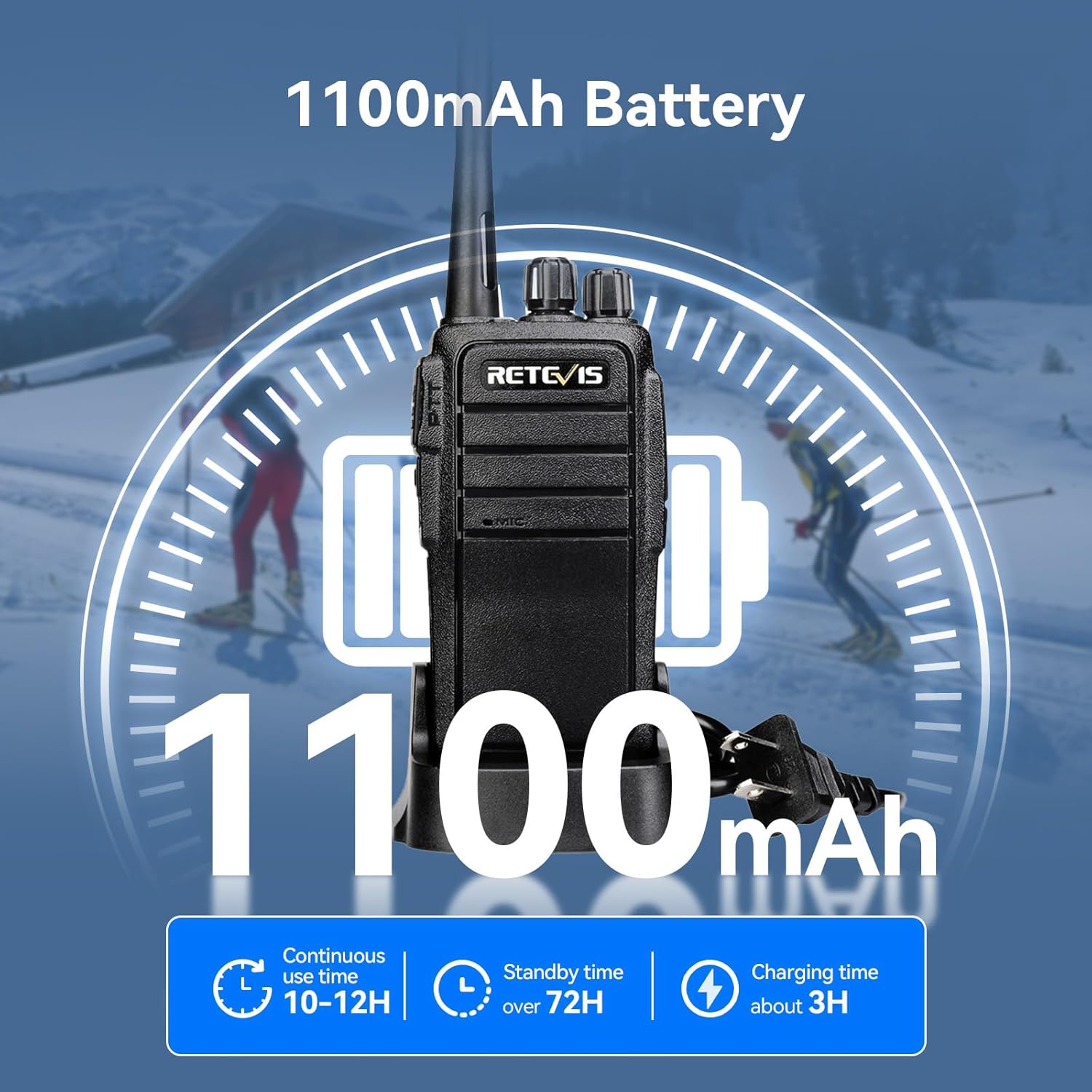
Image 7.1: Illustrative range capabilities of the RT21.
8. Warranty and Support
Retevis provides the following warranty and support for the RT21 walkie talkies:
- Warranty: 3-year warranty for the radio body and 1-year warranty for accessories.
- Returns: 30-day no-reason return policy.
- Customer Support: Lifetime customer support. For assistance, contact Retevis customer service via Amazon. Responses are typically provided within 12 hours.
- Post-Warranty Service: Maintenance services are available beyond the warranty period; buyers are responsible for associated costs.


