
Introduction
This manual provides essential instructions for the safe and effective use, setup, operation, and maintenance of your Mitutoyo MDC-50PX 293-241-30 Coolant Proof Micrometer. Please read this manual thoroughly before using the instrument and retain it for future reference.

Image: The Mitutoyo MDC-50PX 293-241-30 Coolant Proof Micrometer, showing its digital display and robust construction.
Setup
- Unpacking and Inspection: Carefully remove the micrometer from its packaging. Inspect the instrument for any visible damage that may have occurred during shipping. If any damage is found, do not use the micrometer and contact your supplier.
- Cleaning: Before first use, gently wipe the measuring faces and body with a clean, lint-free cloth. Ensure no dust or debris is present on the measuring surfaces.
- Battery Installation (if not pre-installed):
- Locate the battery compartment cover, typically on the side or back of the display unit.
- Use a small screwdriver or coin to open the cover.
- Insert a new SR44 (or equivalent) silver oxide battery, ensuring the correct polarity (+/-).
- Securely close the battery compartment cover.
- Zero Setting:
- Clean the measuring faces thoroughly.
- Gently bring the anvil and spindle into contact using the ratchet stop until it clicks 2-3 times.
- Press the 'ZERO' button on the micrometer. The display should show '0.000 mm' (or '0.0000 in' if in inch mode).
- If the display does not show zero, repeat the cleaning and zero-setting process.
Operating Instructions
- Power On/Off: Press the 'ON/OFF' button to turn the micrometer on or off. The micrometer may also have an auto-off feature to conserve battery.
- Unit Selection: If applicable, press the 'mm/inch' button to switch between metric and imperial units.
- Basic Measurement:
- Hold the micrometer firmly by the frame.
- Open the measuring faces slightly wider than the object to be measured.
- Position the object between the anvil and the spindle.
- Rotate the ratchet stop until the spindle gently contacts the object and the ratchet clicks 2-3 times. This ensures consistent measuring force.
- Read the measurement directly from the digital display.
- Data Output (SPC): The micrometer is SPC output capable. To connect to a data processing unit, use a compatible Mitutoyo SPC cable (sold separately) and follow the instructions provided with the cable and data processing software.
Maintenance
- Cleaning: Despite being coolant-proof, regularly clean the micrometer. Wipe the measuring faces and body with a clean, dry, lint-free cloth after each use. For stubborn grime, a mild, non-corrosive cleaning solution can be used, followed by thorough drying. Avoid using solvents that may damage plastic components or markings.
- Storage: Store the micrometer in its protective case in a clean, dry environment, away from direct sunlight, extreme temperatures, and corrosive substances. Ensure the measuring faces are slightly open to prevent pressure on the spindle.
- Battery Replacement: Replace the battery when the low battery indicator appears on the display or when the display becomes dim or erratic. Refer to the 'Battery Installation' section for replacement steps. Dispose of used batteries according to local regulations.
- Calibration: For continued accuracy, periodic calibration by a qualified technician or calibration laboratory is recommended. The frequency of calibration depends on usage and environmental conditions.
Troubleshooting
- Display is blank or dim:
- Check battery installation and polarity.
- Replace the battery with a new one.
- Inaccurate readings:
- Ensure measuring faces are clean and free of debris.
- Perform a zero-setting procedure.
- Verify that the ratchet stop is used correctly to apply consistent measuring force.
- Check for any physical damage to the micrometer.
- Error messages on display: If an error code appears, consult the Mitutoyo website or contact customer support for specific guidance related to the displayed code.
Specifications
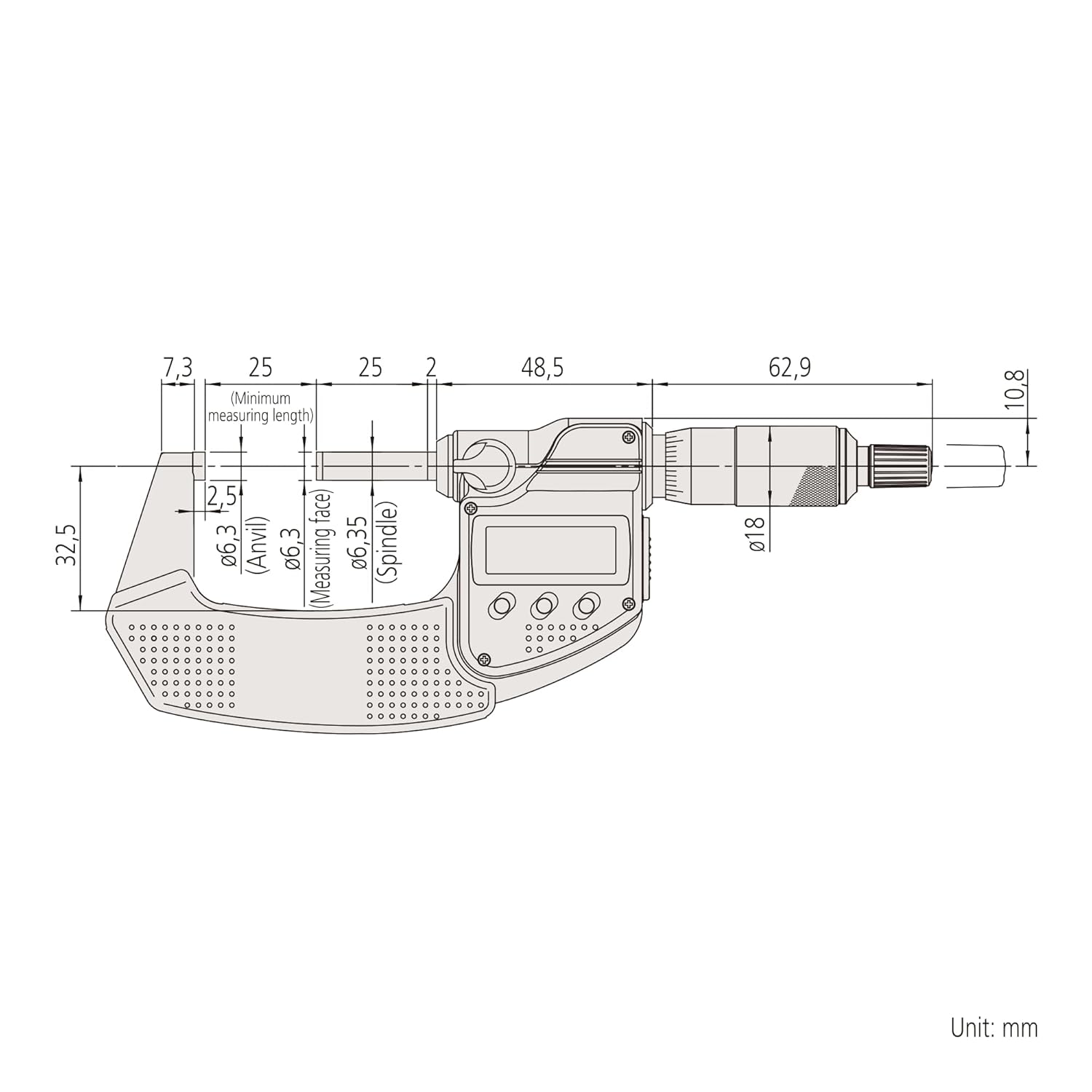
Image: Technical drawing illustrating the dimensions and components of the Mitutoyo MDC-50PX 293-241-30 Micrometer, with measurements in millimeters.
| Feature | Specification |
|---|---|
| Model Number | MDC-50PX 293-241-30 |
| Measurement Range | 25 to 50 mm |
| Minimum Display Amount | 0.001 mm |
| Quantization Error | Not including ± 1 count |
| Material | Stainless Steel |
| Product Dimensions | 20 x 20 x 10 cm |
| Item Weight | 330 Grams |
| Coolant Proof | Yes |
Warranty and Support
This Mitutoyo product is covered by the manufacturer's standard warranty. For detailed information regarding warranty terms, conditions, and duration, please refer to the warranty card included with your product or visit the official Mitutoyo website. For technical support, service, or inquiries, please contact your authorized Mitutoyo dealer or Mitutoyo customer service directly.