
1. Introduction and Overview
This manual provides essential information for the safe and effective use of your Tamron 28-300mm F/3.5-6.3 Di VC PZD Zoom Lens. This versatile all-in-one zoom lens is designed for use with Canon EF-mount cameras, compatible with both full-frame and APS-C DSLR bodies. It features advanced optical construction, including LD, Aspherical, XR, and UXR glass elements, contributing to its compact and lightweight design while minimizing aberrations.
The lens incorporates Tamron's Piezo Drive (PZD) autofocus system for swift and quiet operation, and Vibration Compensation (VC) for enhanced image stability. Its construction includes moisture-resistant features, making it suitable for various shooting conditions.
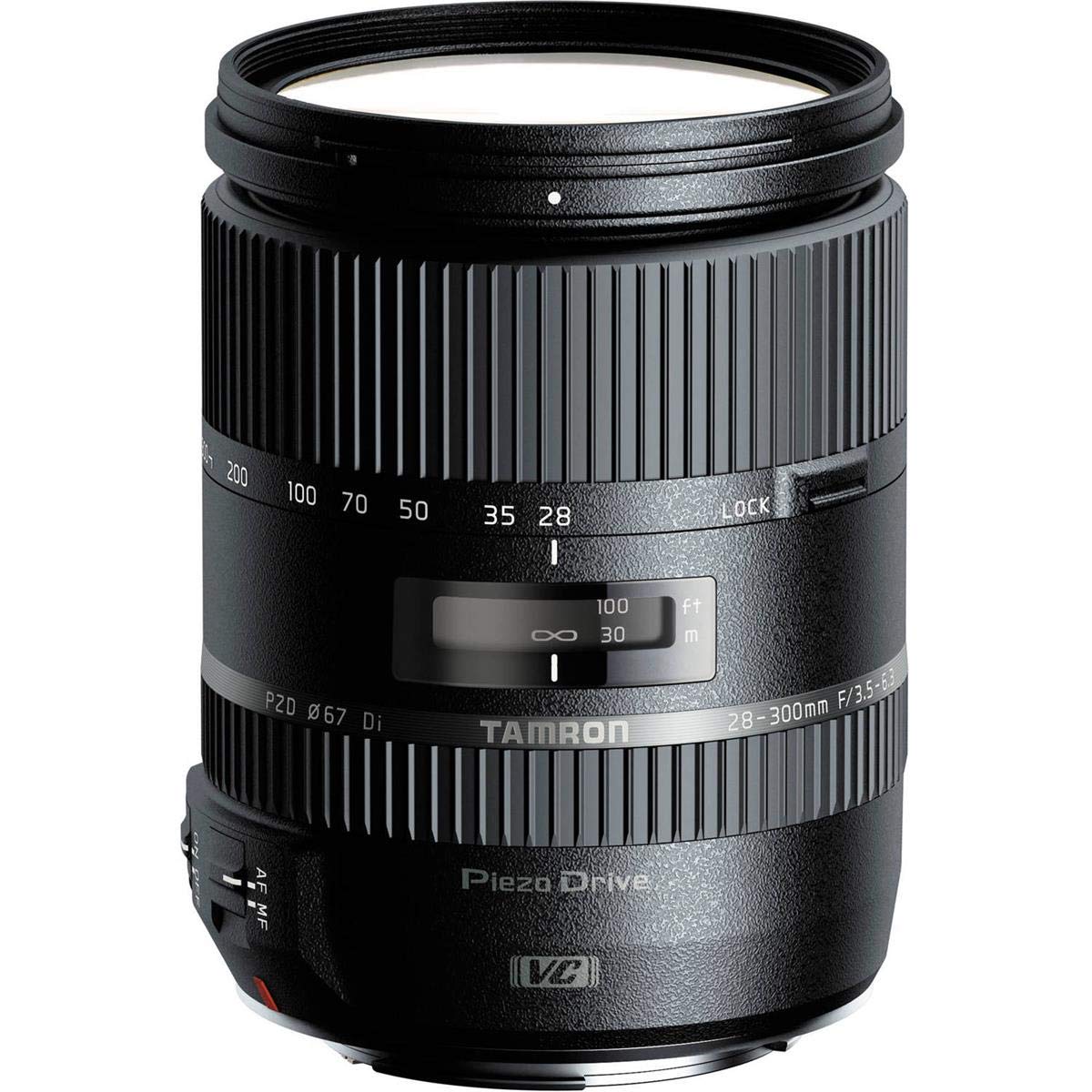
Figure 1.1: Overall view of the Tamron 28-300mm F/3.5-6.3 Di VC PZD Zoom Lens.
2. Product Features
- Focal Length: 28-300mm (equivalent to 42-450mm on APS-C format bodies).
- Maximum Aperture: F/3.5-6.3.
- Minimum Aperture: F/22-40.
- Optical Construction: 19 elements in 15 groups, including LD, Aspherical, XR, and UXR glass elements.
- Autofocus System: Piezo Drive (PZD) for fast and quiet operation.
- Image Stabilization: Vibration Compensation (VC) mechanism.
- Diaphragm: 7-blade circular diaphragm for smooth bokeh.
- Filter Diameter: Ø67mm.
- Design: Compact, lightweight, and moisture-resistant construction.
- Controls: AF/MF toggle switch, VC ON/OFF toggle switch, and a zoom lock switch.
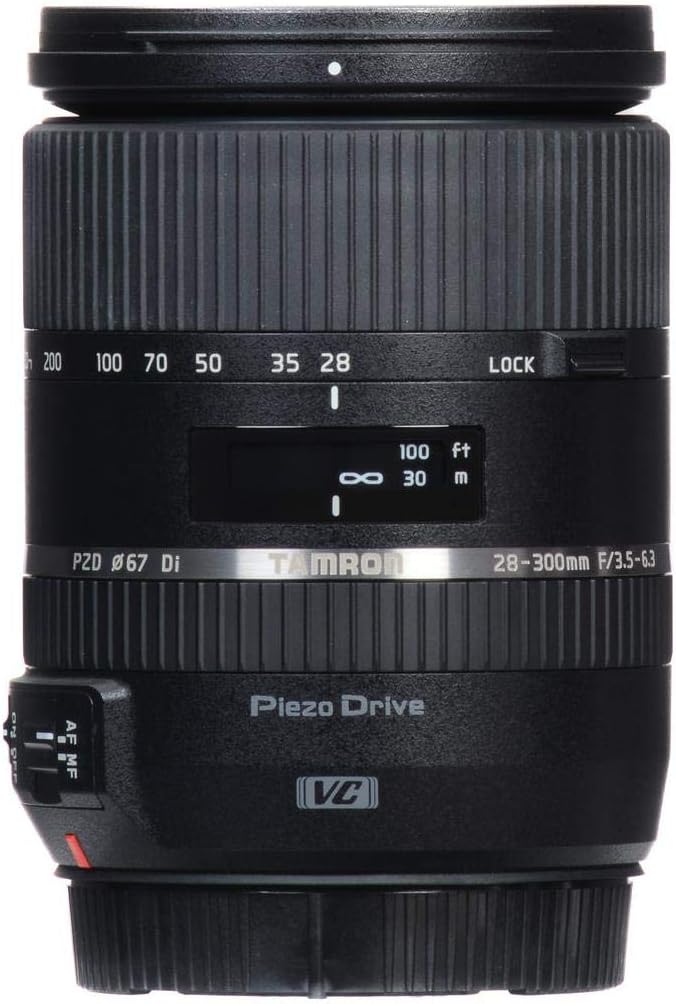
Figure 2.1: Front view of the lens, highlighting focal length markings and control switches.

Figure 2.2: Side view of the lens, showing the camera mount and control switches.

Figure 2.3: Front element of the lens.
3. Setup
3.1 Attaching the Lens to Your Camera
- Ensure your camera is powered off.
- Align the mounting index mark on the lens barrel with the corresponding mark on your Canon EF-mount camera body.
- Rotate the lens clockwise until it clicks into place, indicating it is securely locked.
- Avoid touching the lens contacts on both the lens and camera body to prevent damage or malfunction.
3.2 Attaching the Lens Hood
The lens comes with a flower-shaped lens hood. Align the hood's mounting index with the mark on the lens barrel and rotate until it locks. The hood helps to reduce flare and protect the front element.
3.3 Attaching Filters
This lens accepts Ø67mm filters. Carefully screw the filter onto the front of the lens. Do not overtighten.
4. Operating the Lens
4.1 Zooming
Rotate the zoom ring to adjust the focal length between 28mm and 300mm. The focal length markings are visible on the lens barrel.
4.2 Autofocus (AF) and Manual Focus (MF)
The lens features a Piezo Drive (PZD) AF system. To switch between autofocus and manual focus, use the AF/MF toggle switch located on the lens barrel. In AF mode, the camera will automatically focus. In MF mode, rotate the focus ring to adjust focus manually.
4.3 Vibration Compensation (VC)
The Vibration Compensation (VC) mechanism helps reduce camera shake, especially at longer focal lengths or slower shutter speeds. Use the VC ON/OFF toggle switch on the lens barrel to activate or deactivate this feature. It is recommended to turn VC OFF when using a tripod.
4.4 Zoom Lock Switch
A lock switch is provided on the lens barrel to prevent the lens from extending under its own weight (lens creep) when carried or stored. Engage this switch when the lens is at its minimum extension (28mm) to secure it.
Video 4.1: An overview of the Tamron 28-300mm lens, demonstrating its features and compact design. This video highlights the lens's full-frame compatibility, splash/dust-proof design, Piezo Drive AF system, 7-blade rounded aperture, 67mm filter thread, and compact form factor, along with the lens lock, AF/MF, and VC ON/OFF switches.
5. Maintenance
- Cleaning the Lens: Use a soft, clean microfiber cloth to gently wipe dust and smudges from the lens elements. For stubborn marks, use a specialized lens cleaning solution applied to the cloth, not directly to the lens.
- Cleaning the Lens Body: Wipe the lens barrel with a dry, soft cloth. Avoid using harsh chemicals or solvents.
- Storage: Store the lens in a cool, dry place away from direct sunlight and extreme temperatures. Use lens caps when not in use to protect the front and rear elements.
- Moisture Resistance: While the lens has a moisture-resistant construction, it is not waterproof. Avoid exposing it to heavy rain or submerging it in water. If it gets wet, wipe it dry immediately.
6. Troubleshooting
- Lens Not Focusing: Ensure the AF/MF switch is set to AF. Check if the lens is securely mounted to the camera. In very low light or at 300mm, autofocus might struggle; try manual focus or use a brighter light source.
- "Err-01" or Similar Camera Error: This can sometimes occur with certain camera bodies (e.g., Canon 5D Mark IV) and may indicate a communication issue or require a firmware update for the lens. Contact Tamron support for assistance.
- Lens Creep: If the lens extends on its own, engage the zoom lock switch when the lens is at 28mm.
- Blurry Images: Ensure Vibration Compensation (VC) is ON if shooting handheld in low light. Check shutter speed and aperture settings. Clean lens elements if smudged.
- Noisy Autofocus: The Piezo Drive (PZD) system is designed to be quiet, but some minimal operational sound is normal. If the noise is excessive or unusual, contact support.
7. Specifications
| Feature | Specification |
|---|---|
| Brand | Tamron |
| Model Name | A010E |
| Focal Length | 28-300 millimeters |
| Maximum Aperture | F/3.5-6.3 |
| Minimum Aperture | F/22-40 |
| Lens Type | Telephoto Zoom |
| Compatible Mountings | Canon EF |
| Lens Construction | 19 elements in 15 groups |
| Minimum Focus Distance | 19.3 inches (0.49m) at 300mm |
| Max. Magnification Ratio | 1:3.5 (at 300mm) |
| Filter Diameter | Ø67mm |
| Diaphragm Blades | 7 (circular diaphragm) |
| Image Stabilization | Optical (VC) |
| Focus Type | Ultrasonic (PZD) |
| Overall Length | 3.8 inches (96.5mm) |
| Maximum Diameter | Ø74.4mm |
| Weight | 19 Ounces (539g) |
| Water Resistance Level | Water Resistant |
| Standard Accessory | Flower-shaped Lens Hood |
8. Warranty and Support
This Tamron lens typically comes with a 6-year warranty. For specific warranty terms, registration, and service inquiries, please refer to the warranty card included with your product or visit the official Tamron website. For technical support or repair services, contact Tamron customer service directly. Ensure you have your proof of purchase and product serial number available when contacting support.