
Panasonic DMC-FZ1000
Panasonic Lumix DMC-FZ1000 Digital Camera User Manual
Model: DMC-FZ1000
1. Introduction
The Panasonic Lumix DMC-FZ1000 is a high-performance bridge digital camera designed for both advanced photography and 4K video recording. It features a large 20.1 MP 1-inch high-sensitivity MOS sensor and a Venus Engine image processor, enabling stunning image quality and high-speed performance. The camera is equipped with a versatile 16x Leica DC Vario-Elmarit zoom lens, providing a 35mm equivalent focal range of 25-400mm with an aperture of f/2.8-4.0. Its advanced HYBRID O.I.S.+ (Optical Image Stabilizer) minimizes camera shake across five axes, ensuring sharp images and stable video even in challenging conditions. The DMC-FZ1000 offers both a high-resolution electronic viewfinder and a free-angle LCD monitor for flexible shooting perspectives.
2. Getting Started
2.1. Inserting the Battery
The camera uses a Lithium Ion battery. Ensure the battery is fully charged before first use. To insert the battery:
- Open the battery compartment cover located at the bottom of the camera.
- Insert the battery with the contacts facing the correct direction, as indicated by the diagram inside the compartment.
- Close the battery compartment cover securely until it clicks into place.
2.2. Inserting a Memory Card
The camera supports SD, SDHC, and SDXC memory cards. For 4K video recording, a UHS Speed Class 3 (U3) or higher card is recommended.
- Open the memory card slot cover, usually located near the battery compartment.
- Insert the memory card into the slot with the label facing the front of the camera until it clicks.
- Close the memory card slot cover securely.
2.3. Attaching the Lens Cap
The camera comes with a lens cap to protect the lens when not in use.
- Align the lens cap with the front of the lens.
- Gently push the lens cap onto the lens until it is securely in place.

Figure 2.3.1: Front view of the Panasonic Lumix DMC-FZ1000 with the lens cap attached.
2.4. Initial Power On and Basic Settings
After inserting the battery and memory card, turn on the camera using the power switch. The first time you power on, you may be prompted to set the date, time, and language. Follow the on-screen instructions.
3. Camera Controls and Functions
3.1. Top View Controls
The top of the camera features essential controls for shooting modes and basic operations.

Figure 3.1.1: Top view of the Panasonic Lumix DMC-FZ1000.
- Mode Dial: Selects shooting modes (e.g., Program AE, Aperture Priority, Shutter Priority, Manual, Scene, Creative Control, Movie).
- Shutter Button: Press halfway to focus, press fully to take a picture.
- Zoom Lever: Surrounds the shutter button, used to control the optical zoom.
- Power Switch: Turns the camera on or off.
- Hot Shoe: For attaching external flash units or other accessories.
3.2. Rear View Controls
The rear of the camera provides access to the LCD monitor and various function buttons.
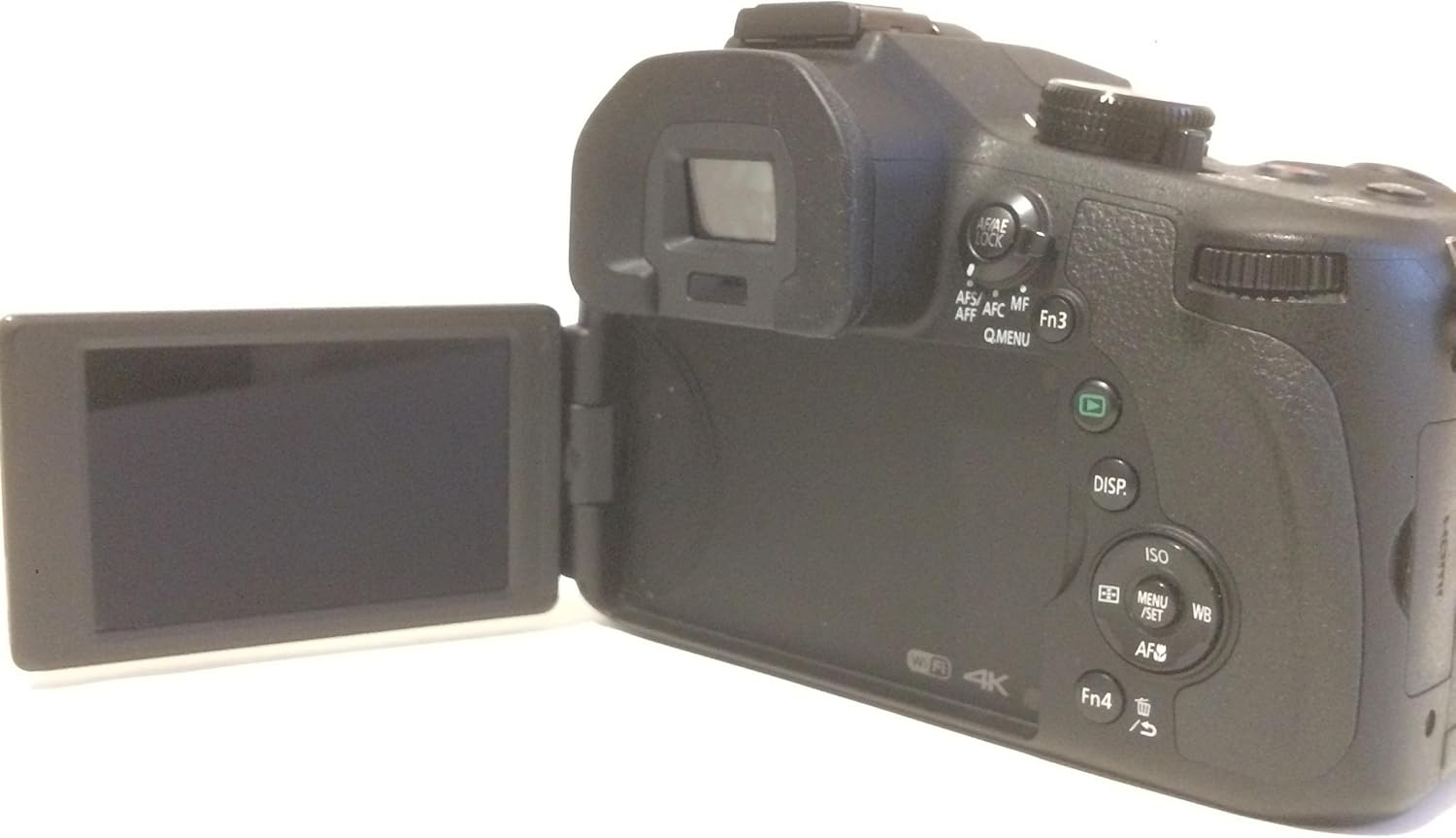
Figure 3.2.1: Rear view of the Panasonic Lumix DMC-FZ1000 with the articulated LCD screen.
- LCD Monitor: A 3.0-inch, 921k-dot free-angle LCD for composing shots, reviewing images, and navigating menus. It can be articulated for various shooting angles.
- Electronic Viewfinder (EVF): A 0.39-inch, 2,359k-dot OLED live viewfinder for precise composition, especially in bright conditions.
- DISP. Button: Changes the information displayed on the LCD/EVF.
- ISO Button: Adjusts the ISO sensitivity.
- WB Button: Adjusts the White Balance settings.
- AF/AE LOCK Button: Locks autofocus and autoexposure.
- Q.MENU Button: Accesses the Quick Menu for frequently used settings.
3.3. Lens Controls
The lens features switches for focus and zoom control.
- Zoom Switch: Allows for smooth, precise zoom adjustments.
- Focus Switch: Toggles between Autofocus (AF) and Manual Focus (MF).
3.4. Shooting Modes
The DMC-FZ1000 offers various shooting modes to suit different photographic needs:
- Intelligent Auto (iA): Camera automatically selects optimal settings.
- Program AE (P): Camera sets aperture and shutter speed, user controls other settings.
- Aperture Priority AE (A): User sets aperture, camera sets shutter speed.
- Shutter Priority AE (S): User sets shutter speed, camera sets aperture.
- Manual Exposure (M): User controls both aperture and shutter speed.
- Scene Modes: Pre-set modes for specific scenes (e.g., Portrait, Landscape, Sports).
- Creative Control: Applies various artistic filters to images.
3.5. Focusing
The camera utilizes Contrast Detection Auto Focus (AF) technology. It supports Automatic AF (AF-A) and Manual Focus (MF).
- Autofocus: The camera automatically focuses on the subject.
- Manual Focus: Allows the user to manually adjust the focus using the lens ring.
3.6. Image Stabilization
The DMC-FZ1000 features Optical Image Stabilization (O.I.S.) to reduce blur caused by camera shake, particularly useful when shooting handheld or in low light.
3.7. Video Recording
The camera can record 4K UHD (2160p) videos in MP4 format. To start recording, press the dedicated movie record button.
3.8. Connectivity
The camera supports Wi-Fi for wireless image transfer and remote control. It also has USB and HDMI ports for wired connections to computers or external displays.
4. Care and Maintenance
Proper care ensures the longevity and optimal performance of your camera.
- Cleaning the Camera Body: Use a soft, dry cloth to wipe the camera body. For stubborn dirt, slightly dampen the cloth with water. Avoid using organic solvents.
- Cleaning the Lens: Use a lens brush or a blower to remove dust. For smudges, use a specialized lens cleaning solution and a microfiber cloth. Never touch the lens surface with your fingers.
- Battery Care: Store batteries in a cool, dry place. Avoid extreme temperatures. Do not fully discharge batteries for extended periods.
- Storage: When not in use for extended periods, store the camera in a dry, well-ventilated area, preferably with a desiccant to prevent mold and mildew. Remove the battery before storage.
5. Troubleshooting
This section addresses common issues you might encounter with your Panasonic Lumix DMC-FZ1000.
| Problem | Possible Cause | Solution |
|---|---|---|
| Camera does not turn on. | Battery is depleted or incorrectly inserted. | Charge the battery fully and ensure it is inserted correctly. |
| Images are blurry. | Camera shake, incorrect focus, or low light. | Hold the camera steady, use O.I.S., ensure proper focus, or increase ISO/use flash in low light. |
| Memory card error. | Card is full, corrupted, or incompatible. | Delete unnecessary files, format the card (this will erase all data), or try a different compatible card. |
| Cannot record 4K video. | Memory card speed is insufficient. | Use a memory card with UHS Speed Class 3 (U3) or higher. |
6. Specifications
Key technical specifications for the Panasonic Lumix DMC-FZ1000.
| Feature | Specification |
|---|---|
| Model Name | Lumix DMC-FZ1000 |
| Photo Sensor Resolution | 20.1 MP |
| Photo Sensor Size | 1-inch |
| Optical Zoom | 16x |
| Maximum Focal Length | 400 Millimeters (35mm equivalent) |
| Minimum Focal Length | 25 Millimeters (35mm equivalent) |
| Maximum Aperture | f/2.8 |
| Video Resolution | 4K UHD 2160p |
| Image Stabilization | Optical |
| Screen Size | 3 Inches |
| Display Type | LCD (Articulating) |
| Viewfinder | Electronic |
| Connectivity | Wi-Fi, USB, HDMI |
| Item Weight | 780 Grams |
7. Warranty and Support
For information regarding product warranty, service, and technical support, please refer to the official Panasonic website or contact Panasonic customer service directly. Keep your proof of purchase for warranty claims.
Related Documents - DMC-FZ1000
 |
Panasonic DMC-G2 Series Service Manual Official Panasonic service manual for the DMC-G2 series digital cameras and lens kits. This guide provides in-depth technical details, repair procedures, safety information, schematics, and troubleshooting steps for models including DMC-G2KPP, DMC-G2KEB, and more. Essential for service technicians. |
 |
Panasonic Digital Camera Service Manual: DMC-TZ27, TZ30, TZ31, ZS19, ZS20 Series Comprehensive service manual for Panasonic Lumix digital cameras, including models DMC-TZ27EB, TZ27EC, TZ30EB, TZ30EE, TZ30EF, TZ30EG, TZ30EP, TZ30GA, TZ30GC, TZ30GN, TZ30SG, TZ31EG, ZS19P, ZS20P, ZS20PC, ZS20PU, ZS20GH, ZS20GK, ZS20GT. This guide provides detailed technical information, troubleshooting, disassembly, and maintenance procedures for experienced repair technicians. |
 |
Panasonic LUMIX DMC-GX8 Series Service Manual This comprehensive service manual provides detailed technical information for the Panasonic LUMIX DMC-GX8 series digital cameras and their interchangeable lens kits. Designed for experienced repair technicians, it offers essential guidance for servicing and maintaining these advanced photographic devices. |
 |
Panasonic DMC-FZ1000 Digital Camera: Advanced Features Owner's Manual Explore the advanced features of your Panasonic Lumix DMC-FZ1000 digital camera with this comprehensive owner's manual. Learn about setup, shooting modes, image settings, focus and exposure control, Wi-Fi connectivity, and more to maximize your photography experience. |
 |
Panasonic LUMIX Digital Camera DMC-FT4/TS4 Service Manual This comprehensive service manual provides detailed technical information, repair procedures, and troubleshooting guides for Panasonic LUMIX digital cameras, models DMC-FT4 and DMC-TS4 series. Essential for experienced repair technicians. |
 |
Panasonic Lumix Digital Camera Service Manual DMC-TZ/ZS Series Comprehensive service manual for Panasonic Lumix DMC-TZ37, TZ40, TZ41, ZS27, and ZS30 series digital cameras. This guide provides detailed technical information for experienced repair technicians, covering safety precautions, troubleshooting, disassembly, assembly procedures, measurements, adjustments, and block diagrams to facilitate effective maintenance and repair. |
Ask a question about this manual
Ask about setup, troubleshooting, compatibility, parts, safety, or missing instructions. Manuals+ will review the question and use this page’s manual context to help answer it.