
Belden 1526A
Belden 1526A Instrumentation Cable User Manual
Model: 1526A | Brand: Belden
1. Introduction
This manual provides essential information for the safe and effective handling, installation, and maintenance of the Belden 1526A Instrumentation Tray Cable. Please read this manual thoroughly before using the product.
2. Product Overview
The Belden 1526A is a 20 AWG, 1-pair (1T) overall shielded instrumentation tray cable designed for industrial applications. It features PVC/PVC insulation and jacket, suitable for temperatures ranging from -30°C to 105°C and rated for 300V.
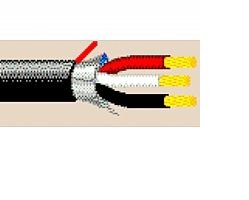
Figure 1: Cross-section diagram of Belden 1526A cable. This image illustrates the internal structure of the cable, showing the individual insulated conductors (red, white, black), the overall foil shield, and the outer black PVC jacket. A drain wire is also visible.
Key Features:
- Conductor Size: 20 AWG
- Pairs: 1 Twisted Pair (1T)
- Shielding: Overall Beldfoil® (Aluminum/Polyester Tape) with 22 AWG Tinned Copper Drain Wire
- Insulation: PVC
- Jacket: PVC, Black
- Temperature Rating: -30°C to 105°C
- Voltage Rating: 300V
- Compliance: UL PLTC/ITC (Power-Limited Tray Cable / Instrumentation Tray Cable)
3. Safety Information
Always adhere to local electrical codes and safety regulations during installation. Improper handling or installation can lead to electrical shock, fire, or damage to equipment.
- Ensure power is disconnected before working with cables.
- Wear appropriate personal protective equipment (PPE), including safety glasses and gloves.
- Do not exceed the cable's specified voltage and temperature ratings.
- Avoid sharp bends or kinks that can damage the cable's internal structure.
- Consult a qualified electrician for complex installations.
4. Setup and Installation
Proper installation is crucial for optimal performance and longevity of the cable.
4.1. Preparation
- Inspect the cable for any visible damage before installation.
- Ensure the installation environment is within the cable's specified temperature range.
- Gather necessary tools: wire strippers, cutters, crimpers (if using terminals), and measuring tape.
4.2. Cable Routing
- Route the cable in accordance with local electrical codes and industry best practices.
- Avoid routing near sources of excessive heat, sharp edges, or areas prone to physical damage.
- Maintain appropriate bend radius to prevent conductor damage and maintain signal integrity.
4.3. Termination
- Carefully strip the outer jacket to expose the shielded pair and drain wire.
- Peel back the overall shield and twist the drain wire. Ensure proper grounding of the shield at one end to prevent ground loops.
- Strip the insulation from the individual conductors (red, white, black) to the required length for termination.
- Connect conductors to appropriate terminals or devices, ensuring secure and proper polarity.
5. Operating Considerations
Once installed, the Belden 1526A cable functions as a passive component for signal transmission. Ensure that the connected equipment operates within the cable's specified electrical parameters (voltage, current, frequency) to prevent damage or signal degradation.
- Do not apply voltages exceeding 300V.
- Ensure proper grounding of the shield to minimize electromagnetic interference (EMI).
- Verify continuity and insulation resistance after installation to confirm proper connection and integrity.
6. Maintenance
The Belden 1526A cable requires minimal maintenance. Regular inspections can help identify potential issues before they become critical.
- Visual Inspection: Periodically check the cable jacket for signs of physical damage, cracks, abrasions, or discoloration.
- Connection Integrity: Ensure all terminations remain secure and free from corrosion.
- Environmental Check: Verify that the cable is not exposed to conditions outside its specified temperature or chemical resistance limits.
- Cleaning: If necessary, clean the outer jacket with a damp cloth. Avoid harsh chemicals that could degrade the PVC material.
7. Troubleshooting
Most issues related to cable performance stem from improper installation or external factors.
| Symptom | Possible Cause | Solution |
|---|---|---|
| Signal Loss/Interference | Improper shield grounding, damaged shield, excessive cable length, external EMI. | Verify shield grounding. Inspect cable for damage. Shorten cable run if possible. Identify and mitigate EMI sources. |
| Intermittent Connection | Loose or corroded terminations, physical stress on cable. | Re-terminate connections securely. Relieve physical stress on cable. |
| Cable Overheating | Overcurrent, ambient temperature exceeding rating, inadequate ventilation. | Ensure current draw is within cable limits. Improve ventilation. Reroute cable away from heat sources. |
8. Specifications
Detailed technical specifications for the Belden 1526A cable.
| Attribute | Value |
|---|---|
| Model Number | 1526A |
| Brand | Belden |
| Conductor Gauge | 20 AWG |
| Number of Conductors/Pairs | 1 Twisted Pair (1T) |
| Shielding Type | Overall Beldfoil® (Aluminum/Polyester Tape) with 22 AWG Tinned Copper Drain Wire |
| Insulation Material | PVC |
| Jacket Material | PVC |
| Jacket Color | Black |
| Temperature Rating | -30°C to 105°C |
| Voltage Rating | 300 Volts |
| UL Listing | PLTC/ITC |
| Length (as per product listing) | 200 FT |
9. Storage and Disposal
9.1. Storage
Store the cable in a cool, dry place, away from direct sunlight, extreme temperatures, and corrosive chemicals. Keep it protected from physical damage and excessive bending.
9.2. Disposal
Dispose of the cable in accordance with local environmental regulations. PVC materials may require specific recycling or disposal procedures.
10. Warranty and Support
For information regarding product warranty, technical support, or further inquiries, please contact Belden customer service or visit the official Belden website. Refer to your purchase documentation for specific warranty terms.
Belden Official Website: www.belden.com
Ask a question about this manual
Ask about setup, troubleshooting, compatibility, parts, safety, or missing instructions. Manuals+ will review the question and use this page’s manual context to help answer it.