
Introduction
This manual provides essential information for the installation, operation, and maintenance of your PowerStop Z36 Truck & Tow Carbon-Fiber Ceramic Front Brake Pads. These brake pads are engineered for demanding applications such as heavy towing, hauling, mountainous driving, and vehicles with modified suspensions or larger wheel/tire combinations. Proper installation and break-in are crucial for optimal performance and safety.
What's in the Box
Your PowerStop Z36 Truck & Tow brake pad kit includes the following components:
- 2 Carbon-Fiber Ceramic Brake Pads
- Installation Hardware (stainless-steel clips)
- Brake Component Lubricant
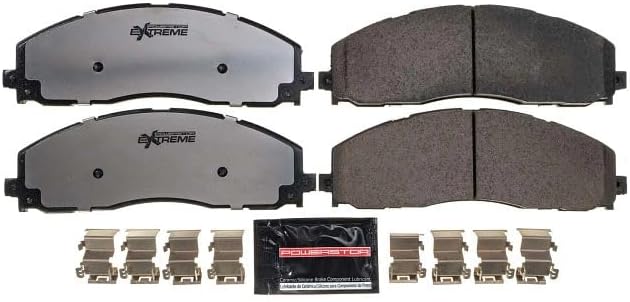
Image: Contents of the PowerStop Z36 brake pad kit, showing two brake pads, a packet of lubricant, and various stainless-steel installation clips.
Key Features
- Complete Front Brake Pad Upgrade: Engineered as a direct-fit upgrade for truck and SUV braking systems, simplifying brake pad replacement.
- Upgraded Stopping Power: Carbon-fiber ceramic Z36 brake pads deliver increased stopping power compared to original equipment (OE) replacement brake pads, while remaining ultra-quiet and providing long-lasting braking performance.
- Heavy Duty Braking: Built for trucks, SUVs, and 4x4 vehicles, providing durable, reliable stopping power to handle the added stress of towing, hauling, mountainous driving, and lifted trucks, while reducing brake fade.
- Low-Dust Formula: Z36 Carbon-Fiber Ceramic low-dust formula helps keep wheels cleaner.
- Premium Hardware: High-quality stainless-steel installation hardware is included for a hassle-free installation.

Image: Close-up view of the carbon-fiber ceramic brake pads, highlighting their material composition for enhanced stopping power.

Image: Stainless steel shims designed to reduce noise and vibration for quiet braking performance.
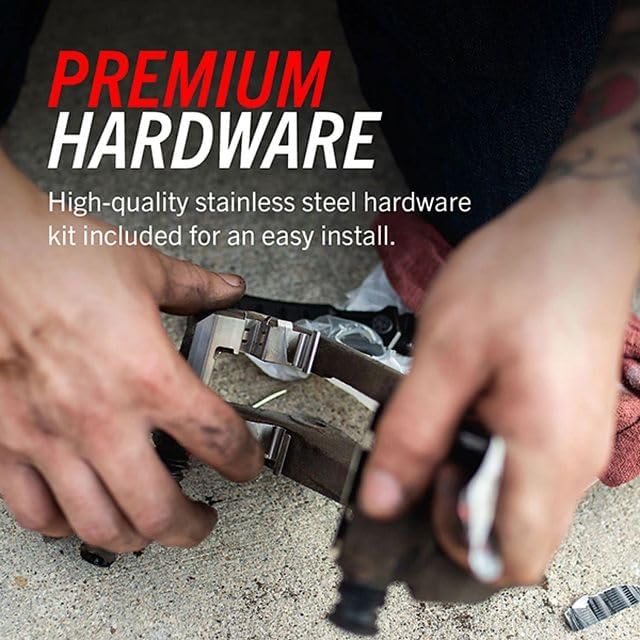
Image: Hands installing premium stainless-steel hardware, ensuring proper fitment and ease of installation.

Image: A white truck driving, representing the benefit of dust-free braking to maintain wheel cleanliness.

Image: A black truck towing a boat, demonstrating the recommended uses for these heavy-duty brake pads in towing and hauling scenarios.
Installation & Setup
The PowerStop Z36 brake pads are designed for a true bolt-on performance upgrade, requiring no modifications. Ensure you confirm your vehicle fitment before beginning installation.
General Installation Steps:
- Safely lift and support the vehicle. Remove the wheels.
- Remove the old brake pads and inspect the brake system components.
- Clean the caliper and caliper bracket thoroughly.
- Install the new stainless-steel hardware clips provided in the kit.
- Apply a thin layer of the supplied lubricant to all moving or sliding components, including caliper bushings, slide pins, and the edges of the pad mounting tabs. Avoid applying lubricant to the friction side of the pad.
- Compress the caliper pistons. Ensure the brake fluid reservoir cap is removed to allow fluid to return.
- Install the new PowerStop Z36 Carbon-Fiber Ceramic Brake Pads.
- Reassemble the caliper and caliper bracket, ensuring all bolts are tightened to manufacturer specifications.
- Reinstall the wheels and lower the vehicle.
Helpful Installation Videos:
Video: This video provides a visual guide on the installation process for PowerStop Z36 Truck & Tow Carbon-Fiber Ceramic Front Brake Pads, including hardware replacement.
Video: This video demonstrates the correct contact points for applying brake lubricant during installation to ensure noise-free braking and proper system operation.
Video: A brief overview of the Z36 Carbon-Fiber Ceramic Brake Pads, highlighting their features and benefits for heavy-duty applications.
Operating Instructions: Break-in Procedure
Proper break-in is critical for optimal brake performance and longevity. Follow these steps carefully:
- Perform five (5) moderate to aggressive stops from 40 MPH down to 10 MPH in rapid succession. Do not allow the brakes to cool between stops. Avoid coming to a complete stop during this phase. If a complete stop is unavoidable, shift into neutral or allow the vehicle to roll slightly to prevent imprinting the pad material onto the rotor.
- Immediately after the first five stops, perform five (5) moderate stops from 35 MPH down to 5 MPH in rapid succession, again without letting the brakes cool.
- You may notice a burning smell and smoke; this is normal as the brake pads get hot.
- After completing the stops, drive the vehicle for as long as possible (at least 5 minutes) at moderate speed without excessive braking or coming to a complete stop. This cooling stage allows the heated brake pads to cool and cure.
- Once the brakes have cooled to standard operating temperature, you may use them normally. Never cool your brakes with water.
Video: This video details the critical break-in procedure for PowerStop brake kits with drilled and slotted rotors, ensuring optimal performance and longevity.
Maintenance
Regular maintenance of your brake system is essential for safety and performance. Always inspect your brake pads and hardware during routine vehicle checks.
Hardware Replacement:
It is important to replace brake pad hardware every time you change your pads. The constant heating and cooling cycles of normal driving can weaken the hardware over time. Compromised hardware can lead to binding, pulling, warping, uneven wear, and noise. PowerStop provides a new set of high-quality stainless-steel hardware with every brake pad kit to ensure proper function and prevent these issues.
Video: This video explains the importance of replacing brake pad hardware with every pad change to prevent issues caused by compromised components.
Troubleshooting
If you experience issues such as binding, pulling, warping, uneven wear, or noise after brake pad installation, it may be due to compromised or improperly installed hardware. Always ensure new hardware is used and correctly installed according to the instructions.
Specifications
| Attribute | Value |
|---|---|
| Brand | PowerStop |
| Model Number | Z36-1680 |
| Material | Carbon Fiber |
| Auto Part Position | Front |
| Vehicle Service Type | Truck |
| Specification Met | OEM |
| Item Type Name | Brake Pad Set |
| Item Weight | 3 Pounds |
| Unit Count | 1.0 Count |
Warranty and Support
Manufacturer Warranty: This product is backed by a 90 Day / 3,000 Mile Warranty.
For additional support, product information, or to explore other PowerStop products, please visit the PowerStop Store.


