
HP J9852A
HPE Networking X450 4U/7U Universal 4-Post Rack Mount Kit
Model: J9852A
Introduction
This instruction manual provides comprehensive guidance for the installation, operation, and maintenance of the HPE Networking X450 4U/7U Universal 4-Post Rack Mount Kit (Model J9852A). This kit is designed to facilitate the secure and efficient mounting of compatible HPE networking equipment within standard 4-post server racks, ensuring high availability and optimal performance.
Please read this manual thoroughly before beginning installation to ensure proper setup and to prevent damage to the equipment or injury to personnel.
Safety Information
Always observe the following safety precautions:
- Ensure the rack is stable and properly secured before mounting any equipment.
- Always use appropriate lifting techniques when handling heavy equipment. It is recommended to use two or more people for heavy items.
- Wear appropriate personal protective equipment (PPE) if necessary.
- Do not exceed the weight capacity of the rack or the rack mount kit. Refer to the specifications section for details.
- Keep all tools and small parts away from children.
- Ensure proper ventilation in the rack to prevent overheating of mounted devices.
Package Contents
Verify that all components listed below are present and undamaged before proceeding with installation. If any items are missing or damaged, contact your vendor or HPE support.
- 2 x Rack Rails (Left and Right)
- 4 x Mounting Brackets (Front and Rear)
- Assorted Screws and Fasteners for installation
- This Instruction Manual
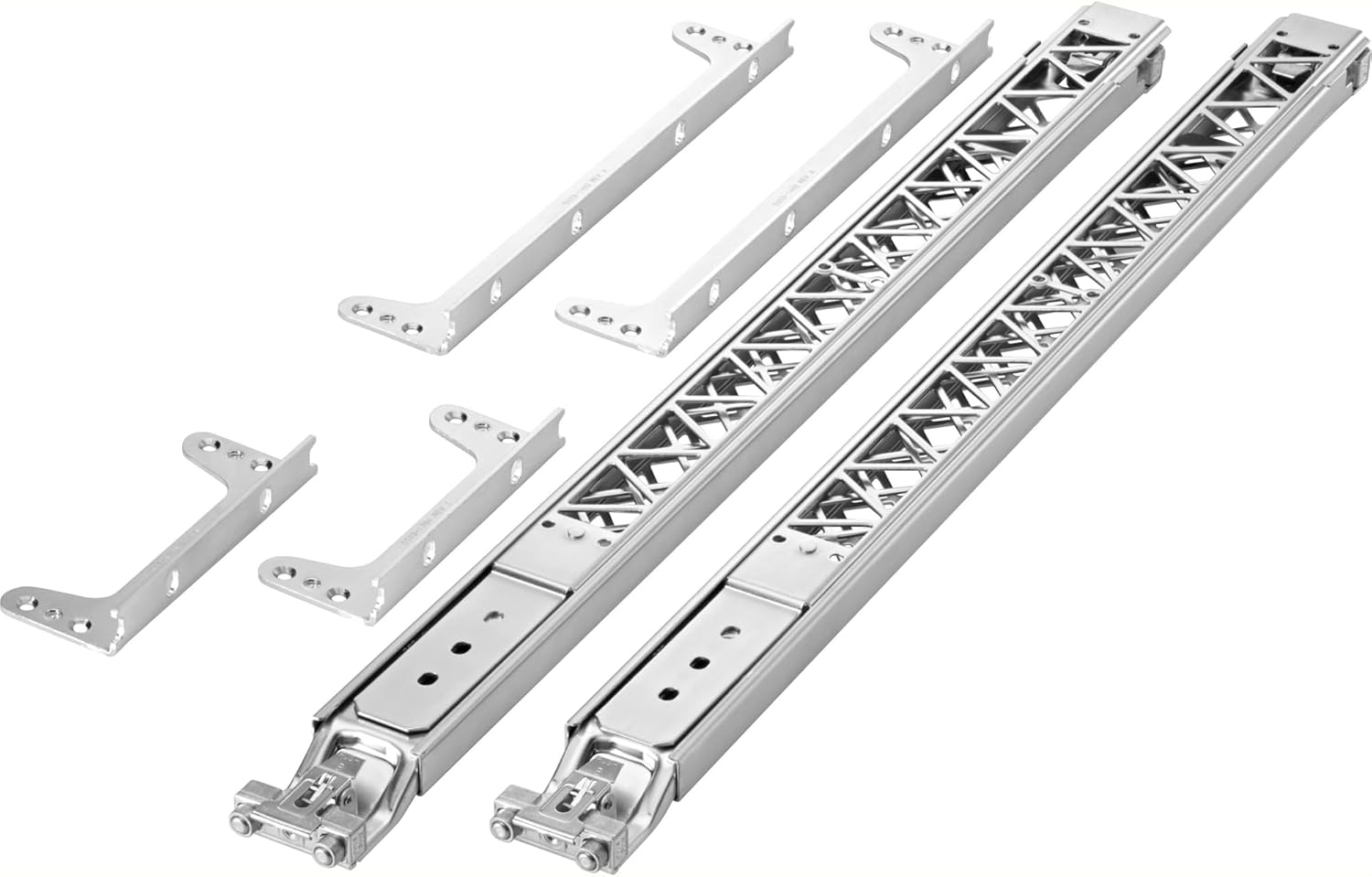
Image: All components of the HPE X450 4U/7U Universal 4-Post Rack Mount Kit, including two rack rails and four mounting brackets, laid out on a white background.
Setup and Installation
Follow these steps to properly install the rack mount kit and your HPE networking device into a 4-post rack.
- Prepare the Rack: Ensure your 4-post rack is stable, level, and has adequate space for the networking device. Identify the desired rack units (U) for installation. The kit supports 4U/7U configurations.
- Attach Front Mounting Brackets: Secure the two front mounting brackets to the front vertical rails of your rack using the provided screws. Ensure they are aligned horizontally and at the correct rack unit height.
- Attach Rear Mounting Brackets: Secure the two rear mounting brackets to the rear vertical rails of your rack. These should align with the front brackets. Adjust the depth of the rear brackets to match the depth of your rack and the rack rails.
- Install Rack Rails: Slide one rack rail into the front and rear mounting brackets on one side of the rack. Repeat for the other side. Ensure the rails are securely seated and can extend and retract smoothly.
- Mount the Device: Carefully slide your HPE networking device onto the installed rack rails. Ensure the device's mounting points align with the rail's attachment points. Secure the device to the rails using the appropriate screws.
- Secure Device to Rack: Once the device is on the rails, push it fully into the rack. Secure the front of the device to the rack's vertical rails using additional screws if your device supports front panel mounting.

Image: An illustration showing the HPE X450 4U/7U Universal 4-Post Rack Mount Kit components alongside a server chassis, demonstrating how the rails and brackets integrate with a rack-mountable device.
Operating
The HPE X450 4U/7U Universal 4-Post Rack Mount Kit is a passive component designed to securely house compatible HPE networking equipment within a standard server rack. Once installed, its primary function is to provide stable support and allow for easy access to the mounted device for maintenance or connectivity. There are no active operational controls for the rack mount kit itself.
- Accessing Mounted Device: To access the mounted device, gently pull the device forward along the rack rails until it locks into its extended position.
- Retracting Mounted Device: To retract the device back into the rack, disengage any locking mechanisms on the rails (if present on your specific device or rack) and gently push the device back until it is fully seated within the rack.
Maintenance
The HPE X450 4U/7U Universal 4-Post Rack Mount Kit requires minimal maintenance to ensure continued reliable operation.
- Regular Inspection: Periodically inspect all mounting screws and fasteners to ensure they remain tight. Loose connections can lead to instability.
- Cleaning: If dust or debris accumulates on the rails, wipe them clean with a dry, lint-free cloth. Avoid using abrasive cleaners or solvents.
- Lubrication: The sliding mechanisms of the rails are typically pre-lubricated. If movement becomes stiff over time, a small amount of silicone-based lubricant can be applied to the sliding surfaces. Do not use oil-based lubricants as they can attract dust.
Troubleshooting
This section addresses common issues you might encounter during the installation or use of the rack mount kit.
| Problem | Possible Cause | Solution |
|---|---|---|
| Rails do not slide smoothly. | Misalignment, dust/debris, lack of lubrication. | Check alignment of front and rear brackets. Clean rails. Apply silicone lubricant if necessary. |
| Device does not fit onto rails. | Incorrect device type, rails installed upside down, or incorrect rail extension. | Verify device compatibility. Ensure rails are installed correctly (check markings). Adjust rail extension to match device depth. |
| Kit feels unstable after installation. | Loose screws, incorrect bracket attachment. | Tighten all screws on brackets and rails. Re-check that brackets are securely fastened to the rack posts. |
Specifications
| Feature | Detail |
|---|---|
| Model Number | J9852A |
| Compatibility | HPE X450 series networking devices, 4U/7U form factor |
| Rack Type | 4-Post Server Racks |
| Material | Metal |
| Item Weight | 5.71 pounds (approx. 2.59 kg) |
| Product Dimensions (LxWxH) | 28.2 x 4.7 x 2.8 inches (approx. 71.6 x 11.9 x 7.1 cm) |
| Assembly Required | No (referring to the kit itself, but installation is required) |
| Manufacturer | HPE |
Warranty and Support
This HPE product is covered by a standard manufacturer's warranty. For specific warranty terms and conditions, please refer to the documentation included with your original HPE networking device or visit the official HPE support website.
For technical support, troubleshooting assistance, or to inquire about replacement parts, please contact HPE Customer Support through their official channels. Have your product model number (J9852A) and serial number of the mounted device ready when contacting support.
HPE Support Website: www.hpe.com/us/en/support.html
Ask a question about this manual
Ask about setup, troubleshooting, compatibility, parts, safety, or missing instructions. Manuals+ will review the question and use this page’s manual context to help answer it.