1. Product Overview
The Panasonic LUMIX DMC-FZ1000 is a high-performance point-and-shoot camera designed for both advanced photography and 4K video recording. It features a large 1-inch 20.1-megapixel MOS sensor and a LEICA DC VARIO-ELMARIT lens with 16x optical zoom (25-400mm equivalent) and a bright F2.8-4.0 aperture.
Key features include:
- Large 1-inch 20.1MP MOS Sensor: Provides improved low-light performance and the ability to achieve shallow depth of field.
- 4K Video & 4K Photo: Records 4K 30P video and allows extraction of 8MP still images from video footage.
- LEICA DC Lens: A high-quality 25-400mm (16x) F2.8-4.0 lens, capable of macro photography down to 3 centimeters.
- Hybrid O.I.S. (Optical Image Stabilizer) + with 5-axis correction: Ensures stable photos and videos, especially during handheld shooting.
- Integrated Wi-Fi: Enables remote control and image transfer via the Panasonic Image App on a smartphone or tablet.

Figure 1.1: Front view of the Panasonic LUMIX FZ1000 camera with its lens and the pop-up flash extended.
2. Initial Setup
2.1. Unpacking and Contents
Carefully unpack all items from the box. Ensure all components are present:
- Panasonic Lumix DMC-FZ1000 Digital Camera
- DMW-BLC12 Rechargeable Lithium-Ion Battery (7.2V, 1200mAh)
- DE-A79B Battery Charger for DMW-BLC12
- Lens Hood
- Lens Cap
- USB Connection Cable
- Hot Shoe Cover
- Shoulder Strap
- Software DVD
2.2. Charging and Installing the Battery
Before first use, fully charge the supplied lithium-ion battery.
- Insert the battery into the DE-A79B charger.
- Connect the charger to a power outlet. The charging indicator light will illuminate.
- Once charging is complete, the indicator light will change or turn off (refer to charger instructions for specific behavior).
- Open the battery compartment cover on the bottom of the camera.
- Insert the charged battery into the compartment, ensuring it clicks into place. Close the cover securely.
2.3. Inserting a Memory Card
The camera requires an SD, SDHC, or SDXC memory card (sold separately) for storing photos and videos.
- Locate the memory card slot, typically near the battery compartment.
- Insert the memory card with the label facing the correct direction (usually towards the front of the camera) until it clicks into place.
- To remove, push the card in once to release it, then pull it out.
2.4. Attaching the Shoulder Strap and Lens Cap/Hood
Attach the shoulder strap to the camera's strap lugs for secure carrying. Affix the lens cap to protect the lens when not in use. For shooting, attach the lens hood to reduce flare and protect the lens.
3. Basic Operation
3.1. Powering On/Off
To power on the camera, rotate the power switch located near the mode dial to the "ON" position. To power off, rotate it to "OFF".

Figure 3.1: The mode dial and power switch on the top of the camera.
3.2. Using the Viewfinder and LCD Monitor
The FZ1000 features both an electronic viewfinder (EVF) and a vari-angle LCD monitor. You can switch between them automatically using the eye sensor, or manually. The articulating LCD allows for flexible shooting angles.

Figure 3.2: The vari-angle LCD monitor extended from the camera body.
3.3. Selecting a Shooting Mode
Rotate the mode dial on the top of the camera to select your desired shooting mode. Common modes include:
- iA (Intelligent Auto): Camera automatically optimizes settings for the scene.
- P (Program AE): Camera sets aperture and shutter speed, but allows exposure compensation.
- A (Aperture Priority AE): You set the aperture, camera sets shutter speed.
- S (Shutter Priority AE): You set the shutter speed, camera sets aperture.
- M (Manual Exposure): You control both aperture and shutter speed.
- Video Mode: Dedicated mode for recording movies.
- SCN (Scene Mode): Pre-set modes for specific scenes (e.g., Portrait, Landscape).
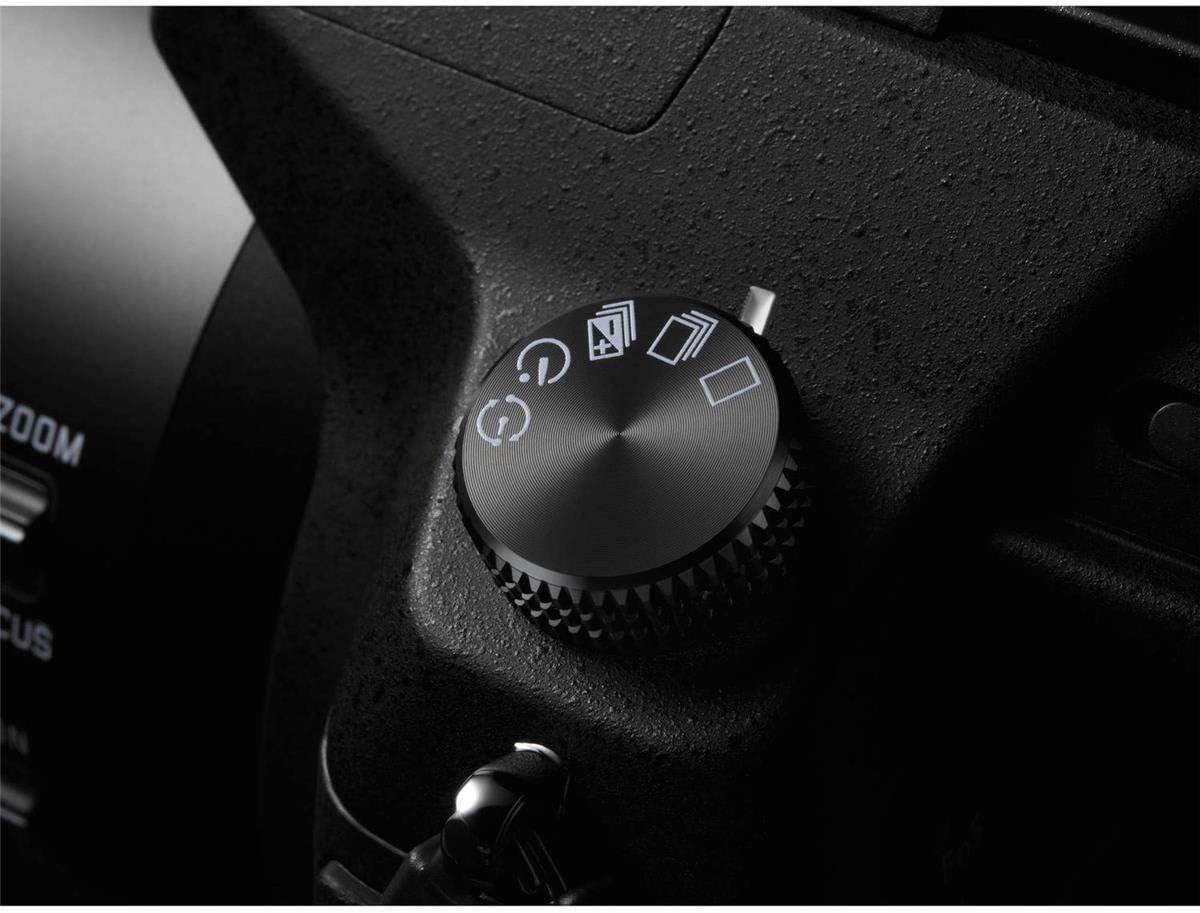
Figure 3.3: A detailed view of the camera's mode dial, showing options like P, A, S, M, and iA.
3.4. Taking Photos
- Select your desired shooting mode.
- Frame your shot using the viewfinder or LCD.
- Press the shutter button halfway down to focus. The camera's fast autofocus system will quickly acquire focus.
- Press the shutter button fully down to capture the image.
3.5. Recording 4K Video
The FZ1000 supports 4K video recording at 30 frames per second. To start recording, press the dedicated movie record button.
- Ensure a high-speed memory card (UHS-I Speed Class 3 or higher recommended for 4K) is inserted.
- Press the red movie record button to start recording. Press it again to stop.
- The 5-axis Hybrid O.I.S. helps stabilize footage during handheld recording (note: 5-axis O.I.S. works in video recording except for 4K video recording).

Figure 3.4: The camera features Wi-Fi connectivity and 4K video capabilities.
3.6. Using the Zoom Lens
The camera features a 16x optical zoom LEICA DC VARIO-ELMARIT lens, equivalent to 25-400mm in 35mm format. Use the zoom lever around the shutter button to adjust the focal length.
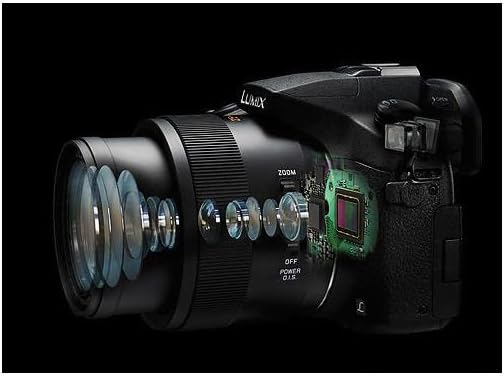
Figure 3.5: An internal diagram illustrating the complex optical structure of the LEICA DC VARIO-ELMARIT lens.
3.7. Built-in Flash
The FZ1000 includes a built-in pop-up flash for illuminating subjects in low-light conditions. Press the flash button to raise the flash unit. The flash mode can be adjusted in the camera's menu.

Figure 3.6: The camera with its integrated pop-up flash deployed.
3.8. Wi-Fi Connectivity
Connect the camera to your smartphone or tablet via Wi-Fi using the Panasonic Image App. This allows for remote control of the camera, viewing images, setting focus, releasing the shutter, and transferring photos for sharing.
4. Care and Maintenance
- Cleaning the Lens: Use a soft, lint-free cloth specifically designed for optical lenses. Gently wipe the lens surface. Avoid touching the lens with your fingers.
- Cleaning the Camera Body: Wipe the camera body with a soft, dry cloth. For stubborn dirt, slightly dampen the cloth with water. Do not use organic solvents or strong cleaning agents.
- Battery Care: Store batteries in a cool, dry place when not in use. Do not expose batteries to extreme temperatures.
- Storage: When storing the camera for extended periods, remove the battery. Store the camera in a dry, well-ventilated area, away from direct sunlight and high humidity.
- Dust and Moisture: While the camera body is rugged, it is not explicitly stated as fully waterproof. Avoid exposing the camera to excessive dust, dirt, or moisture.
5. Troubleshooting
This section addresses common issues you might encounter. For more detailed troubleshooting, refer to the comprehensive User Manual available online.
| Problem | Possible Cause | Solution |
|---|---|---|
| Camera does not power on. | Battery is depleted or incorrectly inserted. | Ensure battery is fully charged and correctly inserted. |
| Images are blurry. | Camera shake, incorrect focus, or dirty lens. | Hold the camera steady, ensure autofocus is engaged, clean the lens. Use O.I.S. |
| Cannot record 4K video. | Memory card speed is insufficient. | Use a UHS-I Speed Class 3 (U3) or faster memory card. |
| Wi-Fi connection fails. | Incorrect settings, app issues, or interference. | Ensure Wi-Fi is enabled on camera and device. Restart app/camera. Check for app updates. |
6. Technical Specifications
- Model Number: DMC-FZ1000
- Product Dimensions: 5.39 x 5.16 x 3.9 inches
- Item Weight: 1.83 pounds
- Sensor: 1-inch MOS Sensor, 20.1 Megapixels
- Lens: LEICA DC VARIO-ELMARIT F2.8-4.0, 16x Optical Zoom (25-400mm equivalent)
- Image Stabilization: Hybrid O.I.S. (Optical Image Stabilizer) + with 5-axis correction
- Video Recording: 4K (3840 x 2160) at 30 fps, Full HD (1920 x 1080)
- Supported File Formats: JPEG (DCF, EXIF v2.3), RAW (ARW)
- Connectivity: Integrated Wi-Fi
- Battery: 1 Lithium Ion battery (DMW-BLC12)
- First Available Date: June 11, 2014
7. Warranty and Support
7.1. Warranty Information
This product comes with a FULL 14 DAY SATISFACTION GUARANTEE and a FULL 90 DAY PARTS AND LABOR WARRANTY. Please retain your proof of purchase for warranty claims.
7.2. Additional Resources
For further assistance and detailed information, please refer to the official resources:
- Official User Guide (PDF): Download User Manual
- Panasonic Brand Store: Visit Panasonic Store on Amazon


