
1. Introduction
Welcome
Thank you for purchasing the ONKYO FR-V77 CD/MD Tuner Amplifier System. This manual provides essential information for the safe and efficient operation of your new audio system. Please read it thoroughly before use and keep it for future reference.
Product Overview
The ONKYO FR-V77 is a compact yet powerful CD/MD tuner amplifier designed to deliver high-quality audio playback and recording. It features a built-in CD player, MD recorder/player, and FM/AM tuner, offering versatile entertainment options. This system includes the FR-V77 main unit and a pair of D-V77 stereo speakers, providing a complete audio solution.

Figure 1.1: The ONKYO FR-V77 CD/MD Tuner Amplifier system, including the main unit, two D-V77 speakers, and the remote control.
2. Safety Information
To ensure safe operation and prevent damage, please observe the following precautions:
- Power Source: Connect the unit only to an AC 100V, 50/60Hz power supply.
- Ventilation: Do not block ventilation openings. Ensure adequate space around the unit for proper airflow.
- Moisture: Do not expose the unit to rain or moisture. Do not place objects filled with liquids, such as vases, on the unit.
- Foreign Objects: Do not insert any foreign objects into the unit's openings.
- Servicing: Do not attempt to service this product yourself. Refer all servicing to qualified service personnel.
- Speaker Impedance: Ensure speakers connected have an impedance between 4Ω and 16Ω.

Figure 2.1: Rear panel of the FR-V77 main unit, highlighting the speaker terminals and the electrical safety warning.
3. Package Contents
Please check that all items listed below are included in your package:
- ONKYO FR-V77 CD/MD Tuner Amplifier Main Unit
- ONKYO D-V77 Speakers (2 units)
- Remote Control (RC-493S)
- FM Indoor Antenna
- Speaker Cables
- User Manual (this document)

Figure 3.1: Overview of the ONKYO FR-V77 system's package contents, including the manual, remote, antenna, and speaker wires.
4. Setup
4.1 Unpacking
Carefully remove all components from the packaging. Retain the packaging materials for future transport or storage.
4.2 Component Placement
Place the FR-V77 main unit and D-V77 speakers on a stable, level surface. Ensure there is adequate ventilation space around the main unit, especially at the top and sides, to prevent overheating.

Figure 4.1: Front view of the ONKYO FR-V77 main unit positioned between the two D-V77 speakers.
4.3 Connecting Speakers
Connect the D-V77 speakers to the FR-V77 main unit using the supplied speaker cables. Observe correct polarity: connect the red (+) terminal on the amplifier to the red (+) terminal on the speaker, and the black (-) terminal on the amplifier to the black (-) terminal on the speaker. Incorrect polarity will result in poor sound quality.
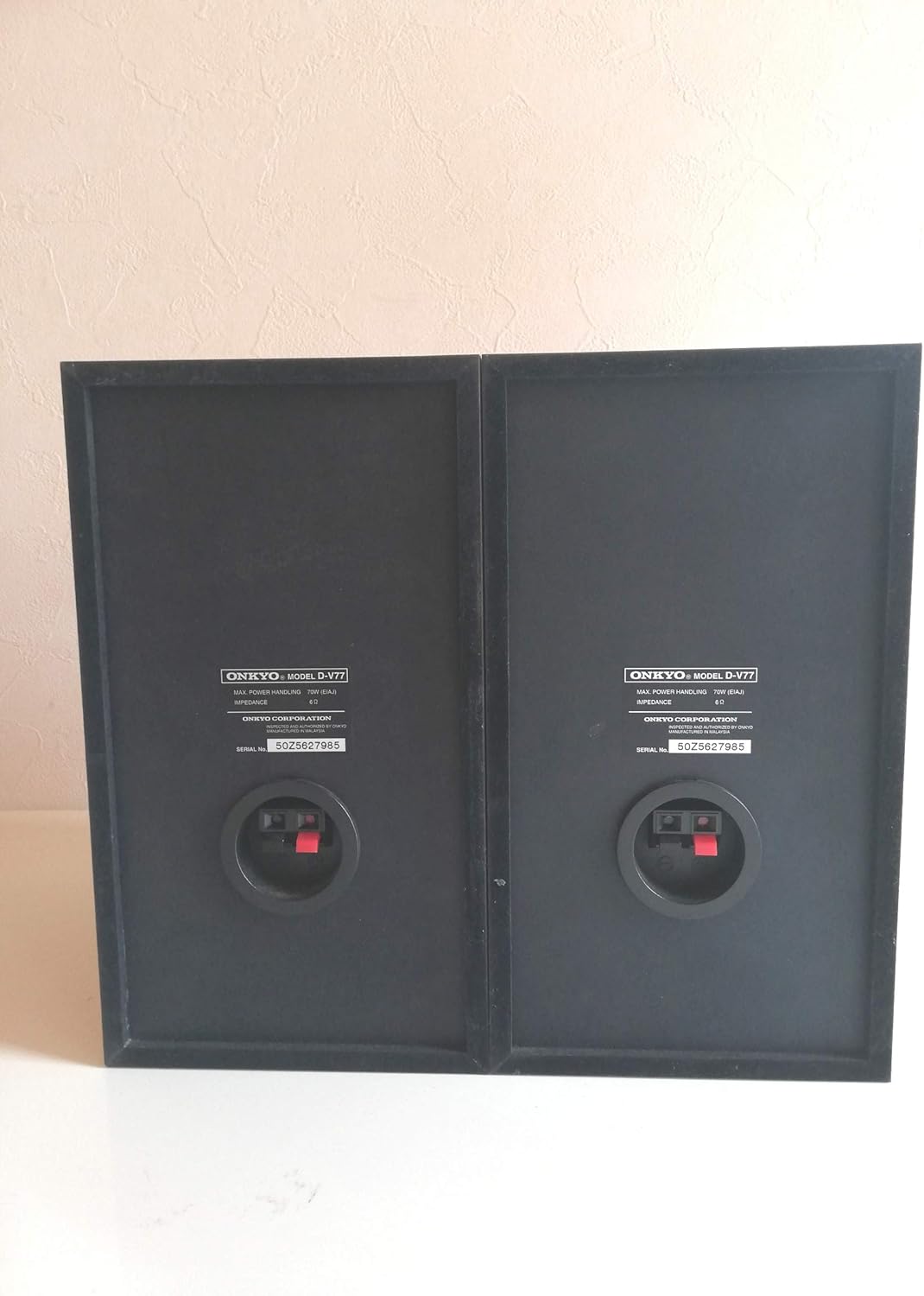
Figure 4.2: Rear view of the D-V77 speakers, showing the spring-clip speaker terminals for connection.
4.4 Connecting Antenna
Connect the supplied FM indoor antenna to the FM 75Ω coaxial terminal on the rear panel of the FR-V77. For AM reception, connect the AM loop antenna to the dedicated AM terminals. Position the antennas for optimal reception.
4.5 Power Connection
After all other connections are made, plug the power cord of the FR-V77 into a suitable AC 100V, 50/60Hz wall outlet.
5. Operating Instructions
5.1 Front Panel Controls
The front panel of the FR-V77 provides direct access to most functions. Refer to the image below for key controls:

Figure 5.1: Detailed view of the ONKYO FR-V77 front panel, showing various controls and indicators.
- STANDBY/ON: Powers the unit on or off.
- PHONES: Headphone jack.
- REC MODE: Selects recording mode (e.g., SP, LP2, LP4 for MD).
- MD/CD/FM/AM Buttons: Selects the input source.
- VOLUME: Adjusts the overall sound level.
- PLAY/PAUSE, STOP, SKIP Buttons: Control CD and MD playback.
- TUNING: Adjusts radio frequency.
- DISPLAY: Changes display information.
- TIMER: Sets timer functions.
5.2 Remote Control Functions
The supplied remote control (RC-493S) allows convenient operation from a distance. Most front panel functions are replicated on the remote, along with additional features like direct track selection and timer settings.
5.3 CD Playback
- Press the CD/MD button to select the CD source.
- Press the OPEN/CLOSE button to open the CD tray.
- Place a CD on the tray with the label side up and close the tray.
- Press the PLAY button to start playback.
5.4 MD Recording and Playback
- Insert an MD into the slot.
- To play, select the MD source and press PLAY.
- To record, select the desired input source (e.g., CD, Tuner, Line-in). Press REC to begin recording.
5.5 Tuner Operation (FM/AM)
- Press the FM/AM button to select the desired band.
- Use the TUNING buttons to manually tune to a station or press AUTO TUNE (if available on remote) for automatic scanning.
6. Maintenance
6.1 Cleaning
Wipe the unit and speakers with a soft, dry cloth. For stubborn stains, dampen the cloth with a mild detergent solution and wipe gently, then dry thoroughly. Do not use abrasive cleaners, alcohol, benzene, or thinners, as these can damage the finish.
6.2 Storage
If the unit will not be used for an extended period, disconnect the power cord from the wall outlet. Store the unit in a cool, dry place away from direct sunlight and extreme temperatures.
7. Troubleshooting
If you experience problems with your FR-V77 system, please consult the following table before seeking service:
| Problem | Possible Cause | Solution |
|---|---|---|
| No power | Power cord not connected. | Ensure power cord is securely plugged into the wall outlet and the unit. |
| No sound | Volume is too low or muted. Speakers not connected correctly. Incorrect input source selected. | Increase volume. Check speaker connections and polarity. Select the correct input source (CD, MD, FM/AM, etc.). |
| CD/MD disc not playing | Disc is dirty or scratched. Disc inserted incorrectly. | Clean the disc with a soft cloth. Re-insert the disc correctly. |
| Poor radio reception | Antenna not connected or poorly positioned. Interference. | Connect the antenna properly and adjust its position. Move the unit away from other electronic devices. |
8. Specifications
The following are the technical specifications for the ONKYO FR-V77 system:
| Component/Feature | Specification |
|---|---|
| Amplifier Section | |
| Practical Maximum Output | 26W + 26W (4Ω, JEITA) |
| Rated Output | 19W + 19W (4Ω) |
| Input Sensitivity/Impedance | 150mV/50kΩ (LINE-1, TAPE, CDR) |
| Tuner Section | |
| Receiving Frequency (FM) | 76.00 - 108.00 MHz |
| Receiving Frequency (AM) | 522 - 1629 kHz |
| Frequency Response | 30Hz - 15kHz (±1.5dB) |
| CD Section | |
| D/A Converter | Single-bit method |
| Frequency Response | 10Hz - 20kHz (±3.0dB) |
| MD Section | |
| Max. Recording/Playback Time | Approx. 320 minutes (using 80-min disc in LP4 mode) |
| Frequency Response | 10Hz - 20kHz (±3.0dB) |
| General | |
| Power Consumption | 55W |
| Dimensions (W x H x D) | 205 x 154 x 356 mm |
| Weight | 5.5 kg |
9. Warranty and Support
For warranty information and customer support, please refer to the warranty card included with your product or visit the official ONKYO website. Keep your proof of purchase for warranty claims.


