
1. Product Overview
The BMB CSD series offers high-powered 10-inch and 12-inch speakers, designed for robust sound and high volume handling. These speakers feature a new high-volume woofer and a sturdy cabinet for enhanced sound stability. BMB speakers utilize reliable paper cones from Japan and are enclosed in double-layer wood cabinets with interlocking panels to improve audio quality and structural integrity. BMB is a Green partner and RoHS Compliant, committed to environmental protection.
The BMB CSD-2000 is a bass reflex system with a 3-way, 5-speaker configuration. It includes a 12-inch woofer, two 3.15-inch drivers, and two 3.15-inch tweeters. The system is rated for a minimum input power of 500 watts and a maximum input of 1200 watts at 8 ohms. Each speaker cabinet weighs 41 lbs and measures 22.36"x13.78"x13.23".
Key Features:
- 3 Ways 5 Speakers configuration
- Bass Reflex Type design
- Max Input Power: 1200W
- Rating Input Power: 500W
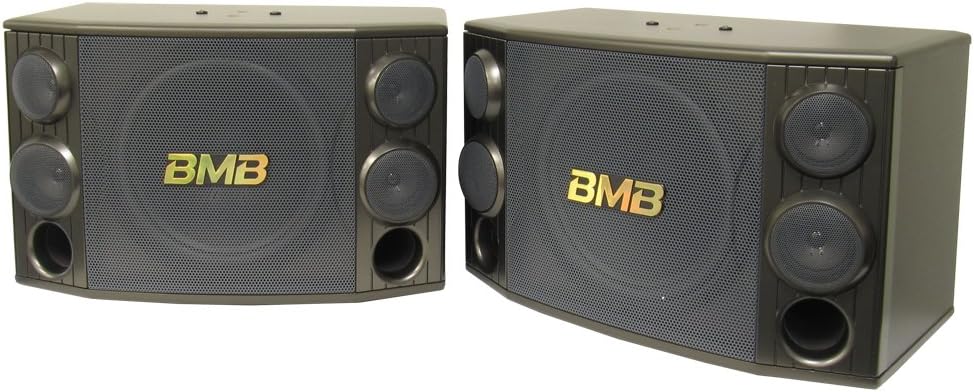
BMB Speaker Series Overview
Video 1: An overview of BMB speaker systems, including the CSD series, highlighting features like anti-howling function, wide listening position, and robust construction. This video provides context on the design philosophy and advantages of BMB karaoke speakers.
2. Setup and Connections
Speaker Placement:
BMB karaoke speakers are designed with a wide listening position, ensuring high-quality sound across multiple locations in a room. Unlike traditional listening speakers that direct sound to a central point, BMB speakers distribute sound more broadly. Position the speakers to maximize sound coverage in your desired area. The safety mechanism speaker case allows for secure ceiling mounting, preventing accidental falls over time.
Connecting the Speakers:
Ensure all audio equipment is powered off before making any connections. Connect your amplifier or receiver to the speaker terminals located on the rear of each BMB CSD-2000 speaker. Use appropriate speaker wire, ensuring correct polarity (positive to positive, negative to negative) for optimal sound performance.

3. Operating Instructions
Basic Operation:
- After connecting the speakers to your amplifier, power on your audio system.
- Start with the volume at a low level and gradually increase it to your desired listening level.
- The CSD-2000 speakers are designed to handle high power and volume, providing a solid sound experience.
Karaoke Features:
BMB karaoke speakers are specifically designed to integrate microphones into their setup. They feature an anti-howling function to prevent unwanted feedback, allowing vocals to mix seamlessly with music. The tweeters and squawkers are individually adjustable to optimize sound quality for unique room acoustics.
4. Maintenance and Care
Cleaning:
- Wipe the speaker cabinets with a soft, dry cloth.
- Avoid using abrasive cleaners, solvents, or chemical sprays, as these can damage the finish.
- Do not allow liquids to enter the speaker grilles or ports.
General Care:
- Place speakers on a stable surface or mount them securely using the built-in safety mechanism.
- Avoid exposing speakers to extreme temperatures, humidity, or direct sunlight.
- The double-layer housing is designed for durability and to prevent sound leakage, but proper handling is still recommended.
5. Troubleshooting
No Sound:
- Check all cable connections between the speakers and the amplifier. Ensure they are secure and correctly polarized.
- Verify that the amplifier is powered on and the volume is not set to minimum or muted.
- Test with another audio source or speaker to isolate the problem.
Distorted Sound:
- Reduce the volume level on your amplifier. Overdriving the speakers can cause distortion.
- Check the audio source for distortion.
- Ensure the speaker wires are not frayed or short-circuiting.
Howling/Feedback (Karaoke):
- The BMB CSD-2000 features an anti-howling function. If feedback occurs, try adjusting microphone placement or reducing microphone gain.
- Adjust the individual tweeters and squawkers to fine-tune the sound and minimize feedback.
6. Specifications
| Feature | Detail |
|---|---|
| Model Name | CSD-2000 |
| Speaker Type | Woofer, 3-Way, 5 Speakers (1x 12" woofer, 2x 3.15" drivers, 2x 3.15" tweeters) |
| Mounting Type | Floor Standing, Tabletop Mount |
| Max Input Power | 1200 Watts |
| Rating Input Power | 500 Watts |
| Impedance | 8 Ohms |
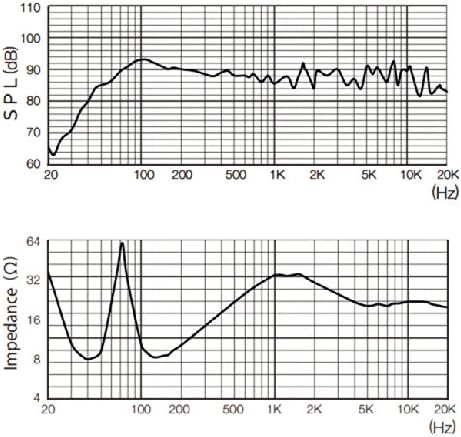
| Frequency Response | 20 KHz (range not fully specified, typical for tweeters) |
| Connectivity Technology | Serial (wired) |
| Audio Output Mode | Stereo |
| Item Weight | 41 Pounds (per speaker cabinet) |
| Product Dimensions | 30.91 x 27.37 x 17.88 inches |
| UPC | 608641943375 |
| Manufacturer | BMB |
| EU Spare Part Availability Duration | 5 Years |
7. Warranty and Support
BMB products are shipped with a certificate of authenticity, and each unit is assigned a unique serial number for verification on the official BMB website. This ensures you have a genuine product and access to official support.

For any support inquiries, please refer to the contact information provided with your purchase or visit the official BMB website. Spare parts for this product are available for a duration of 5 years within the EU.
For additional information or to explore other BMB products, visit the BMB Store on Amazon.