LETING Portable Mini FM Radio Speaker and MP3 Player
Model: 088
Introduction
Thank you for purchasing the LETING Portable Mini FM Radio Speaker and MP3 Player, Model 088. This device is designed for versatile audio playback, offering FM radio, MP3 playback from TF cards and USB drives, and an AUX input for external audio sources. Please read this manual carefully to ensure proper use and optimal performance of your device.
Product Overview
The LETING Model 088 is a compact and lightweight audio device featuring a high-performance speaker for clear sound. Its multi-functional design allows for various audio playback options and includes an emergency flashlight.
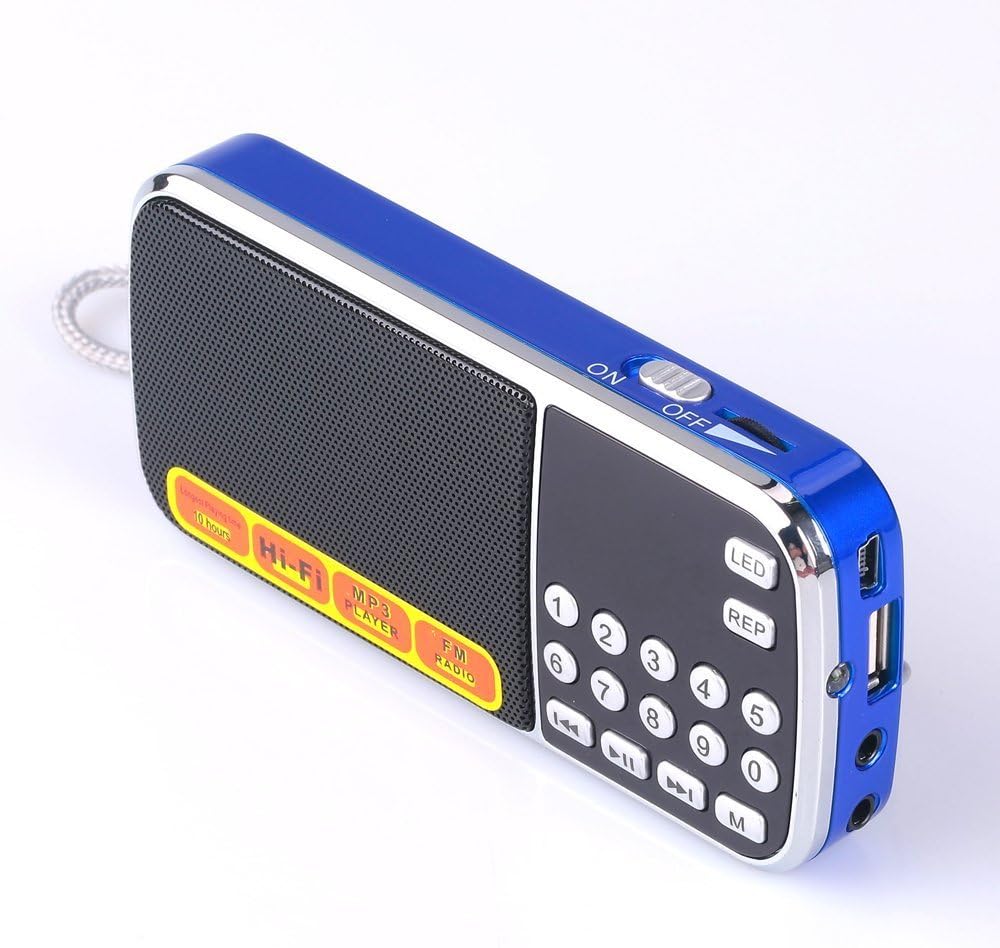
Image: The LETING Portable Mini FM Radio Speaker Model 088, showcasing its compact design with a blue casing, front speaker grille, and control panel.
Key Features:
- Multiple Playback Modes: Supports FM radio, TF card (up to 32GB), USB flash drive, and AUX input.
- MP3 Player Functionality: Plays MP3 files directly from TF cards and USB drives.
- High-Fidelity Sound: Built-in high-performance speaker delivers clear audio.
- Automatic FM Scan: One-key auto-scan and memory function for FM stations (87.8-108MHz).
- Emergency Flashlight: Integrated LED light for convenience in low-light conditions.
- Portable Design: Ultra-slim, lightweight, and compact for easy carrying.
- Rechargeable Battery: Powered by a rechargeable Lithium-Ion battery.
- Headphone Jack: Provides a private listening experience.
Package Contents
Upon unpacking, please ensure all items listed below are present:
- LETING Portable Mini FM Radio Speaker (Model 088)
- User Manual
- AUX Cable
- Charging Cable

Image: The LETING portable radio, user manual, AUX cable, and charging cable, as included in the product package.
Device Layout and Controls
Familiarize yourself with the various parts and controls of your LETING portable radio:

Image: A detailed diagram of the LETING Portable Mini FM Radio Speaker Model 088, with labels pointing to the power switch, volume knob, LED flashlight, DCSV charge port, MP3 repeat button, USB port, LED charging indicator, audio input, earphone output, LED display screen, previous/rewind button, next/fast-forward button, TF card slot, and play/pause/scan button.
- Power Switch (ON/OFF): Slide switch located on the top for turning the device on or off.
- Volume Knob: Rotary dial on the side to adjust the audio volume.
- LED Flashlight: Button to activate the integrated flashlight.
- DCSV Charge Port: Micro USB port for charging the device.
- MP3 Repeat (REP) Button: For repeating the current track or playlist in MP3 mode.
- USB Port: For connecting a USB flash drive for MP3 playback.
- LED Charging Indicator: Light indicating charging status.
- Audio Input (AUX): 3.5mm jack for connecting external audio devices.
- Earphone Output: 3.5mm jack for private listening with headphones.
- LED Display Screen: Shows current mode, frequency, or track number.
- Number Pad (0-9): For direct channel selection in FM mode or track selection in MP3 mode.
- Previous/Rewind Button: Skips to the previous track or rewinds.
- Next/Fast-Forward Button: Skips to the next track or fast-forwards.
- TF Card Slot: For inserting a TF (MicroSD) card for MP3 playback.
- Play/Pause/Scan Button: Plays/pauses audio; long press initiates auto-scan in FM mode.
- Mode (M) Button: Switches between TF/USB/AUX/FM modes.
Initial Setup
- Charging the Device:
- Connect the provided charging cable to the DCSV Charge Port on the device.
- Plug the other end of the cable into a standard USB power adapter (not included) or a computer's USB port.
- The LED charging indicator will illuminate during charging and turn off when fully charged.
- Inserting TF Card or USB Drive:
- Ensure the device is powered off.
- Carefully insert a TF (MicroSD) card into the TF Card Slot or a USB flash drive into the USB Port. Ensure it is inserted correctly to avoid damage.
- The device supports MP3 format files only.
Operating Instructions
1. Power On/Off
Slide the Power Switch (ON/OFF) to the 'ON' position to power on the device. Slide it to 'OFF' to power off.
2. Volume Control
Rotate the Volume Knob on the side of the device clockwise to increase volume and counter-clockwise to decrease volume.
3. Mode Selection
Press the 'M' (Mode) button repeatedly to cycle through the available modes: FM Radio, TF Card, USB, and AUX. The current mode will be displayed on the LED screen.
4. FM Radio Operation
- Auto Scan and Memory: In FM mode, long press the Play/Pause/Scan button for approximately 3 seconds. The device will automatically scan for available FM stations (87.8-108MHz) and save them to memory.
- Switching Stations: Use the Previous/Rewind or Next/Fast-Forward buttons to navigate through saved stations.
- Direct Frequency Input: Use the number pad (0-9) to directly enter a desired FM frequency.

Image: A finger pressing the play/pause button on the LETING portable radio, illustrating the auto-scan feature for FM radio stations.
5. MP3 Playback (TF Card/USB)
- Insert a TF card or USB drive with MP3 files.
- Switch to TF or USB mode using the 'M' button. The device will automatically begin playing MP3 files.
- Use the Play/Pause button to pause or resume playback.
- Use the Previous/Rewind or Next/Fast-Forward buttons to skip tracks. Long press these buttons to fast-forward or rewind within a track.
- Press the 'REP' button to cycle through repeat modes (e.g., repeat one, repeat all).
- Use the number pad (0-9) to directly select a track number.
6. AUX Input
- Connect an external audio device (e.g., smartphone, computer) to the Audio Input (AUX) port using the provided AUX cable.
- Switch to AUX mode using the 'M' button.
- Audio playback will be controlled by the connected external device.
7. Emergency Flashlight
Press the 'LED' button to turn the emergency flashlight on or off. This feature is useful in dark environments.

Image: The LETING portable radio illuminating a dark outdoor scene with its integrated LED flashlight, demonstrating its utility as an emergency light source.
Care and Maintenance
- Keep the device dry. Avoid exposure to moisture or rain.
- Clean the device with a soft, dry cloth. Do not use harsh chemicals or abrasive cleaners.
- Avoid dropping the device or subjecting it to strong impacts.
- Store the device in a cool, dry place when not in use.
- Do not attempt to disassemble or modify the device, as this will void the warranty and may cause damage.
Troubleshooting Guide
| Problem | Possible Cause | Solution |
|---|---|---|
| Device does not power on. | Battery is depleted. | Charge the device fully. |
| No sound from speaker. | Volume is too low or muted. | Increase volume using the volume knob. |
| FM radio reception is poor. | Weak signal or interference. | Relocate the device to an area with better reception. Extend the antenna if applicable. |
| MP3 files not playing. | Incorrect file format or card/drive not inserted properly. | Ensure files are in MP3 format. Reinsert TF card/USB drive. Check if card/drive is corrupted. |
| AUX input not working. | Incorrect mode selected or cable not connected properly. | Switch to AUX mode. Ensure AUX cable is securely connected to both devices. |
Technical Specifications
| Feature | Specification |
|---|---|
| Model Number | 088 |
| Product Dimensions | 4.9"L x 0.95"W x 2.3"H (12.45 x 2.41 x 5.84 cm) |
| Item Weight | 5.6 ounces (158.76 grams) |
| Power Source | Battery Powered (1 Lithium Ion battery required) |
| Connectivity Technology | USB |
| Tuner Technology | FM |
| Radio Bands Supported | FM-87.8-108MHZ |
| Special Features | Lightweight, Portable, Emergency Flashlight, MP3 Speaker, Rechargeable, TF/USB/Headphone support |
Warranty and Customer Support
LETING is committed to providing quality products and customer satisfaction. For any inquiries or support needs, please refer to the following:
- Warranty: The product includes a 365-day replacement policy for quality issues.
- Customer Service: We offer 24-hour buyer-seller message support.
- After-Sales Support: Amazon after-sales support is available for this product.
For further assistance, please contact your seller through the Amazon platform.