
1. Introduction
Thank you for choosing the American Weigh Scales Precision Digital Kitchen Food Weight Scale, Model 2K-BOWL-BK. This scale is designed for accurate and versatile weighing in your kitchen, offering precision measurements for various culinary needs. Its user-friendly design, removable bowl, and multiple unit options make it an essential tool for precise cooking, baking, and portion control.
Key Features:
- Versatile Weighing Units: Easily switch between grams, ounces, troy ounces, and pennyweights.
- Removable 2-Liter Capacity Bowl: Convenient for measuring liquids, powders, or small items, and easy to clean.
- Backlit LCD Display: Ensures clear visibility of measurements in any lighting conditions.
- Intuitive 2-Key Operation: Simple and straightforward controls for ease of use.
- Dual Weighing Options: Use with the removable bowl or directly on the scale's surface.
- High Precision: Measures with accuracy down to 0.1 grams.
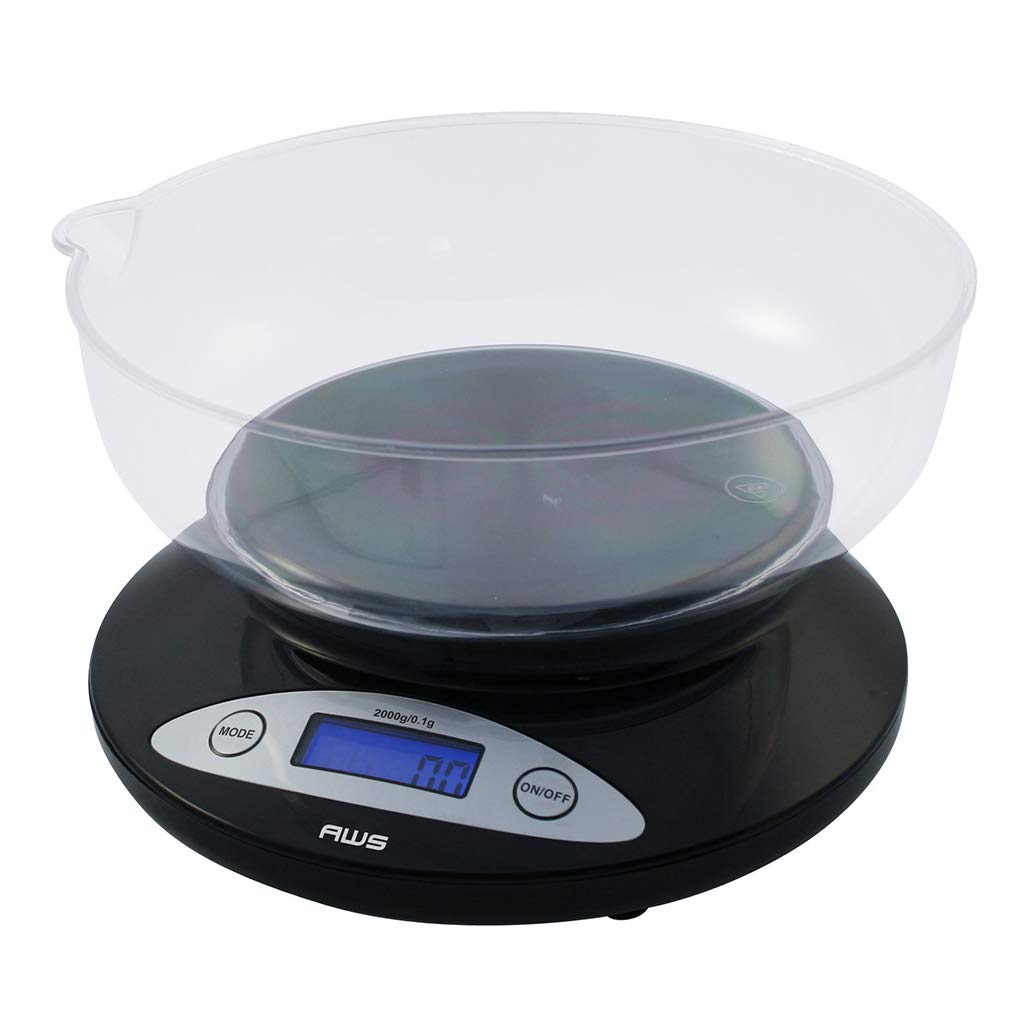
Figure 1: American Weigh Scales Digital Kitchen Scale with Removable Bowl. A black digital kitchen scale with a clear, removable plastic bowl on top, displaying "0.0" on its backlit LCD screen.
2. What's in the Box
Upon opening your product packaging, please ensure all items listed below are present and in good condition:
- Digital Kitchen Scale Base
- Removable Plastic Weighing Bowl (2-liter capacity)
- 2 x AAA Batteries
- Instruction Manual (this document)
3. Setup
3.1. Battery Installation
- Locate the battery compartment on the underside of the scale.
- Open the battery compartment cover.
- Insert the 2 AAA batteries, ensuring correct polarity (+/-).
- Close the battery compartment cover securely.
3.2. Bowl Placement
Place the removable plastic bowl securely onto the weighing platform of the scale. The bowl is designed to fit snugly.
3.3. Initial Calibration (Recommended)
For optimal accuracy, it is recommended to perform an initial calibration. While the scale is designed for precision, environmental factors can sometimes affect readings. A 2000g calibration weight is required (sold separately).
- Ensure the scale is on a flat, stable surface and turned off.
- Press and hold the 'MODE' button, then press the 'ON/OFF' button simultaneously. The display will show 'CAL'.
- Release both buttons. The display will flash '2000g'.
- Place a 2000g calibration weight (not included) onto the center of the weighing platform.
- The display will show 'PASS' and then return to normal weighing mode. Calibration is complete.

Figure 2: Digital kitchen scale showing capacity and resolution details, including calibration information.
4. Operating Instructions
4.1. Power On/Off
- To turn on the scale, press the 'ON/OFF' button. The display will light up and show '0.0'.
- To turn off the scale, press and hold the 'ON/OFF' button for a few seconds until the display turns off. The scale also features an automatic shut-off function to conserve battery power.
4.2. Unit Conversion
The scale supports multiple weighing units. To change the unit of measurement:
- With the scale turned on, press the 'MODE' button repeatedly to cycle through the available units: grams (g), ounces (oz), troy ounces (ozt), and pennyweights (dwt).
- The selected unit will be displayed on the LCD screen.

Figure 3: Digital kitchen scale displaying available weighing units. The scale shows options for grams, ounces, troy ounces, and pennyweights.
4.3. Tare Function
The Tare function allows you to subtract the weight of a container, so you only measure the weight of the contents.
- Place an empty container (e.g., the removable bowl) on the weighing platform. The display will show its weight.
- Press the 'ON/OFF' button (which also functions as Tare). The display will reset to '0.0'.
- Add the items you wish to weigh into the container. The display will now show only the net weight of the items.
- To clear the Tare function, remove all items from the scale. The display will show a negative value. Press the 'ON/OFF' button again to reset to '0.0'.

Figure 4: Digital kitchen scale weighing grapes in its removable bowl, demonstrating the scale in use.
5. Maintenance
5.1. Cleaning
- Removable Bowl: The plastic weighing bowl can be easily removed and washed with warm, soapy water. Rinse thoroughly and dry completely before re-attaching.
- Scale Base: Wipe the scale base with a soft, damp cloth. Do not immerse the scale base in water or use abrasive cleaners.
5.2. Storage
Store the scale in a clean, dry environment. Avoid extreme temperatures and humidity. The compact design allows for easy storage in cabinets or on countertops.
6. Troubleshooting
- Inaccurate Readings: Ensure the scale is on a flat, stable surface. Re-calibrate the scale if readings are inconsistent (refer to Section 3.3).
- Display Not Turning On: Check if the batteries are correctly installed and have sufficient charge. Replace batteries if necessary.
- 'Lo' or 'Err' Message: This typically indicates low battery power. Replace the batteries.
- Overload Indication: If the display shows 'O-Ld', the scale is overloaded. Remove items immediately to prevent damage.
7. Specifications
| Model Number | 2K-BOWL-BK |
| Brand | AMERICAN WEIGH SCALES |
| Maximum Capacity | 2000g (2kg) |
| Accuracy / Graduation | 0.1g |
| Weighing Units | g, oz, ozt, dwt |
| Display Type | Backlit LCD |
| Power Source | 2 x AAA Batteries (included) |
| Product Dimensions | 7.08 x 7.08 x 2 inches |
| Item Weight | 8.96 ounces |

Figure 5: Dimensions of the American Weigh Scales Digital Kitchen Scale. The digital kitchen scale with its removable bowl, showing overall dimensions.
8. Warranty & Support
American Weigh Scales products are designed for durability and accuracy. For specific warranty details and customer support, please refer to the official American Weigh Scales website or contact their customer service directly. Keep your purchase receipt as proof of purchase.
For further assistance or inquiries, please visit the AMERICAN WEIGH SCALES Store on Amazon.