
ST PAUL'S CATHEDRAL 3D PAPER MODEL B00KBT210M
Instruction Manual: Build Your Own St. Paul's Cathedral 3D Paper Model
Model: B00KBT210M
1. Introduction
Thank you for purchasing the Build Your Own St. Paul's Cathedral 3D Paper Model. This kit allows you to construct a detailed replica of the iconic St. Paul's Cathedral, complete with a working interior light to illuminate your creation. This manual provides comprehensive instructions for assembly, operation, and maintenance to ensure a rewarding building experience.
2. Safety Information
- This product contains small parts and is not suitable for children under 3 years due to choking hazards.
- Adult supervision is recommended during assembly, especially when handling sharp tools (e.g., scissors, craft knife) if required for cutting paper parts.
- Keep the model away from open flames, excessive heat, and direct sunlight to prevent damage to the paper and electronic components.
- Ensure the light unit is handled carefully. Do not attempt to disassemble or modify the light unit.
- Dispose of batteries responsibly according to local regulations.
3. Package Contents
Please verify that all components listed below are present in your kit before beginning assembly. Refer to the images for visual confirmation.

Figure 3.1: The retail box for the St. Paul's Cathedral 3D paper model kit, showcasing the completed model on the front.
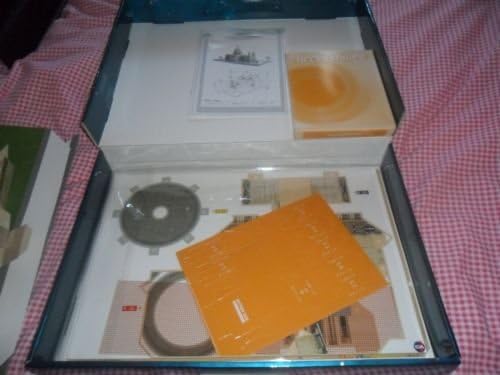
Figure 3.2: Contents of the kit, including pre-cut paper sheets for the cathedral structure, base, and other elements.

Figure 3.3: The detailed instruction sheet, providing diagrams and steps for assembly.
- Pre-cut and pre-scored paper sheets for St. Paul's Cathedral components.
- Baseboard or platform pieces.
- Interior light unit (battery operated).
- Detailed instruction manual with diagrams (this document).
- Adhesive (glue or double-sided tape, may be included or required separately).
4. Setup and Assembly
Follow these steps carefully to assemble your 3D paper model. It is recommended to read through all steps before beginning.
- Preparation:
- Clear a well-lit, flat, and clean workspace.
- Gather necessary tools: small scissors or craft knife (for detaching parts if not fully pre-cut), ruler, and appropriate adhesive (paper glue or double-sided tape).
- Carefully detach all paper parts from their sheets. Use a craft knife for intricate cuts if necessary, always cutting away from yourself on a protective surface.
- Folding:
- Identify all fold lines on each part. Solid lines usually indicate cutting, dashed lines indicate folding.
- Fold along all pre-scored lines precisely. For crisp folds, use a ruler to guide the fold.
- Base Assembly:
- Assemble the base platform first, following the numbered steps in the included diagram. This typically involves interlocking tabs or gluing sections together to form a stable foundation.
- Cathedral Structure Assembly:
- Begin with the main body of the cathedral. Match numbered tabs to corresponding slots or areas for gluing.
- Work section by section, allowing glue to dry sufficiently before moving to the next connected part to ensure structural integrity.
- Pay close attention to the orientation of printed details and windows.
- Dome and Towers:
- Assemble the dome and individual towers as separate sub-assemblies. These often involve conical or cylindrical shapes.
- Attach these completed sections to the main cathedral body once dry.
- Interior Light Installation:
- Locate the designated compartment or area within the model for the light unit. This is typically within the main body or base.
- Insert the required batteries into the light unit, observing polarity (+/-).
- Place the light unit into its compartment. Ensure the switch is accessible if it's designed to be operated after assembly.
- Secure any flaps or covers over the light compartment.
- Finishing Touches:
- Attach any smaller decorative elements, such as trees or statues, to the base or cathedral structure.
- Ensure all parts are securely attached and the model is stable.
5. Operating Instructions
The St. Paul's Cathedral model features an interior light for enhanced display.
- Powering On: Locate the ON/OFF switch on the light unit. This switch is typically accessible from the underside of the base or a designated opening. Slide the switch to the 'ON' position to illuminate the interior of the cathedral.
- Powering Off: To turn off the light, slide the switch to the 'OFF' position.
- Battery Replacement: When the light dims or stops working, it's time to replace the batteries. Carefully access the battery compartment, remove old batteries, and insert new ones of the correct type and polarity.
6. Maintenance
To keep your St. Paul's Cathedral model in excellent condition:
- Cleaning: Gently dust the model with a soft, dry brush or a microfibre cloth. Avoid using water or cleaning solutions, as they can damage the paper.
- Storage: Store the model in a dry environment, away from direct sunlight, high humidity, and extreme temperatures.
- Handling: Always handle the model by its base to prevent damage to delicate paper structures.
- Battery Care: If the model will not be used for an extended period, remove the batteries from the light unit to prevent leakage and corrosion.
7. Troubleshooting
- Light Not Working:
- Check if the ON/OFF switch is in the 'ON' position.
- Ensure batteries are inserted correctly with the correct polarity.
- Replace batteries with new ones.
- Check for any loose connections within the battery compartment (if accessible).
- Parts Not Fitting:
- Double-check the part numbers and diagrams in the instruction manual.
- Ensure all folds are crisp and accurate.
- Do not force parts; gently adjust or re-fold if necessary.
- Model Instability:
- Ensure all glued joints have fully dried and are secure.
- Verify the base assembly is correctly constructed and stable on a flat surface.
8. Specifications
- Model Name: St. Paul's Cathedral 3D Paper Model
- Model Number (ASIN): B00KBT210M
- Material Type: Paper
- Educational Objective(s): Literacy & Spacial Awareness
- First Available: 14 May 2014
- Light Unit: Integrated LED (battery operated, batteries not included unless specified on packaging)
9. Warranty Information
This product is a paper model kit and typically does not come with an extended manufacturer's warranty beyond ensuring all parts are present and undamaged upon purchase. Please inspect all components immediately upon opening the package.
If you find any missing or damaged parts, please contact the retailer or seller from whom you purchased the product within their specified return or exchange period.
10. Support
For further assistance or inquiries regarding your St. Paul's Cathedral 3D Paper Model, please refer to the contact information provided by your retailer or the original point of purchase. Keep your proof of purchase handy when contacting support.
Ask a question about this manual
Ask about setup, troubleshooting, compatibility, parts, safety, or missing instructions. Manuals+ will review the question and use this page’s manual context to help answer it.