
1. Introduction
This manual provides essential information for the safe and effective installation, operation, and maintenance of your LEDUPDATES 20ft Storefront Super Bright Pure White LED Light 5630 Series. Please read this manual thoroughly before installation and retain it for future reference.
2. Safety Information
- Indoor Use Only: This product is designed for indoor applications. Do not expose to water or high humidity.
- Power Supply: Use only the provided UL-listed 12V 3A power driver. Using an incompatible power supply may damage the LEDs or pose a fire hazard.
- Electrical Safety: Ensure the power supply is disconnected from the main power outlet before installation, maintenance, or troubleshooting.
- Ventilation: Ensure adequate ventilation around the power driver to prevent overheating.
- Handling: Do not bend the LED modules excessively or apply undue force, as this may damage the internal circuitry.
- Children: Keep out of reach of children.
3. Package Contents
Verify that all components are present and undamaged upon opening the package:
- 20ft Super Bright Pure White LED Modules (5630 Series)
- UL 12V 3A Power Driver

Image 3.1: Complete package contents including LED modules and power driver.
4. Specifications
| Feature | Detail |
|---|---|
| Brand | LEDUPDATES |
| Model Number | 4339335222 |
| Light Color | Pure White |
| Color Temperature | 5500 Kelvin |
| Item Length | 20 Feet |
| Voltage | 12 Volts DC |
| Wattage | 26 Watts |
| Power Source | Corded Electric |
| Light Source Type | LED (5630 Series) |
| Indoor/Outdoor Usage | Indoor |
| Material | Plastic |
| Included Components | Power Driver |
| Certification | UL Listed Power Driver |
5. Setup
Follow these steps for proper installation of your LED light modules:
- Plan Layout: Determine the desired path for your LED modules. Ensure the 20ft length is suitable for your application (e.g., storefront, sign, under cabinet).
- Surface Preparation: Clean the mounting surface thoroughly. It must be dry, smooth, and free of dust, grease, or debris to ensure optimal adhesion of the self-stick backing.
- Mounting LED Modules:
- Carefully peel off the protective backing from the self-stick adhesive on each LED module.
- Press each module firmly onto the prepared surface, ensuring good contact.
- Repeat for all modules, following your planned layout.
- Note: For long-term or heavy-duty applications, or if the adhesive proves insufficient, consider using additional mounting methods such as small clips or screws (not included) to secure the modules.

Image 5.1: LED modules with visible red adhesive backing.
- Connect Power Driver: Locate the DC output connector from the power driver and the input connector on the LED module string. Align and firmly push the connectors together. Ensure a secure connection.

Image 5.2: Close-up of the connection point between LED modules and the power input cable.
- Connect to Power Outlet: Plug the power driver's AC cord into a standard 120V AC wall outlet.
6. Operating Instructions
Once properly installed and connected to a power outlet, the LED modules will illuminate. There are no additional controls for this basic model; operation is controlled by connecting or disconnecting the power supply.
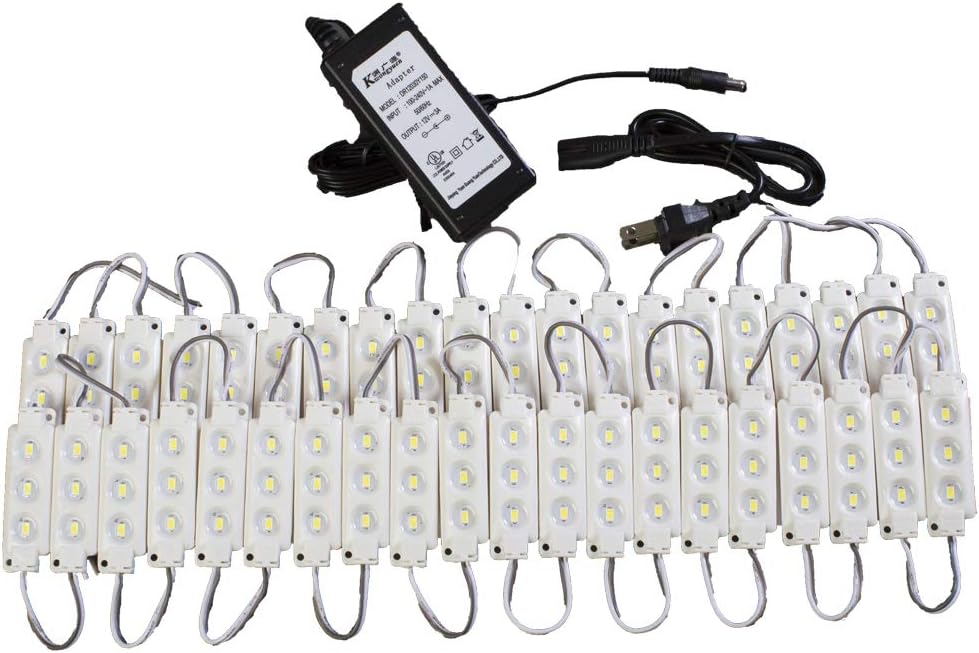
Image 6.1: Illuminated LED modules demonstrating light output.
7. Maintenance
- Cleaning: Disconnect power before cleaning. Gently wipe the LED modules with a soft, dry cloth. Do not use abrasive cleaners or solvents.
- Connection Check: Periodically inspect all electrical connections to ensure they remain secure.
- Adhesive Check: Regularly check the adhesion of the modules to the mounting surface. Re-secure or use additional fasteners if any modules become loose.
8. Troubleshooting
| Problem | Possible Cause | Solution |
|---|---|---|
| LEDs do not light up | No power to the driver; Loose connection; Faulty power driver or LEDs | Check wall outlet; Ensure all connections are secure; Test with another 12V DC power source if available (ensure correct polarity and amperage); Contact support if issues persist. |
| LEDs are dim or flicker | Insufficient power; Loose connection; Damaged LEDs | Ensure power driver is correctly rated (12V 3A); Check all connections; Inspect LED modules for visible damage. |
| LED modules fall off surface | Improper surface preparation; Weak adhesive | Clean and dry surface thoroughly before re-applying; Use additional mounting clips or fasteners for better security. |
9. Warranty and Support
For warranty information or technical support, please contact LEDUPDATES customer service through the retailer where the product was purchased. Keep your purchase receipt as proof of purchase.