
1. Introduction
The MaxiClimber 2.0 Vertical Climber ERS is designed to provide a full-body, low-impact workout that combines cardio and strength training. This manual provides essential information for the safe and effective use, assembly, operation, and maintenance of your MaxiClimber 2.0.

Image 1: The MaxiClimber 2.0 Vertical Climber ERS, a compact fitness machine designed for full-body workouts.
2. Important Safety Information
Before operating the MaxiClimber 2.0, please read and understand all instructions and warnings. Retain this manual for future reference.
- Consult your physician before starting any exercise program.
- This product is intended for adult use only. Users must be at least 18 years of age.
- The maximum user weight limit for this machine is 250 pounds.
- Place the MaxiClimber on a flat, stable surface. Ensure adequate space around the machine for safe operation.
- Inspect the machine for loose or damaged parts before each use. Do not use if any components are compromised.
- Wear appropriate athletic footwear during use.
- Keep children and pets away from the machine during operation.
- Stop exercising immediately if you feel faint, dizzy, or experience pain.
3. Product Overview and Features
The MaxiClimber 2.0 is engineered for effective and efficient workouts. Key features include:
- Full Body Conditioning: Engages arms, core, and legs in a fluid climbing motion.
- Customizable Resistance: Features an Elastic Resistance System (ERS) for varied intensity.
- Low-Impact Workout: Designed to be gentle on knees and ankles.
- Compact & Quick Setup: Arrives 90% pre-assembled and features a foldable design for easy storage.
- Integrated Monitor: Tracks steps, calories burned, and other workout metrics.

Image 2: Diagram highlighting the adjustable height, aluminum mainframe, isometric non-stick grips, lightweight cold-rolled steel, compact folding design, Elastic Resistance System (ERS), and weight capacity of the MaxiClimber 2.0.
4. Setup and Assembly
The MaxiClimber 2.0 arrives largely pre-assembled for a quick setup process. Follow these general steps:
- Remove all packaging materials and place the main frame on a clear, flat surface.
- Unfold the base and secure any locking pins or mechanisms as indicated in the quick start guide (included in packaging).
- Attach the handlebars and ensure they are securely fastened. The handlebars are height-adjustable to suit different user heights.
- Verify all bolts and connections are tight before first use.
For visual guidance on assembly and setup, please refer to the official product video below:
Video 1: Official MaxiClimber Vertical Climber product overview, demonstrating assembly and key features. This video is provided by the seller to assist with initial setup and understanding of the machine's functions.
5. Operating Instructions
Using your MaxiClimber 2.0 is straightforward. Follow these steps for an effective workout:
- Step On: Carefully step onto the foot pedals, ensuring your feet are securely placed within the adjustable straps.
- Grip Handles: Hold onto the upper handlebars. These are designed to move with your body during the climbing motion.
- Begin Climbing: Initiate a climbing motion, pushing down with one leg while pulling down with the opposite arm. Maintain a steady, controlled pace.
- Adjust Resistance: The Elastic Resistance System (ERS) allows you to adjust the intensity of your workout. Refer to the quick start guide for specific adjustment methods.
- Monitor Progress: The integrated digital monitor tracks your workout data, including time, steps, and estimated calories burned. Press the button to cycle through different metrics.
- Phone Holder: An adjustable phone holder is integrated for convenient access to your smartphone during workouts.

Image 3: A woman demonstrating the climbing motion on the MaxiClimber 2.0, engaging both upper and lower body.

Image 4: A man using the MaxiClimber 2.0, showcasing the vertical climbing exercise.
6. Maintenance
Regular maintenance ensures the longevity and optimal performance of your MaxiClimber 2.0.
- Cleaning: Wipe down the machine with a damp cloth after each use to remove sweat and dust. Avoid abrasive cleaners.
- Lubrication: Periodically apply a small amount of machine oil to the roller glide mechanism to ensure smooth operation and prevent friction.
- Inspection: Regularly check all nuts, bolts, and moving parts for tightness and wear. Tighten any loose fasteners.
- Storage: When not in use, the MaxiClimber can be folded for compact storage. Ensure it is stored in a dry, safe place away from direct sunlight or extreme temperatures.
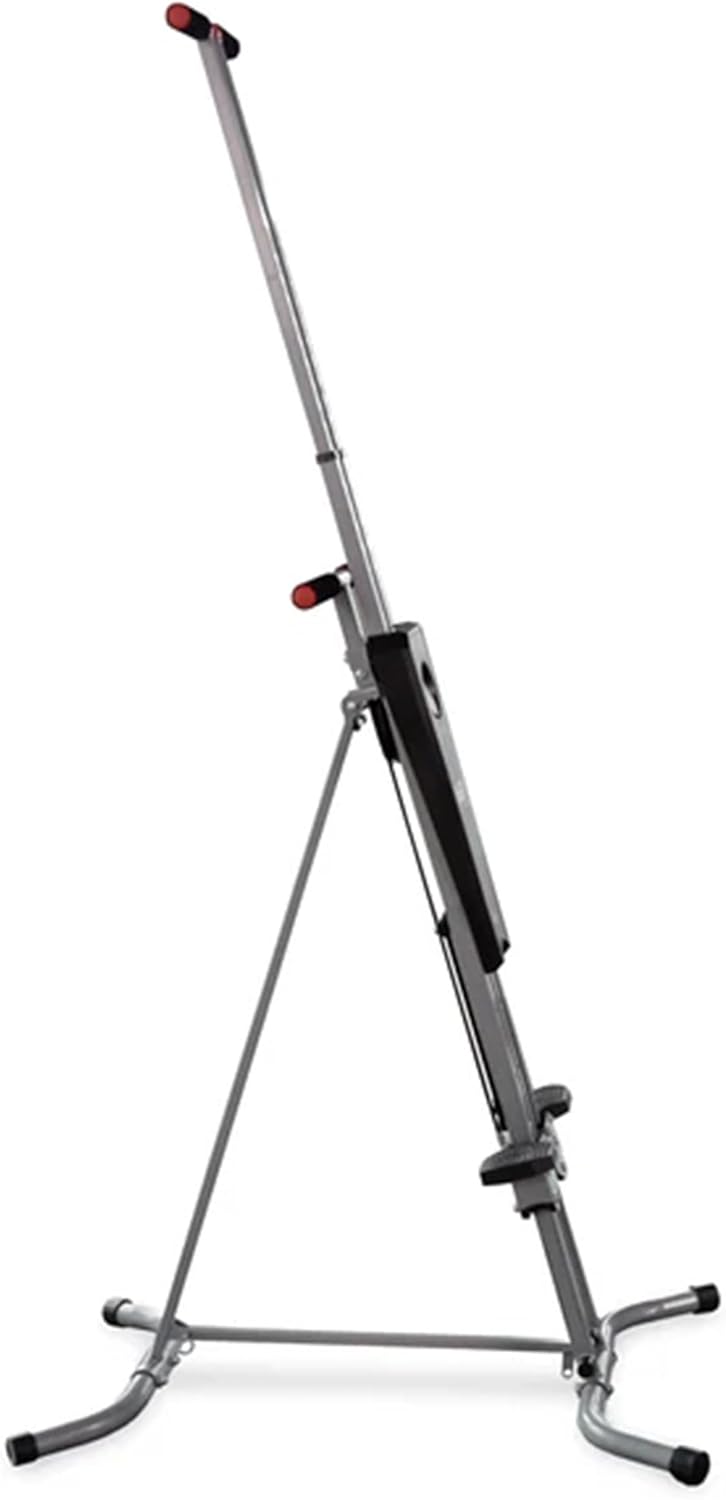
Image 5: The MaxiClimber 2.0 in a folded position, illustrating its compact design for easy storage.
7. Troubleshooting
If you encounter issues with your MaxiClimber 2.0, refer to the following common solutions:
- Squeaking/Noise: Apply machine oil to the roller glide and check for any loose connections.
- Monitor Not Working: Ensure the battery (1 AAA required) is correctly installed and has sufficient charge. Check the white cable connection to the meter.
- Stiff Movement: Lubricate the moving parts, especially the roller glide. Ensure the machine is on a level surface.
- Unstable: Verify all assembly bolts are tightened. Ensure the machine is placed on a firm, level surface.
8. Specifications
| Attribute | Detail |
|---|---|
| Brand | MaxiClimber |
| Model Name | MXC 2.0 |
| Color | Black & Silver |
| Material | Cold-rolled Steel |
| Product Dimensions (L x W x H) | 38.93" x 27.95" x 85.31" |
| Item Weight | 33 Pounds |
| Weight Limit | 250 Pounds |
| Batteries Required | 1 AAA (for monitor) |
| Manufacturer | Inova USA |
9. Warranty and Support
The MaxiClimber 2.0 comes with a One Year Warranty. For warranty claims or technical support, please refer to the contact information provided in your product packaging or visit the official MaxiClimber website.
Additionally, a free fitness app is available to enhance your workout experience, offering guided routines and tracking features. Download it from your device's app store.