
1. Product Overview
This OM3 Duplex Multimode Fiber Optic Cable is designed for high-speed network connections. It is ideal for connecting 10GBase-SR, 10GBase-LRM, SFP+, and QSFP+ transceivers, supporting 10 Gigabit Ethernet applications. The cable offers backward compatibility with existing 50/125 equipment and provides the necessary performance for LED and VCSEL laser light sources.
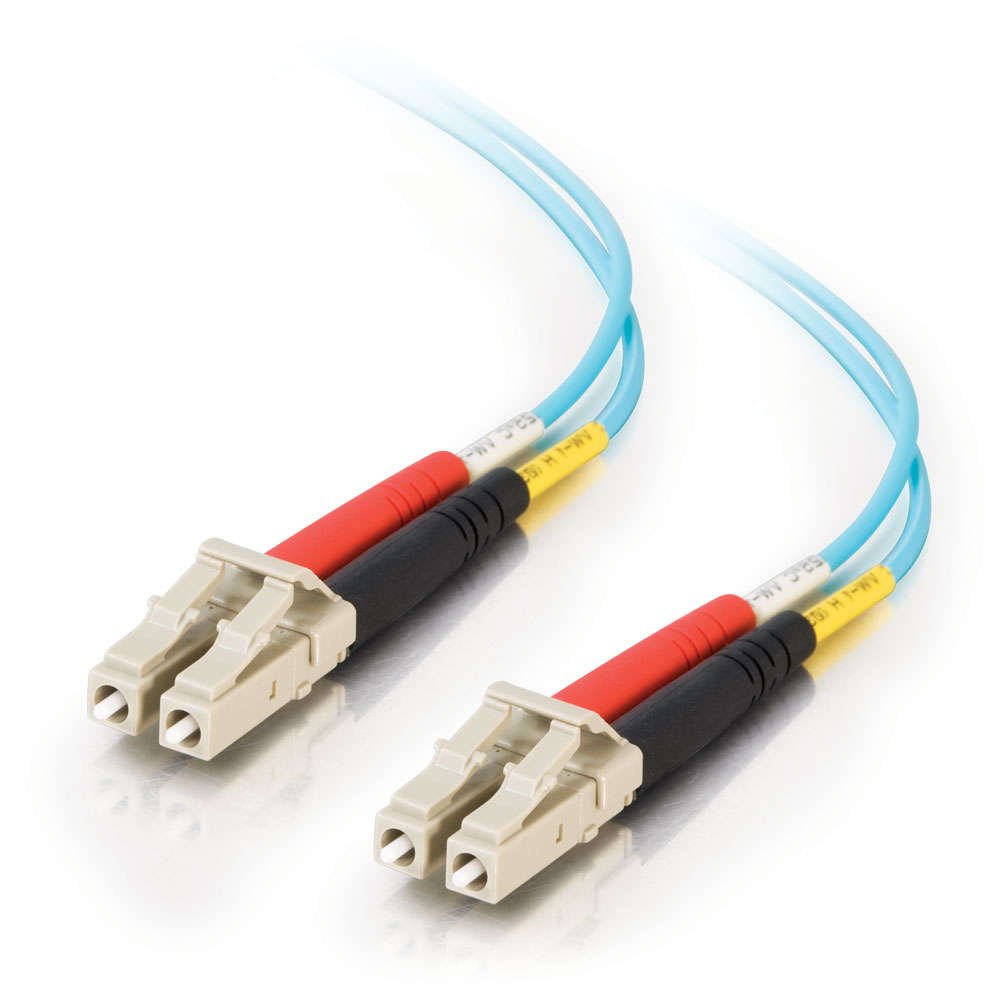
This image displays the C2G OM3 Fiber Optic Cable, featuring aqua-colored cabling and beige LC-LC connectors. The connectors have red and black boots, indicating duplex functionality.
An official product video demonstrating the features and applications of the C2G OM3 Fiber Optic Cable, highlighting its compatibility and performance for 10 Gigabit networks.
2. Key Features
- OM3 - 50 µm core: Optimized for high-speed data transmission.
- OFNR - Riser rated jacket: Suitable for vertical cable runs in buildings.
- Tested in accordance with EIA/TIA-455-171A: Ensures compliance with industry standards for fiber optic cable performance.
- Designed for 10Gbase-SR and LRM applications: Supports high-bandwidth network requirements.
- Backward compatible with existing 50/125 equipment: Allows integration into current network infrastructures.
3. Setup Guide
Follow these steps for proper installation of your C2G OM3 Fiber Optic Cable:
- Inspect Connectors: Before connecting, visually inspect both LC connectors for any dust or damage. Use a fiber optic cleaning tool if necessary.
- Identify Ports: Locate the appropriate fiber optic ports on your network devices (e.g., SFP+ or QSFP+ transceivers on a network switch or server). Ensure they are clean and free of debris.
- Connect Cable: Gently insert the LC connectors into the corresponding ports until they click securely into place. Ensure the duplex connection (transmit and receive fibers) is correctly aligned.
- Secure Cable: Route the cable carefully, avoiding sharp bends, kinks, or excessive tension, which can damage the fiber. Use cable management solutions if available.
- Verify Connection: After connecting, check the link status indicators on your network devices to confirm a successful fiber optic link.

A close-up view of the LC-LC fiber optic connector, showing the beige housing, red and black strain relief boots, and the two fiber strands.
4. Operating Instructions
The C2G OM3 Fiber Optic Cable operates passively to transmit data signals. Once properly connected between compatible devices, it facilitates high-speed data transfer without requiring user intervention. Ensure that both connected devices are powered on and configured for fiber optic communication.
- Data Transmission: The cable supports data transfer rates up to 10 Gigabits Per Second, suitable for demanding network environments.
- Environmental Considerations: While rated for outdoor usage, protect the cable from extreme physical stress, prolonged direct sunlight, and harsh chemicals to maintain optimal performance and longevity.
5. Maintenance
Proper maintenance ensures the longevity and performance of your fiber optic cable:
- Keep Connectors Clean: Dust and contaminants are the primary causes of fiber optic signal loss. Always keep the connector end-faces clean. Use specialized fiber optic cleaning kits (e.g., lint-free wipes and isopropyl alcohol or one-click cleaners) before each connection.
- Protect Connectors: When not in use, always cover the LC connectors with their protective caps to prevent dust accumulation and damage to the fiber end-faces.
- Avoid Bending: Do not bend the fiber optic cable beyond its minimum bend radius. Excessive bending can cause micro-cracks in the fiber, leading to signal degradation or breakage.
- Handle with Care: Avoid pulling the cable by the connectors. Always handle the cable body.
6. Troubleshooting
If you experience issues with your fiber optic connection, consider the following troubleshooting steps:
- No Link Light:
- Ensure both ends of the cable are securely connected to the correct ports.
- Clean the LC connectors on both the cable and the network devices.
- Verify that the network devices are powered on and configured correctly.
- Check if the transceivers (SFP+, QSFP+) are properly seated and compatible with OM3 multimode fiber.
- Intermittent Connection or Slow Speed:
- Inspect the cable for any visible damage, such as kinks or sharp bends.
- Reclean the connectors. Even a small amount of dust can significantly impact performance.
- Ensure the cable length is within the recommended limits for 10Gbps OM3 connections (e.g., up to 300 meters for 10GBASE-SR).
- Test with a known working fiber optic cable if available, to rule out the cable as the issue.
- Incorrect Transmit/Receive (Tx/Rx) Polarity:
- If the connection is duplex, ensure that the transmit fiber from one device connects to the receive fiber of the other device. Some LC connectors allow for easy polarity reversal if needed.
7. Technical Specifications
| Specification | Detail |
|---|---|
| Brand | C2G |
| Model Number | 01111 |
| Cable Type | OM3 Duplex Multimode Fiber Optic |
| Core Size | 50/125 µm |
| Connector Type | LC-LC Male-to-Male |
| Data Transfer Rate | 10 Gigabits Per Second |
| Jacket Rating | OFNR (Optical Fiber Nonconductive Riser) |
| Color | Aqua |
| Compatible Devices | Fiber Optic Device, Network Switch, Server |
| Recommended Uses | Networking and data transfer |
| Special Feature | Heat Resistant |
| Indoor/Outdoor Usage | Outdoor |
| Product Dimensions | 7.5 x 6 x 0.2 inches (packaging) |
| Item Weight | 0.81 ounces |
| UPC | 757120011118 |
8. Warranty and Support
This C2G product is backed by the manufacturer's standard warranty. For specific warranty details, duration, and terms, please refer to the documentation included with your purchase or visit the official C2G website.
For technical support, troubleshooting assistance, or inquiries regarding your C2G OM3 Fiber Optic Cable, please contact C2G customer service through their official website or the contact information provided with your product.


