
BLACK+DECKER PV1820L
BLACK+DECKER PV1820L Handheld Vacuum Cleaner User Manual
Model: PV1820L
Introduction
This manual provides essential information for the safe and efficient operation, maintenance, and troubleshooting of your BLACK+DECKER PV1820L handheld vacuum cleaner. Please read it thoroughly before first use and keep it for future reference.

Image: The BLACK+DECKER PV1820L handheld vacuum cleaner, showcasing its compact design and pivot nozzle.
Important Safety Information
Always observe basic safety precautions when using electrical appliances to reduce the risk of fire, electric shock, and personal injury. This includes, but is not limited to:
- Do not use the appliance in wet conditions or immerse it in water.
- Do not pick up flammable or combustible materials, hot ashes, or sharp objects.
- Ensure the charger is disconnected from the power supply before cleaning or performing maintenance.
- Keep hair, loose clothing, fingers, and all parts of the body away from openings and moving parts.
- Use only as described in this manual. Use only manufacturer's recommended attachments.
Package Contents
Verify that all items are present in the package:
- BLACK+DECKER PV1820L Handheld Vacuum Cleaner
- Charging Base
- Integrated Crevice Tool
- Integrated Brush Tool
- Filter (pre-installed)
- Instruction Manual
Setup
1. Initial Charging
Before first use, fully charge the vacuum cleaner. Place the vacuum onto its charging base. The charging indicator light will illuminate. A full charge typically takes approximately 4 hours. The vacuum is powered by a Lithium-Ion battery (included).

Image: The BLACK+DECKER PV1820L handheld vacuum positioned on its charging base, ready for charging.
2. Attaching Accessories (if applicable)
The PV1820L features integrated crevice and brush tools. These tools slide out from the nozzle for quick access and convenience. No separate assembly is required for these accessories.

Image: A hand extending the integrated crevice tool from the vacuum's nozzle for reaching tight spaces.

Image: A hand demonstrating the use of the integrated brush tool, ideal for upholstery and delicate surfaces.
Operating Instructions
Powering On/Off
To turn the vacuum on, slide the power switch located on the handle to the "ON" position. To turn it off, slide the switch back to the "OFF" position.
Using the Pivot Nozzle
The PV1820L features a patented pivot nozzle that allows you to access hard-to-reach areas. Press the pivot release button to adjust the nozzle angle. This flexibility makes it ideal for cleaning under furniture, in high corners, or inside vehicles.

Image: The BLACK+DECKER PV1820L with its nozzle pivoted downwards, demonstrating its flexible design.

Image: The vacuum being used to clean dust and debris from under a sofa, showcasing the pivot feature.
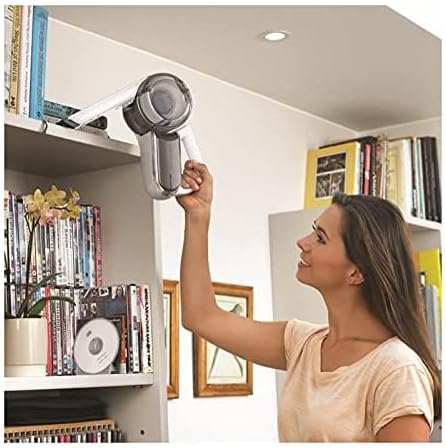
Image: A person using the BLACK+DECKER PV1820L to clean dust from a high bookshelf, demonstrating its versatility.
Runtime
The vacuum provides approximately 10 minutes of continuous runtime on a full charge.
Maintenance
1. Emptying the Dustbin
For optimal performance, empty the dustbin after each use or when the debris reaches the "MAX" fill line. To empty, press the dustbin release button and detach the dustbin from the main unit. Dispose of the contents.

Image: A hand detaching the transparent dustbin from the main body of the vacuum cleaner.
2. Cleaning the Filter
The filter should be cleaned regularly to maintain suction power. After emptying the dustbin, remove the filter. Tap it gently over a waste bin to remove loose dust. For a more thorough clean, the filter can be washed with warm, soapy water. Ensure the filter is completely dry before reinserting it into the vacuum. Do not wash the filter in a dishwasher.

Image: A hand removing the circular filter from inside the dustbin of the vacuum cleaner.
3. Battery Care
To prolong battery life, avoid fully discharging the battery before recharging. Store the vacuum in a cool, dry place when not in use.
Troubleshooting
| Problem | Possible Cause | Solution |
|---|---|---|
| Vacuum does not turn on. | Battery is not charged. | Charge the vacuum fully. |
| Reduced suction power. | Dustbin is full or filter is clogged. | Empty the dustbin and clean the filter. |
| Vacuum stops during operation. | Battery is depleted. | Recharge the vacuum. |
Specifications
| Feature | Detail |
|---|---|
| Brand | BLACK+DECKER |
| Model Name | PV1820L-QW |
| Item Model Number | PV1820L |
| Capacity | 0.44 Liters |
| Wattage | 27 watts |
| Runtime | 10 minutes |
| Battery Type | Lithium Ion (included) |
| Noise Level | 85 dB |
| Item Weight | 3.04 pounds (1.38 kg) |
| Product Dimensions | 7.28 x 7.28 x 12.01 inches |
| Filter Type | Tissu (VF90-XJ) |
| Cordless | Yes |
| Recommended Uses | Furniture, general household cleaning |
Warranty and Support
For warranty information or technical support, please refer to the warranty card included with your product or visit the official BLACK+DECKER website. You can also contact customer service through their provided channels for assistance with product inquiries, parts, or service.
Official BLACK+DECKER Website: www.blackanddecker.com
Related documentsPV1820L


Ask a question about this manual
Ask about setup, troubleshooting, compatibility, parts, safety, or missing instructions. Manuals+ will review the question and use this page’s manual context to help answer it.