
Introduction
This manual provides essential information for the safe and efficient installation, operation, and maintenance of the Eaton ECN5412CAA Freedom Combination Pump Panel. Please read this manual thoroughly before attempting to install or operate the unit. Retain this manual for future reference.
The Eaton ECN5412CAA is a NEMA Size 1 combination pump panel designed for 480V applications, featuring a flange handle disconnect, fusible protection, and a thermal overload relay. It is rated for up to 10 HP at 480V and is housed in a NEMA Type 3R rainproof enclosure.
Safety Information
WARNING: Electrical shock hazard. Only qualified personnel should install, operate, or service this equipment. Disconnect all power before working on the unit. Failure to follow these instructions can result in serious injury or death.
- Always follow local and national electrical codes.
- Ensure proper grounding of the equipment.
- Do not operate the unit with damaged components.
- Wear appropriate personal protective equipment (PPE).
Setup and Installation
Unpacking and Inspection
Carefully unpack the pump panel and inspect for any shipping damage. Report any damage to the carrier immediately. Verify that all components listed in the packing slip are present.
Mounting
The ECN5412CAA features a NEMA Type 3R rainproof enclosure, suitable for outdoor installation. Mount the panel securely on a flat, vertical surface using appropriate hardware. Ensure adequate clearance for ventilation and access to controls and wiring.
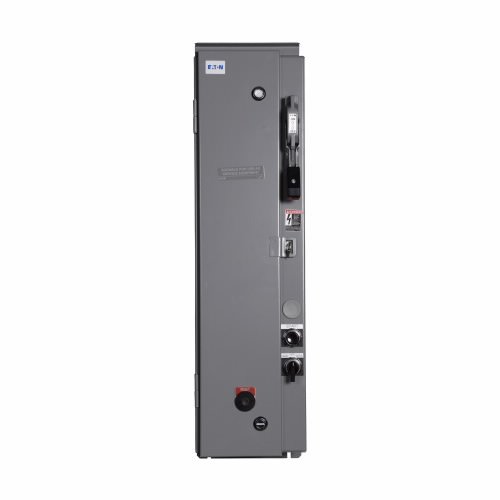
Figure 1: Eaton ECN5412CAA Freedom Combination Pump Panel. This image shows the front view of the pump panel with its enclosure, flange handle disconnect, and control interface.
Wiring
All wiring must be performed by a qualified electrician in accordance with national and local electrical codes. Ensure the main power supply is disconnected before beginning any wiring. The panel is designed for 480V, 3-phase operation.
- Connect incoming power to the designated terminals.
- Connect the motor leads to the motor starter terminals.
- Ensure proper grounding connections.
- Install the required heater pack for thermal overload protection and fuse clips for fusible protection (if not pre-installed). Refer to the wiring diagram inside the panel cover for specific connections.
Operating Instructions
Pre-Operation Checks
- Verify all wiring connections are secure.
- Ensure the enclosure door is properly closed and latched.
- Confirm the motor and pump system are ready for operation.
Starting the Pump Panel
- Engage Disconnect: Turn the flange handle disconnect to the "ON" position to apply power to the control circuit.
- Select Mode: Use the Hand/Off/Auto selector switch on the cover to choose the desired operating mode:
- HAND: For manual operation. Press the "START" pushbutton to energize the motor. Press "STOP" (or "RESET" if an overload occurred) to de-energize.
- OFF: Disables all motor operation.
- AUTO: For automatic operation, typically controlled by an external float switch or pressure sensor. The motor will start and stop based on the external control signal.
- Start Motor: If in HAND mode, press the "START" pushbutton. The motor should begin operation.
Stopping the Pump Panel
- Manual Stop: If in HAND mode, press the "STOP" pushbutton.
- Automatic Stop: In AUTO mode, the motor will stop when the external control signal dictates.
- Emergency Stop/Power Disconnect: Turn the flange handle disconnect to the "OFF" position to completely remove power from the panel.
Maintenance
WARNING: Disconnect all power to the pump panel before performing any maintenance. Failure to do so can result in severe injury or death.
- Regular Inspection: Periodically inspect the enclosure for signs of damage, corrosion, or water ingress. Ensure all seals are intact.
- Terminal Connections: Annually, check all terminal connections for tightness. Loose connections can cause overheating and equipment failure.
- Dust and Debris: Keep the interior of the panel clean and free of dust and debris. Use a dry, non-conductive brush or vacuum.
- Overload Relay: Test the thermal overload relay periodically according to manufacturer's recommendations to ensure proper operation.
- Fuse Replacement: If a fuse blows, replace it only with a fuse of the same type and rating.
Troubleshooting
| Problem | Possible Cause | Solution |
|---|---|---|
| Motor does not start in HAND mode. |
|
|
| Motor does not start in AUTO mode. |
|
|
| Motor trips frequently. |
|
|
Specifications
| Feature | Detail |
|---|---|
| Model | ECN5412CAA |
| Brand | Eaton |
| Type | Freedom Combination Pump Panel |
| NEMA Size | N1 |
| Voltage | 480V (60 Hz) / 440V (50 Hz) Coil |
| Maximum Horsepower | 10 HP @ 480V |
| Phase | 3 Phase |
| Enclosure Type | NEMA Type 3R (Rainproof) |
| Disconnect Type | Flange Handle Disconnect, Fusible |
| Overload Protection | Thermal Overload Relay (Heater Pack Required) |
| Controls | Start/Reset Pushbuttons, Hand/Off/Auto Selector Switch |
| UPC | 782114138854 |
Warranty and Support
For warranty information and technical support, please contact Eaton customer service or visit the official Eaton website. Keep your purchase receipt and product model number (ECN5412CAA) handy when contacting support.
Eaton Official Website: www.eaton.com