
1. Introduction
The EuControls LD4-10070 is a DALI (Digital Addressable Lighting Interface) low voltage constant current decoder designed for precise dimming control of LED modules. This device converts DALI digital control signals into a constant current output, enabling smooth and efficient brightness adjustment for compatible LED lighting systems. It supports both DALI digital control and Touch DIM functionality, offering versatile control options for various applications.
Key Features:
- DALI digital control input for dimming LED modules.
- 700mA constant current output.
- Addressable output channels for individual control.
- Supports Touch DIM and manual dimming.
- Dimming range of 0-100% (LED brightness starts up at 1%).
- Operates with a DC power supply.
- Safety Class 2 rated.
- Integrated over-heat protection.
- Compatible with lights of 1W x 3~12 LED configurations.
2. Safety Information
Please read all safety instructions carefully before installation and operation. Failure to follow these instructions may result in electric shock, fire, or other hazards.
- Installation should be performed by a qualified electrician in accordance with all local and national electrical codes.
- Ensure the power supply is disconnected before any installation or maintenance work.
- Do not expose the device to moisture or extreme temperatures outside its specified operating range (-20°C to +50°C).
- Verify that the input voltage and current ratings of the power supply match the requirements of the decoder and connected LEDs.
- Use appropriate wire gauges (AWG16-20) for all connections to ensure safe and reliable operation.
- Do not exceed the maximum power supply of 33.6W or 48VDC.
3. Product Overview
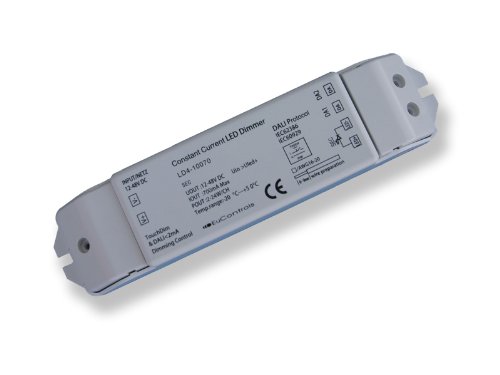
Figure 1: EuControls LD4-10070 DALI Low Voltage Constant Current Decoder. This image displays the compact, rectangular device with clearly labeled input, output, and control terminals, along with product specifications and certifications.
Device Labels and Connections:
- INPUT/NETZ 12-48V DC: Power input terminals for DC voltage ranging from 12V to 48V.
- TouchDim & DALI 2mA Dimming Control: Terminals for connecting DALI control lines or a Touch DIM switch.
- Constant Current LED Dimmer LD4-10070: Product name and model number.
- SEC UOUT 12-48V DC: Secondary output voltage range.
- IOUT 700mA Max: Maximum output current of 700mA.
- POUT 2-24W/CH: Output power per channel, ranging from 2W to 24W.
- Temp range: -20°C - +50°C: Operating temperature range.
- EuControls: Manufacturer's brand.
- DALI Protocol IEC62386, IEC60929: Indicates compliance with DALI standards.
- CE: European Conformity mark.
- AWG16-20: Recommended wire gauge for connections.
4. Setup
Proper installation is crucial for the safe and effective operation of the LD4-10070 decoder. Ensure all connections are secure and comply with electrical standards.
Wiring Instructions:
- Power Input (INPUT/NETZ 12-48V DC): Connect the DC power supply to the input terminals. Observe correct polarity (+ and -). The recommended power supply is EUPS03612, providing 48VDC.
- LED Output: Connect the LED module(s) to the output terminals. Ensure the total power consumption of the connected LEDs does not exceed 24W per channel and that the LEDs are compatible with a 700mA constant current output.
- DALI Control (TouchDim & DALI 2mA Dimming Control):
- For DALI control: Connect the DALI bus lines to the designated DALI control terminals. The device will then be addressable via a DALI master controller.
- For Touch DIM control: Connect a momentary push switch to the Touch DIM terminals. This allows for manual dimming control without a DALI master.
- Wire Preparation: Use wires with a gauge between AWG16 and AWG20 for all connections. Strip wires to the appropriate length to ensure full contact within the screw terminals without exposed strands.
- Mounting: Secure the decoder in a suitable enclosure or mounting location, ensuring adequate ventilation and protection from environmental factors.
5. Operating Instructions
The LD4-10070 decoder offers flexible control methods for dimming LED modules.
DALI Control:
When connected to a DALI master controller, the LD4-10070 can be individually addressed and controlled. The DALI master sends digital commands to adjust the brightness of the connected LED modules. Refer to your DALI master controller's manual for specific programming and addressing procedures. The dimming range is 0-100%, with LED brightness starting at 1% for smooth transitions.
Touch DIM Control:
If a momentary push switch is connected to the Touch DIM terminals, the following operations are possible:
- Short Press: A quick press and release of the switch will turn the connected LEDs ON or OFF.
- Long Press: Press and hold the switch to dim the LEDs up or down. The dimming direction will reverse with each subsequent long press. Release the switch at the desired brightness level.
6. Maintenance
The EuControls LD4-10070 decoder is designed for reliable operation with minimal maintenance. Follow these guidelines to ensure longevity:
- Cleaning: Ensure the device is powered off before cleaning. Use a soft, dry cloth to wipe the exterior. Do not use liquid cleaners or solvents.
- Inspection: Periodically check all wiring connections for tightness and signs of wear or damage. Address any issues promptly.
- Environment: Maintain the operating environment within the specified temperature range (-20°C to +50°C) and avoid excessive humidity or dust.
7. Troubleshooting
If you encounter issues with your LD4-10070 decoder, refer to the table below for common problems and solutions.
| Problem | Possible Cause | Solution |
|---|---|---|
| LEDs do not turn ON. | No power supply; incorrect wiring; faulty LEDs; DALI command issue. | Check power connections and voltage. Verify LED wiring polarity. Test LEDs. Check DALI master commands. |
| LEDs do not dim. | Incorrect DALI addressing; Touch DIM switch not connected or faulty; DALI bus error. | Verify DALI address. Check Touch DIM switch connection. Inspect DALI bus for shorts or open circuits. |
| LEDs flicker or behave erratically. | Unstable power supply; loose connections; incompatible LEDs; DALI bus interference. | Ensure stable power supply. Tighten all wiring connections. Verify LED compatibility. Check DALI bus for noise. |
| Device is hot to the touch. | Overload; insufficient ventilation; ambient temperature too high. | Reduce load on the device. Ensure proper airflow around the unit. Check ambient temperature is within range. |
8. Specifications
Technical specifications for the EuControls LD4-10070 DALI Low Voltage Constant Current Decoder.
| Parameter | Value |
|---|---|
| Model Number | LD4-10070 |
| Input Voltage | 12-48V DC |
| Output Type | Constant Current |
| Output Current | 700mA Max |
| Output Power per Channel | 2-24W/CH |
| Maximum Power Supply | 33.6W, 48VDC |
| Recommended Power Supply | EUPS03612 |
| Dimming Range | 0-100% (LED brightness starts at 1%) |
| Control Protocol | DALI (IEC62386, IEC60929), Touch DIM |
| Operating Temperature | -20°C to +50°C |
| Safety Class | Class 2 |
| Compatible LEDs | 1W x 3~12 LED configurations |
| Wire Gauge Recommendation | AWG16-20 |
| UPC | 852678872133 |
9. Warranty and Support
EuControls products are manufactured to high-quality standards and are backed by a manufacturer's warranty. For specific warranty terms and conditions, please refer to the documentation provided with your purchase or visit the official EuControls website.
Customer Support:
If you require technical assistance, have questions about installation, or need to report a product issue, please contact EuControls customer support. Contact information can typically be found on the product packaging or the official EuControls website.