
1. Introduction
This instruction manual provides essential information for the safe and effective installation, operation, and maintenance of your FI Lamps OSRAM XL-2100/69374 P-VIP 120/132W projector lamp. This lamp is designed as a replacement for compatible Sony televisions. Please read this manual thoroughly before proceeding with installation to ensure proper function and to prevent damage to the product or your television.
2. Safety Information
Always observe the following safety precautions to prevent injury or damage:
- Power Disconnection: Always disconnect the television from the main power supply before attempting any installation or maintenance.
- Cool Down Period: Allow the television and the old lamp to cool down completely (at least 30 minutes) before handling. Lamps operate at very high temperatures and can cause severe burns.
- Handle with Care: Do not touch the glass surface of the new lamp with bare hands. Oils from your skin can create hot spots and reduce lamp life. Use gloves or a clean cloth.
- Electrical Shock Hazard: Do not open the lamp housing or attempt to repair the lamp. There are no user-serviceable parts inside.
- Disposal: Dispose of the old lamp according to local regulations. Projector lamps may contain mercury or other hazardous materials.
3. Product Overview
The FI Lamps OSRAM XL-2100/69374 is a high-quality replacement projector lamp designed to restore optimal picture brightness and clarity to your compatible Sony television. It features an original OSRAM P-VIP 120/132W bulb, ensuring performance comparable to the original manufacturer's lamp.
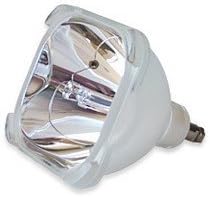
An image showing the FI Lamps OSRAM XL-2100/69374 P-VIP 120/132W projector lamp, featuring its reflective housing and internal bulb element. This is the replacement lamp for compatible Sony televisions.
4. Setup and Installation
Follow these steps carefully to replace the projector lamp in your Sony television:
- Prepare the Television: Turn off your Sony television and unplug it from the power outlet. Allow at least 30 minutes for the lamp and television to cool down completely.
- Locate the Lamp Compartment: Refer to your Sony television's user manual to locate the lamp access door. This is typically on the back or side of the TV.
- Remove the Access Door: Use a screwdriver if necessary to remove the screws securing the lamp access door, then carefully remove the door.
- Remove the Old Lamp: The old lamp will be housed in a module. Unscrew any retaining screws that hold the lamp module in place. Gently pull the handle on the lamp module to slide it out of the television.
- Install the New Lamp: Carefully insert the new FI Lamps OSRAM XL-2100/69374 lamp module into the compartment. Ensure it slides in smoothly and is seated firmly. Do not force it.
- Secure the New Lamp: Re-insert and tighten any retaining screws to secure the new lamp module.
- Close the Access Door: Replace the lamp access door and secure it with its screws.
- Reconnect Power: Plug the television back into the power outlet.
5. Operating and Lamp Timer Reset
After installing the new lamp, it is crucial to reset the lamp timer in your Sony television. This ensures accurate tracking of the new lamp's lifespan and prevents premature warning messages.
5.1 Initial Power On
Turn on your Sony television. The picture should now be restored to its optimal brightness.
5.2 Resetting the Lamp Timer
The procedure for resetting the lamp timer varies by Sony television model. Please consult your specific Sony television's user manual for the exact steps. Generally, this involves navigating through the TV's on-screen menu (often under 'Picture Settings', 'Setup', or 'Maintenance') to find a 'Lamp Timer Reset' or similar option.
Failure to reset the lamp timer may result in the TV displaying a 'replace lamp' warning prematurely, even with a new lamp installed.
6. Maintenance
Proper maintenance can help prolong the life of your projector lamp and maintain picture quality.
- Keep Vents Clear: Ensure that the ventilation openings on your television are not blocked. Proper airflow is essential for cooling the lamp and preventing overheating.
- Clean Regularly: Periodically clean the exterior of your television and the lamp access area with a soft, dry cloth to prevent dust buildup. Do not use abrasive cleaners or solvents.
- Avoid Frequent On/Off Cycles: Turning the television on and off frequently can reduce lamp life. Allow the lamp to operate for a reasonable period before turning it off.
- Lamp Life: The typical lifespan of a projector lamp can vary, but it is generally recommended to replace the lamp when brightness significantly diminishes or when the television displays a lamp replacement warning.
7. Troubleshooting
If you encounter issues after installing your new lamp, consider the following troubleshooting steps:
- No Picture / Lamp Indicator Light:
- Ensure the lamp module is fully seated and secured.
- Check that the lamp access door is closed and secured properly. Many TVs have a safety switch that prevents operation if the door is open.
- Verify the television is plugged in and receiving power.
- Dim Picture / Poor Color:
- Confirm that the lamp timer has been reset.
- Check the picture settings on your television.
- Lamp Warning Message Persists:
- Double-check that the lamp timer has been correctly reset according to your TV's manual.
- If the issue persists, the lamp module might be faulty, or there could be an issue with the television itself.
If these steps do not resolve the issue, please contact customer support or a qualified service technician.
8. Specifications
| Feature | Specification |
|---|---|
| Model Number | XL-2100/69374 |
| Original Bulb Type | OSRAM P-VIP 120/132W 1.0 P22H |
| Brand (Lamp Module) | FI Lamps |
| Wattage | 132 watts |
| Compatibility | Sony Televisions (specific models vary, refer to TV manual) |
| Unit Count | 1 Count |
| Number of Items | 1 |
9. Warranty and Support
For information regarding the warranty of your FI Lamps OSRAM XL-2100/69374 projector lamp, please refer to the documentation provided at the time of purchase or contact your retailer directly. Specific warranty terms and conditions may vary.
If you require technical assistance or have questions not covered in this manual, please contact the customer support of your product vendor. When contacting support, please have your product model number (XL-2100/69374) and purchase information readily available.