
Introduction
The GTD Audio U-502L is a professional and reliable 2-channel UHF wireless microphone system. Designed with advanced SMT (Surface Mounted Technology) and high-quality components, this system ensures excellent performance and reliability. It is suitable for various applications, including professional performances, church events, and home karaoke.
Key features include:
- 2-channel receiver with support for two microphones.
- Includes two lavalier microphones and two headset microphones.
- Individual volume controls for each channel.
- Operating range of up to 300 feet (100 meters).
- Carrier Frequency: UHF 650~660MHz.
- One 1/4" mixed output and two XLR individual outputs.
Package Contents
Please check the package carefully to ensure all items are present:
- 1 x U-502L 2-Channel UHF Receiver
- 2 x Bodypack Transmitters
- 2 x Lavalier Microphones
- 2 x Headset Microphones
- 1 x 1/4" Audio Cable
- 1 x Power Adapter
- User Manual (this document)
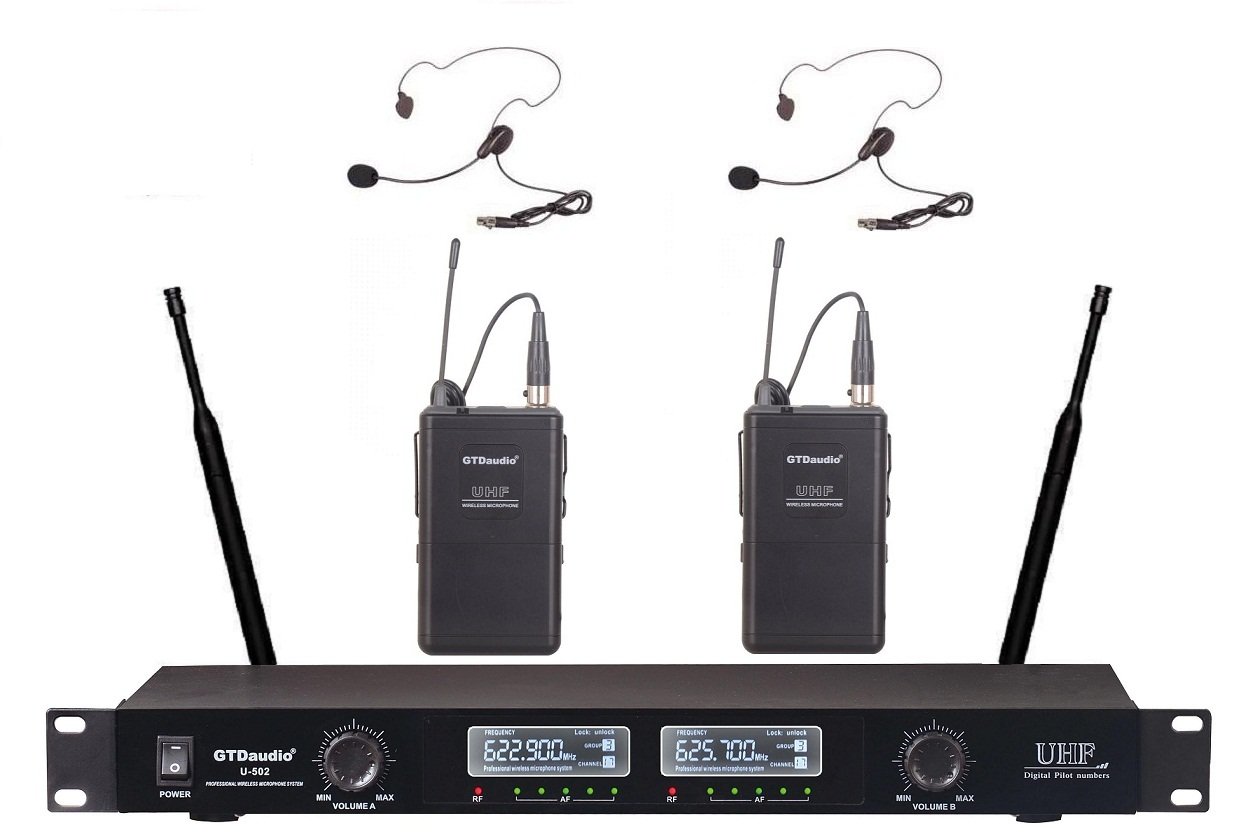
Image: Overview of the GTD Audio U-502L wireless microphone system components, including the receiver, bodypack transmitters, lavalier mics, and headset mics.
Setup Instructions
- Receiver Placement: Place the U-502L receiver in a central location, away from large metal objects or other electronic devices that may cause interference. Ensure a clear line of sight to where the transmitters will be used.
- Connect Antennas: Screw the two included antennas onto the corresponding antenna connectors on the rear panel of the receiver. Position them vertically for optimal signal reception.
- Power Connection: Connect the provided power adapter to the DC IN jack on the receiver and then plug it into a standard AC power outlet. Do not power on the receiver yet.
- Audio Output Connection:
- Mixed Output: For a combined signal of both microphones, connect one end of the 1/4" audio cable to the "MIX OUT" jack on the receiver and the other end to an input on your mixer, amplifier, or sound system.
- Individual XLR Outputs: For separate control of each microphone, use XLR cables (not included) to connect the "CH1 OUT" and "CH2 OUT" jacks on the receiver to individual XLR inputs on your mixer.
- Transmitter Battery Installation: Open the battery compartment on each bodypack transmitter. Insert two fresh AA batteries, observing the correct polarity (+/-). Close the compartment securely.
- Microphone Connection to Transmitters: Connect either a lavalier microphone or a headset microphone to the 3.5mm input jack on each bodypack transmitter. Ensure the connection is secure.
- Initial Power On:
- First, turn on your mixer/amplifier and set its volume to a low level.
- Then, turn on the U-502L receiver using the power button. The power indicator should illuminate.
- Finally, turn on each bodypack transmitter. The RF indicator on the receiver should light up for each active transmitter, indicating a successful wireless connection.
Operating Instructions
- Volume Adjustment:
- Use the individual volume control knobs on the front panel of the receiver (CH1 VOL and CH2 VOL) to adjust the output level of each microphone.
- Further volume adjustments can be made on your connected mixer or amplifier.
- Microphone Usage:
- Lavalier Microphones: Clip the lavalier microphone to clothing, approximately 6-8 inches below the chin, for clear voice pickup.
- Headset Microphones: Position the headset microphone boom approximately 1-2 inches from the corner of your mouth for optimal sound.
- Range: The system operates effectively up to 300 feet (100 meters) in open areas. Obstacles like walls, metal structures, and other wireless devices can reduce this range.
- Power Off Sequence: When finished, first turn off the bodypack transmitters, then turn off the receiver, and finally turn off your audio system. This prevents sudden loud noises (pops) through your speakers.
Maintenance
- Cleaning: Use a soft, dry cloth to clean the receiver and transmitters. Do not use liquid cleaners or solvents, as they may damage the finish or internal components.
- Battery Replacement: Replace batteries in the bodypack transmitters when the low battery indicator illuminates or when audio quality degrades. Always use fresh, high-quality AA batteries. Remove batteries if the system will not be used for an extended period to prevent leakage.
- Storage: Store the system in a cool, dry place, away from direct sunlight and extreme temperatures.
Troubleshooting
| Problem | Possible Cause | Solution |
|---|---|---|
| No sound from microphone |
|
|
| Interference or static |
|
|
| Short operating range |
|
|
Specifications
- Model: U-502L
- Brand: GTDaudio
- Number of Channels: 2
- Carrier Frequency: UHF 650~660MHz
- Operating Range: Up to 300 feet (100 meters)
- Outputs: One 1/4" Mixed output, Two XLR individual outputs
- Microphone Form Factor: Microphone System (includes Lavalier and Headset)
- Receiver Dimensions (L x W x H): Approximately 19 x 9 x 2 inches
- Item Weight: Approximately 6 Pounds (total system)
- UPC: 700371825393
Warranty and Support
For warranty information, technical support, or service inquiries regarding your GTD Audio U-502L wireless microphone system, please refer to the warranty card included with your product or visit the official GTD Audio website. You may also contact GTD Audio customer service directly for assistance.
Manufacturer: GTD Audio
For the most up-to-date support information, please visit the GTDaudio Store on Amazon.