
1. Introduction
This manual provides detailed instructions for the assembly, operation, and maintenance of your FILMCITY FC-02 Camera Shoulder Support Rig Kit. This kit is designed to provide stable and comfortable support for DSLRs, video camcorders, and other compatible cameras, enhancing your video production capabilities. Please read this manual thoroughly before use to ensure proper setup and safe operation.

Figure 1: Fully assembled FILMCITY FC-02 Camera Shoulder Support Rig Kit, including the matte box and cage.
2. Safety Information
⚠ WARNING
Do not attempt to disassemble, modify, or repair the product yourself to avoid personal injury or equipment damage. This product is not suitable for children. Always ensure all components are securely fastened before use to prevent accidental detachment and potential damage to your camera equipment.

Figure 2: Multi-language warning label emphasizing not to disassemble, modify, or repair the product and that it is not suitable for children.
3. Package Contents
Verify that all items listed below are present in your package:
- Shoulder Rig for DSLR
- 2 x 300mm Female Threaded Rods
- 1 x 300mm Learning Threaded Rod
- 2 x 300mm Male Threaded Rods
- 2 x 200mm Female Threaded Rods
- 2 x 150mm Male Threaded Rods
- 2 x 100mm Male Threaded Rods
- 2 x Accessory Mounting Adapter
- MB-600 Matte Box (P-MB-600)
- 2 x 9" Cage Brackets
- Junction Rod Adapter
- Z-Bracket
- 3x Wire Organizer Clamps
- Tripod Mounting Plate
4. Setup Instructions
Follow these steps to assemble your FILMCITY FC-02 Shoulder Support Rig Kit:
4.1. Assembling the Base Shoulder Rig
- Attach the shoulder pad to the rear rods. Ensure it is securely fastened for comfort and stability.
- Connect the adjustable rubber handgrips to the front rod system. Adjust their position for ergonomic handling.
- Mount the counterweight to the rear of the shoulder pad assembly to balance the rig, especially with heavier cameras.

Figure 3: The base shoulder rig assembly, showing the shoulder pad and rod system without the cage or matte box.

Figure 4: Close-up view of the ergonomic shoulder pad, designed for comfortable long-duration shooting.

Figure 5: The adjustable soft-grip handles, which can be positioned for optimal comfort and control.
4.2. Installing the Camera Cage
- Attach the 9" cage brackets to the 15mm rods. These brackets are convertible to 6" to accommodate various camera sizes.
- Secure your camera to the quick release plate, then mount the quick release plate onto the cage base.
- Utilize the accessory mounting threads (1/4"-20) on the cage to attach additional accessories as needed.
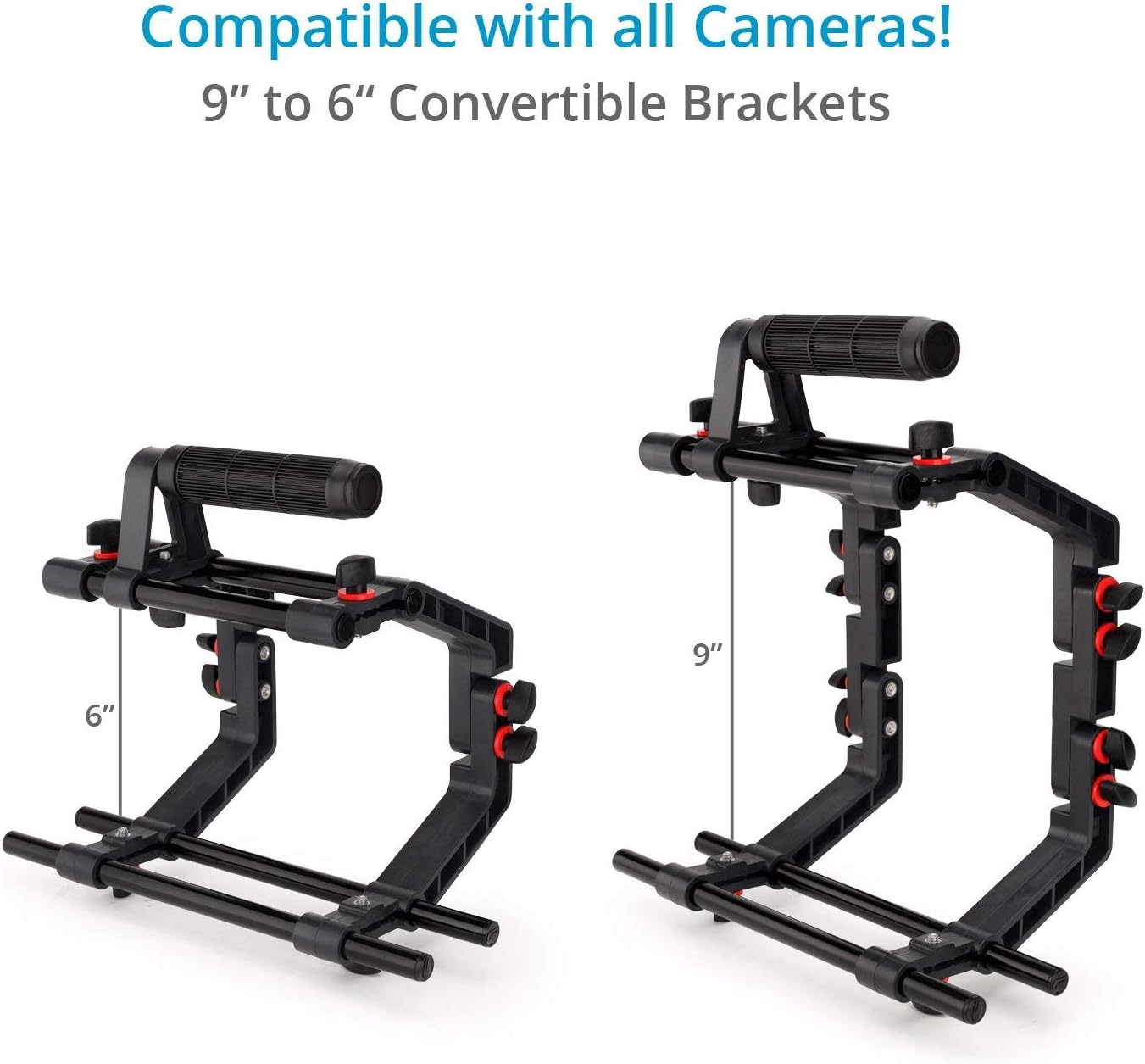
Figure 6: The camera cage demonstrating its 9-inch and 6-inch convertible bracket configurations, compatible with various camera sizes.
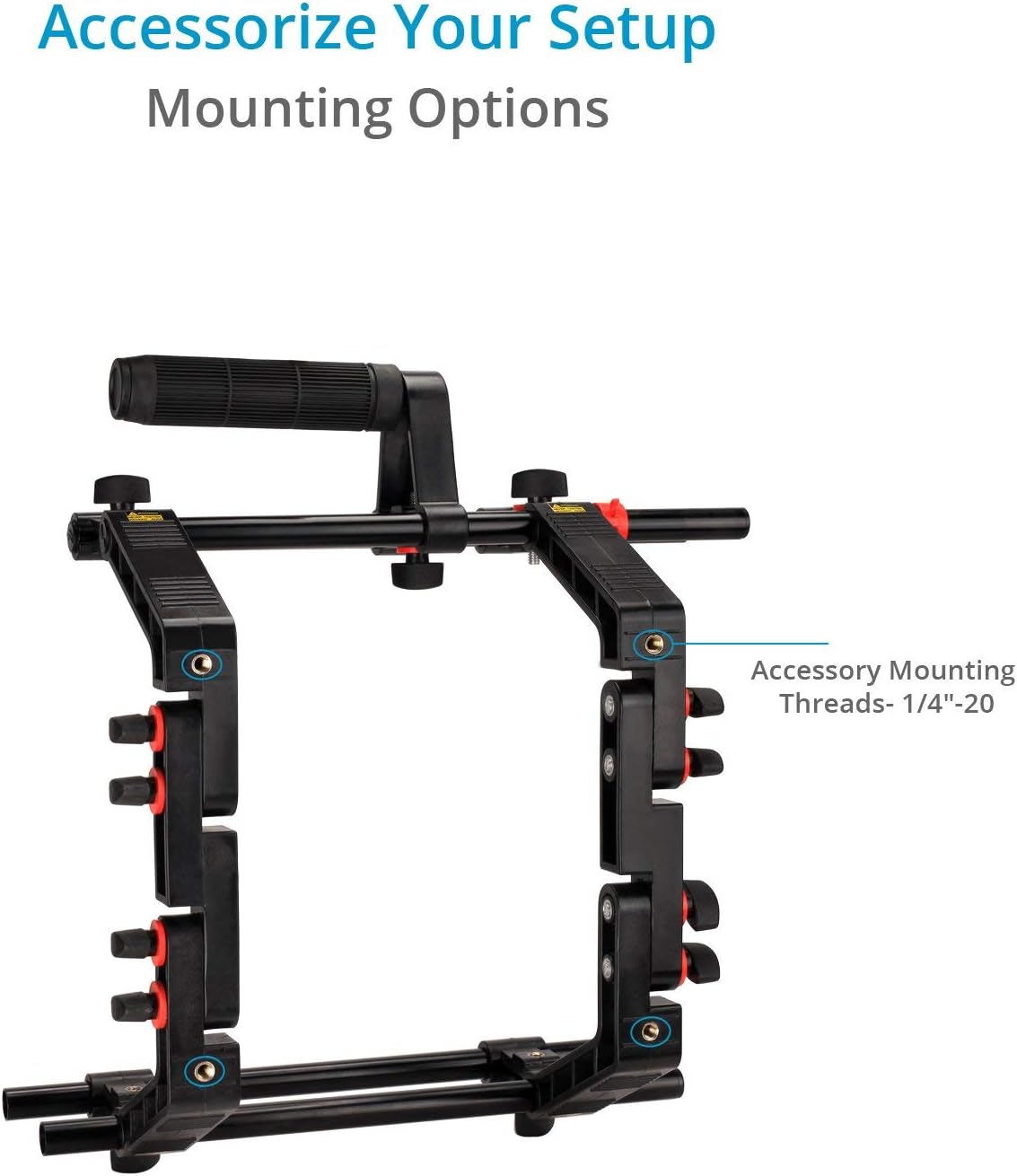
Figure 7: Detail of the camera cage showing the 1/4"-20 accessory mounting threads for attaching external devices.

Figure 8: The quick release plate, designed for fast and secure camera mounting and dismounting.
4.3. Attaching the MB-600 Matte Box
- Slide the MB-600 Matte Box onto the 15mm rods in front of your camera lens.
- Adjust the height of the matte box to align with your camera lens (up to 2.5cm adjustment).
- Position the French flags and side flags to block unwanted light and prevent lens flares.
- Insert 4x4" filters into the rotating filter holders if required.

Figure 9: The MB-600 Matte Box with adjustable flags, designed to protect against unwanted lens flares and glare.
5. Operating Instructions
Once assembled, the FILMCITY FC-02 rig provides a stable platform for various shooting scenarios.
5.1. Shoulder-Mounted Operation
- Place the shoulder pad comfortably on your shoulder.
- Grip the adjustable handles firmly with both hands.
- Adjust the counterweight as needed to achieve optimal balance, reducing strain during extended use.
- Ensure all camera and accessory connections are secure before moving.
5.2. Tripod Mounting
The rig can be quickly transferred from shoulder-mounted to tripod-mounted operation.
- Utilize the integrated tripod mounting plate to attach the entire rig to a compatible tripod.
- Ensure the tripod head is capable of supporting the combined weight of the rig, camera, and accessories.

Figure 10: The FILMCITY FC-02 rig mounted on a tripod, demonstrating its versatility for both handheld and static shots.
6. Maintenance
Proper maintenance ensures the longevity and optimal performance of your FILMCITY FC-02 rig.
- Cleaning: Wipe down all components with a soft, dry cloth after each use. For stubborn dirt, use a slightly damp cloth and mild soap, then dry thoroughly. Avoid harsh chemicals.
- Storage: Store the rig in a clean, dry environment, away from extreme temperatures and direct sunlight. Disassemble if necessary for compact storage.
- Inspection: Regularly inspect all screws, clamps, and joints for tightness. Tighten any loose connections to prevent accidental damage. Check for any signs of wear or damage to plastic or metal components.
- Lubrication: Moving parts, such as rod clamps, may benefit from a small amount of silicone-based lubricant if they become stiff.
7. Troubleshooting
This section addresses common issues you might encounter with your FILMCITY FC-02 rig.
| Problem | Possible Cause | Solution |
|---|---|---|
| Rig feels unstable or wobbly. | Loose connections; uneven weight distribution. | Ensure all screws and clamps are tightened. Adjust the counterweight and camera position for better balance. |
| Matte box does not align with the lens. | Incorrect height adjustment. | Adjust the matte box's vertical position using its height adjustment mechanism until it aligns with the lens. |
| Handles loosen during use. | Insufficient tightening of handle clamps. | Ensure the handle clamps are securely tightened. Periodically check and re-tighten during extended shoots. |
| Difficulty attaching camera to quick release plate. | Camera screw not aligned or tightened. | Ensure the camera's tripod mount is aligned with the quick release plate's screw. Tighten the screw firmly. |
8. Specifications
8.1. Shoulder Rig
- Construction: High-grade Plastic & Aluminum
- Camera Compatibility: Universal
- Support Type: Cage, Shoulder Support & Grip Type: Topside Handgrip, Dual Handgrips
- Rod Standard: 15 mm LWS / 60 mm Spacing
- Camera Mounting: ¼"-20 Screw
- Tripod Mounting: Baseplate: ¼"-20 Thread
- Accessory Mounting: ¼"-20 Threads
- Weight: 4.96kg / 10.93 lb
- Product Dimensions: 13.39 x 12.6 x 6.3 inches (34 x 32 x 16 cm)
8.2. MB-600 Matte Box
- Construction: Aluminum, Metal & Industrial Plastic
- Compatible Lens Diameter: Up to 95mm
- Front Adapter Height Adjustment: Up to 2.5cm (to match camera lens)
- Format Ratios: 4:3 & 16:9 (optional)
- Filter Holders: Two 4x4" rotating holders
- Rod Mount: 15mm
- Product Weight (without packing): 720 gram / 1.58 lb
9. Warranty & Support
9.1. Warranty Information
FILMCITY products are manufactured with high-quality materials and undergo rigorous quality control. For specific warranty details, please refer to the warranty card included with your product or visit the official FILMCITY website. Keep your purchase receipt as proof of purchase for any warranty claims.
9.2. Customer Support
If you encounter any issues not covered in the troubleshooting section or require further assistance, please contact FILMCITY customer support. Contact information can typically be found on the product packaging or the official FILMCITY website.
Online Resources: For additional tips, tutorials, and product information, visit the FILMCITY Store on Amazon.