Introduction
This manual provides essential instructions for the setup, operation, and maintenance of your Seiko QXM531BRH Melodies in Motion Japanese Quartz Wall Clock. Please read this manual thoroughly before using the clock to ensure proper function and longevity.
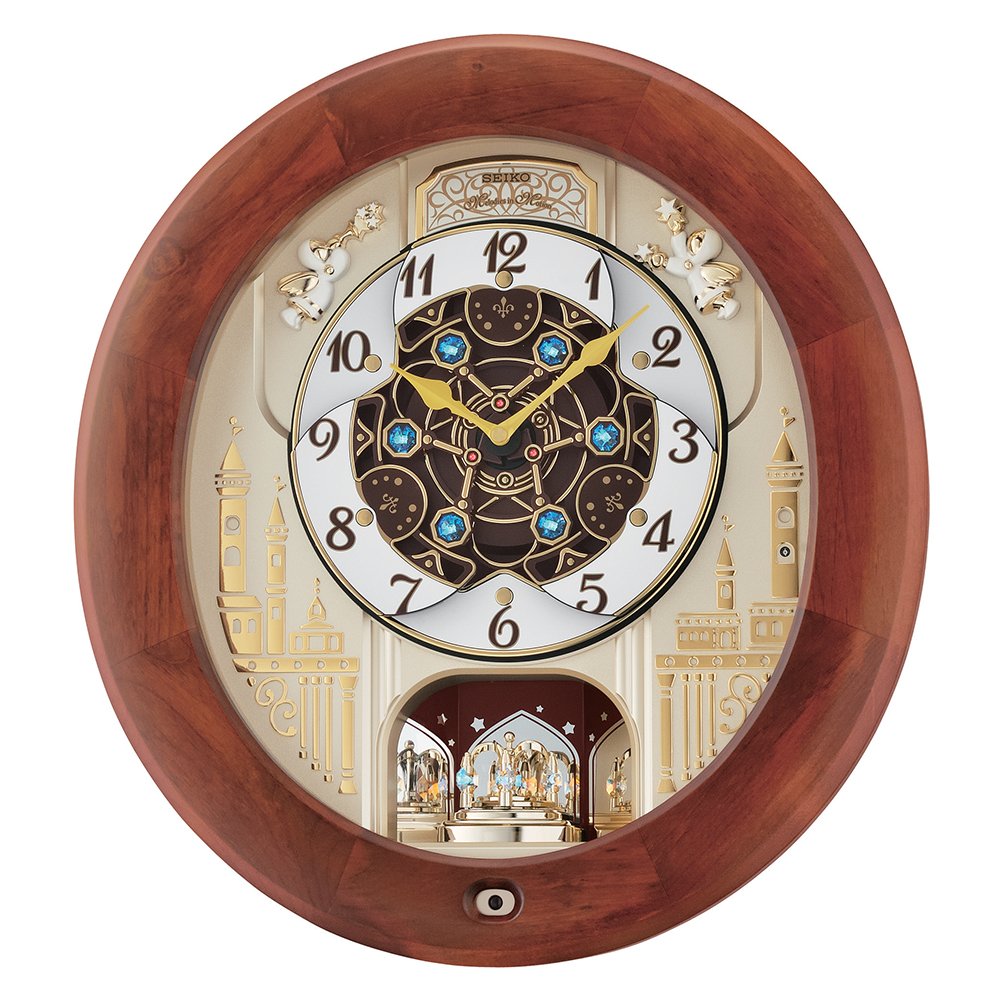
Image 1: Front view of the Seiko QXM531BRH Melodies in Motion Wall Clock, showcasing its ornate dial, pendulum, and brown frame.
Safety Information
- Keep batteries out of reach of children.
- Do not mix old and new batteries, or different types of batteries.
- Remove batteries if the clock will not be used for an extended period.
- Avoid exposing the clock to extreme temperatures, direct sunlight, or high humidity.
- Handle the clock with care to prevent damage to the glass and internal mechanisms.
Package Contents
Verify that all items are present in the package:
- Seiko QXM531BRH Wall Clock
- Batteries (included)
- User Manual (this document)
Setup
1. Battery Installation
- Open the battery compartment cover located on the back of the clock.
- Insert the included batteries, ensuring correct polarity (+ and -).
- Close the battery compartment cover securely.
2. Setting the Time
- Locate the time setting knob on the back of the clock.
- Rotate the knob clockwise or counter-clockwise to set the correct time.
- Ensure the clock hands move freely and are not obstructed.
3. Mounting the Clock
- Choose a suitable wall location, ensuring it is sturdy enough to support the clock's weight (approximately 4.67 kg).
- Use an appropriate wall anchor and screw for secure mounting.
- Hang the clock using the keyhole slot on the back.
Operating Instructions
Melodies in Motion Feature
The clock plays one of 18 songs every hour on the hour. The dial face opens, revealing a turning movement synchronized with the music. After the main melody, a closing melody plays as the dial closes.
Melody Selection Switch
Locate the melody selection switch on the side or back of the clock. Flip the switch to choose between three groups of songs:
- Group A (Popular Melodies): The Entertainer, Lara's Theme, Good Morning Starshine, New York, New York, Time In A Bottle, Your Decorated My Life.
- Group B (Classic Melodies): The Four Seasons "Spring", Kanon, Eine Kleine Nachtmusik, Symphony No. 6 "Pastoral", From Peer Gynt, La Traviata "Drinking Song".
- Group C (Christmas Selections): Deck The Halls, O'Tannenbaum, We Wish You A Merry Christmas, Joy To The World, Silent Night, Jingle Bells.
Volume Control
Adjust the volume of the melodies using the volume control knob, typically located on the side or back of the clock.
Light Sensor
The built-in light sensor automatically turns off the music and motion features in low light conditions or darkness to prevent disturbance during nighttime hours.
Demo Button
Press the demo button to play a sample of the current melody selection and observe the motion feature.
On-Off Switch
Use the On-Off switch to completely disable or enable the musical and motion features of the clock.
Maintenance
Cleaning
- Wipe the clock's surface with a soft, dry cloth.
- Do not use abrasive cleaners, solvents, or chemical sprays, as these may damage the finish or internal components.
- For the glass, use a glass cleaner sparingly on a cloth, then wipe the glass. Do not spray directly onto the clock.
Battery Replacement
When the clock's performance diminishes or the melodies become faint, it is time to replace the batteries. Follow the battery installation steps outlined in the "Setup" section.
Troubleshooting
| Problem | Possible Cause | Solution |
|---|---|---|
| Clock not functioning | Dead or incorrectly installed batteries. | Check battery polarity and replace with fresh batteries. |
| Melodies not playing | Light sensor activated (dark room); Volume too low; On-Off switch is off. | Ensure the room is well-lit; Increase volume; Turn the On-Off switch to 'On'. |
| Motion feature not working | Similar to melodies not playing; Obstruction. | Check light conditions, volume, and On-Off switch. Ensure no physical obstructions to the moving parts. |
Specifications
- Model: QXM531BRH
- Brand: SEIKO
- Display Type: Analog
- Special Feature: Musical, Silent Clock
- Power Source: Battery Powered
- Material: Fibreglass (body), Glass (frame)
- Colour: Brown
- Item Weight: 4 kg 670 g
- Dimensions: Approximately 17" x 16" x 5"
- Melodies: 18 (3 selectable groups)
- Light Sensor: Yes
- Batteries: Included

Image 2: This image shows a size comparison chart for watches, which is not directly relevant to the wall clock. Please refer to the stated dimensions for the Seiko QXM531BRH wall clock.
Warranty and Support
For warranty information and customer support, please refer to the documentation provided with your purchase or visit the official Seiko website. Keep your proof of purchase for warranty claims.
For further assistance, you may contact Seiko customer service through their official channels.


