
Sunbeam SGDJ701
Sunbeam 700 Watts 0.7 Cubic Feet Microwave Oven Instruction Manual
Model: SGDJ701
Important Safeguards
When using electrical appliances, basic safety precautions should be followed, including the following:
- Read all instructions before using the appliance.
- Do not operate any appliance with a damaged cord or plug, or after the appliance malfunctions or has been damaged in any manner.
- Do not use outdoors.
- Do not let cord hang over edge of table or counter, or touch hot surfaces.
- To protect against electrical shock, do not immerse cord, plugs, or microwave oven in water or other liquid.
- Close supervision is necessary when any appliance is used by or near children.
- Do not use the microwave oven for purposes other than its intended use.
- Always ensure the turntable is properly seated before operation.
- Do not heat sealed containers, as they may explode.
- Exercise caution when removing hot food or liquids from the microwave.
Product Overview
The Sunbeam Digital Microwave Oven (Model SGDJ701) is a compact and efficient appliance designed for everyday cooking and reheating. With a capacity of 0.7 cubic feet (19.82 liters) and 700 watts of power, it features a turntable for uniform heat distribution and a digital display for easy operation. It includes 9 pre-programmed settings, a cooking light, and a child lock for safety.
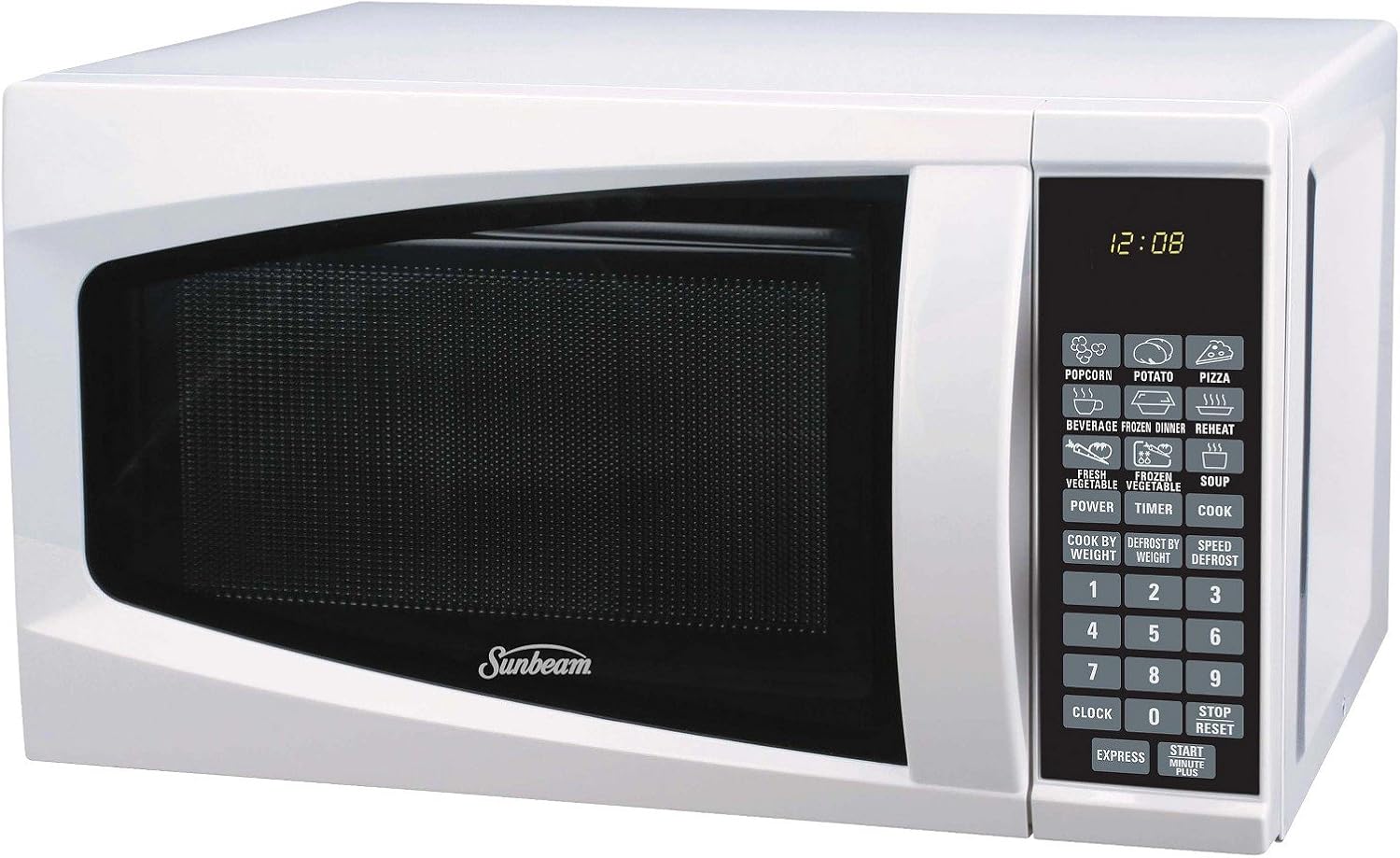
Front view of the Sunbeam 0.7 Cubic Feet Microwave Oven, showing the white exterior, dark door, and the digital control panel with various function buttons and a time display.
Setup
- Unpacking: Carefully remove the microwave oven and all packing materials from the carton. Check for any damage, such as dents or a broken door. Do not operate if damaged.
- Placement: Place the microwave oven on a flat, stable surface. Ensure there is adequate ventilation space around the unit (at least 4 inches on top, sides, and back) for proper operation. Do not block air vents.
- Power Connection: Plug the power cord into a grounded electrical outlet. Ensure the outlet meets the electrical requirements for the appliance (120V AC, 60Hz).
- Turntable Installation: Place the roller ring in the center of the microwave oven cavity. Place the glass turntable on top of the roller ring, ensuring it is securely seated in the center hub.
Operating Instructions
Setting the Clock
- Press the CLOCK button once.
- Use the number pads to enter the current time (e.g., 12:08).
- Press the CLOCK button again to confirm.
Basic Cooking (Time Cook)
- Place food in the microwave-safe container.
- Enter the desired cooking time using the number pads.
- Press the START MINUTE PLUS button to begin cooking.
- To adjust power level: After entering time, press POWER, then use number pads (1-10 for 10%-100% power). Press START MINUTE PLUS.
Express Cooking
For quick cooking at 100% power:
- Press the EXPRESS button repeatedly to add cooking time in 30-second increments (up to 99 minutes 99 seconds). Cooking starts automatically.
- Alternatively, press START MINUTE PLUS to cook for 1 minute at 100% power. Each subsequent press adds 1 minute.
One-Touch Settings
The microwave features 9 pre-programmed settings for common foods:
- POPCORN: Press once for standard popcorn bag.
- POTATO: Press once for 1 potato, twice for 2, three times for 3.
- PIZZA: Press once for 1 slice, twice for 2, three times for 3.
- BEVERAGE: Press once for 1 cup, twice for 2, three times for 3.
- FROZEN DINNER: Press once for 1 serving, twice for 2.
- REHEAT: Press once to reheat a plate of food.
- FRESH VEGETABLE: Press once for 1 serving, twice for 2, three times for 3.
- FROZEN VEGETABLE: Press once for 1 serving, twice for 2, three times for 3.
- SOUP: Press once for 1 serving, twice for 2, three times for 3.
For most one-touch settings, simply press the corresponding button. For items with multiple serving options, press the button repeatedly to select the desired quantity.
Defrosting
- Defrost by Weight:
- Press the DEFROST BY WEIGHT button.
- Enter the weight of the food in ounces (e.g., 12 for 12 oz) using the number pads.
- Press START MINUTE PLUS.
- Speed Defrost:
- Press the SPEED DEFROST button.
- Enter the desired defrosting time using the number pads.
- Press START MINUTE PLUS.
Child Lock
To activate the child lock, press and hold the STOP/RESET button for 3 seconds. The display will show "LOCK". To deactivate, press and hold the STOP/RESET button again for 3 seconds.
Stopping/Resetting Operation
To pause cooking, open the door or press the STOP/RESET button once. To cancel cooking entirely, press the STOP/RESET button twice.
Maintenance and Cleaning
- Exterior: Wipe the exterior with a damp cloth and mild soap. Do not use abrasive cleaners or solvents.
- Interior: Clean the interior cavity regularly with a damp cloth. For stubborn food splatters, place a bowl of water with lemon slices inside and microwave for a few minutes to loosen residue, then wipe clean.
- Turntable and Roller Ring: The glass turntable and roller ring can be washed in warm, soapy water or in the dishwasher. Ensure they are completely dry before placing them back in the microwave.
- Door Seal: Keep the door seal and adjacent parts clean. Wipe with a damp cloth to remove any food residue.
- Odor Removal: To remove odors, combine 1 cup of water with the juice of one lemon in a microwave-safe bowl. Microwave for 5-7 minutes.
- Always unplug the microwave oven before cleaning.
Troubleshooting
| Problem | Possible Cause | Solution |
|---|---|---|
| Microwave does not start. | Power cord not plugged in; Door not closed properly; Fuse blown or circuit breaker tripped; Child lock activated. | Ensure plug is firmly in outlet; Close door securely; Check household fuse/circuit breaker; Deactivate child lock by holding STOP/RESET for 3 seconds. |
| Food is not cooking or heating properly. | Incorrect cooking time/power level set; Door not closed properly; Food quantity too large. | Adjust cooking time/power; Ensure door is latched; Reduce food quantity or increase cooking time. |
| Turntable is noisy or not rotating. | Turntable or roller ring not positioned correctly; Debris under turntable. | Reposition turntable and roller ring; Clean under the turntable. |
| Oven light not working. | Light bulb needs replacement. | Contact qualified service personnel for bulb replacement. |
Specifications
- Brand: Sunbeam
- Model Number: SGDJ701
- Capacity: 0.7 Cubic Feet (19.82 Liters)
- Power Output: 700 Watts
- Color: White
- Product Dimensions (L x W x H): 35.56 x 29.21 x 49.53 cm (14 x 11.5 x 19.5 inches)
- Item Weight: 11.43 kg (25.2 lbs)
- Special Features: Timer, Turntable, Digital Display, One-touch Settings, Child Lock
- Controller Type: Touch
Warranty and Support
For warranty information or technical support, please refer to the warranty card included with your purchase or visit the official Sunbeam website. You may also contact Sunbeam customer service directly for assistance with product operation, troubleshooting, or parts replacement.
Please have your model number (SGDJ701) and purchase date available when contacting support.
Ask a question about this manual
Ask about setup, troubleshooting, compatibility, parts, safety, or missing instructions. Manuals+ will review the question and use this page’s manual context to help answer it.