
Panasonic KX-TGC210S
Panasonic KX-TGC210S DECT 6.0 Cordless Phone User Manual
Model: KX-TGC210S
Introduction
This manual provides essential information for the safe and efficient operation of your Panasonic KX-TGC210S DECT 6.0 Expandable Cordless Phone. Please read this manual thoroughly before using the phone and retain it for future reference.
What's in the Box
- Dect 6.0 Plus Expandable Digital Cordless Phone (single-handset System)
- AC Adapter
- Telephone Line Cord
- Rechargeable Batteries (2 AA batteries included)
Setup and Installation
1. Base Unit Placement
Place the base unit near a standard telephone jack and an AC power outlet. Avoid placing it near electronic appliances that may cause interference, such as microwave ovens or computers.
2. Battery Installation and Charging
Your phone comes with two AA rechargeable batteries. Insert the batteries into the handset, observing the correct polarity (+ and -). Place the handset on the base unit to charge. The handset display will indicate charging. Allow at least 7 hours for the initial charge.
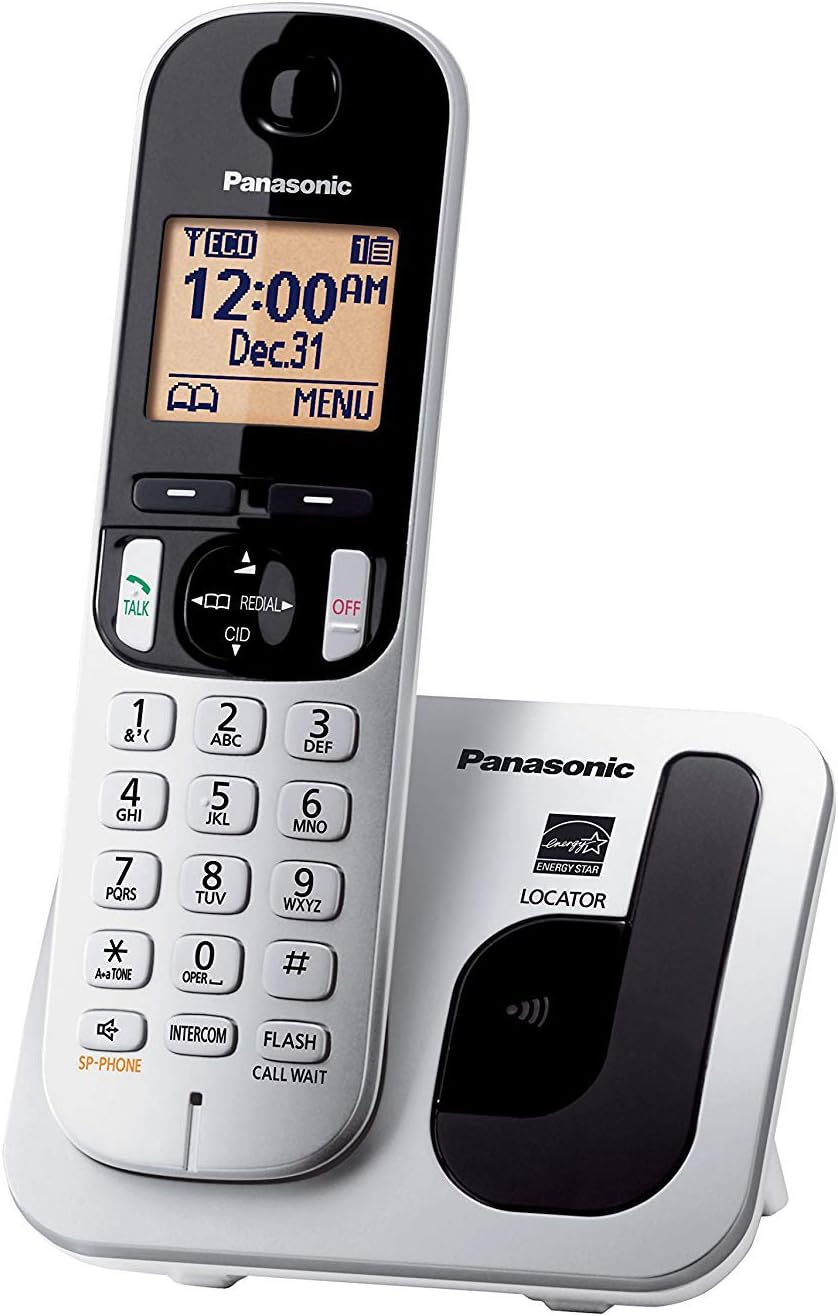
Image: The Panasonic KX-TGC210S cordless phone handset docked in its base unit, showing the display and keypad. This image illustrates the primary components of the phone system.
3. Connecting the Telephone Line Cord
Connect one end of the telephone line cord to the LINE jack on the base unit and the other end to your telephone wall jack.
4. Connecting the AC Adapter
Connect the AC adapter to the power jack on the base unit and plug it into a standard AC outlet.

Image: Rear view of the Panasonic KX-TGC210S base unit, highlighting the telephone line and power input ports for connection.
Operating Instructions
Making and Receiving Calls
- To Make a Call: Press TALK, then dial the phone number.
- To Receive a Call: When the phone rings, press TALK.
- To End a Call: Press OFF or place the handset back on the base unit.
Caller ID
The 1.6-inch amber backlit display shows the caller's name and number (if available and subscribed to Caller ID service). Use the navigation buttons to scroll through the Caller ID list.
Call Block
To block unwanted calls, access the Call Block feature through the menu. You can add numbers from your Caller ID list or manually enter them to prevent future calls from those numbers.
Silent Mode
Activate Silent Mode to disable the handset ringer for a specified period, useful for quiet times. Calls will still be recorded in the Caller ID log.
Handset Locator
If you misplace your handset, press the LOCATOR button on the base unit. The handset will ring, allowing you to find it easily.

Image: Side view of the Panasonic KX-TGC210S cordless phone, showing its ergonomic design and how it rests on the charging base.
Intelligent Eco Mode
This feature automatically lowers the power consumption when the handset is used close to the base unit, conserving battery life and energy.
Expandability
The system is expandable up to six handsets (sold separately), allowing for multiple phones throughout your home or office on a single line.
Maintenance
Cleaning
Wipe the phone and base unit with a soft, damp cloth. Do not use abrasive cleaners or solvents. Ensure the phone is unplugged before cleaning.
Battery Care
To maintain optimal battery performance, fully charge the handset batteries regularly. If the phone will not be used for an extended period, remove the batteries to prevent leakage.
Troubleshooting
| Problem | Solution |
|---|---|
| No dial tone | Check if the telephone line cord is securely connected to both the base unit and the wall jack. Ensure the AC adapter is plugged in. |
| Handset not charging | Ensure the handset is properly seated in the base unit. Clean the charging contacts on both the handset and base unit with a dry cloth. Verify the AC adapter is connected. |
| Poor sound quality / Interference | Move the base unit away from other electronic devices (e.g., Wi-Fi routers, microwaves). Ensure the handset is within range of the base unit. |
| Display is blank | Charge the handset battery. If the issue persists, try replacing the rechargeable batteries. |
Specifications
- Model Number: KX-TGC210S
- Technology: DECT 6.0 Plus
- Display: 1.6-inch Amber Backlit LCD
- Expandability: Up to 6 Handsets
- Power Source: AC Adapter (Base Unit), 2 x AA Rechargeable Batteries (Handset)
- Product Dimensions: 3.8 x 4.3 x 3.1 inches (Base Unit)
- Item Weight: 3.68 ounces (Handset)
- Manufacturer: Panasonic
- First Available: March 11, 2014
Warranty and Support
For warranty information and technical support, please refer to the warranty card included with your product or visit the official Panasonic support website. Keep your purchase receipt as proof of purchase.
Panasonic Support: https://na.panasonic.com/us/support
Ask a question about this manual
Ask about setup, troubleshooting, compatibility, parts, safety, or missing instructions. Manuals+ will review the question and use this page’s manual context to help answer it.