
Introduction
This manual provides detailed instructions for the safe installation, operation, and maintenance of your allen + roth Mazon 44 Inch Oil Rubbed Bronze Ceiling Fan. Please read all instructions carefully before beginning installation and retain this manual for future reference.
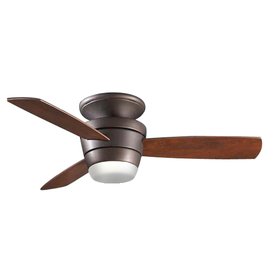
Image: The allen + roth Mazon 44 Inch Oil Rubbed Bronze Ceiling Fan, featuring a dark bronze motor housing, three wooden-look blades, and a single frosted glass light globe at the bottom.
Safety Information
Always follow basic safety precautions when installing and operating this ceiling fan to reduce the risk of fire, electric shock, and personal injury.
- Ensure the power is turned off at the circuit breaker before installation or maintenance.
- All wiring must be in accordance with national and local electrical codes.
- The mounting structure must be capable of supporting the fan's weight (minimum 35 lbs).
- Do not operate the fan with damaged blades or housing.
- Keep hands, clothing, and other objects clear of the fan blades when in operation.
Package Contents
Verify that all components are present before beginning installation:
- Ceiling Fan Motor Housing (Oil Rubbed Bronze)
- Fan Blades (3)
- Light Kit Assembly
- Frosted Glass Globe
- Remote Control with Wall Mount
- Mounting Hardware
- Instruction Manual
Setup and Installation
- Turn off Power: Locate the circuit breaker and turn off the power to the fan's location.
- Mounting Bracket Installation: Secure the mounting bracket to the ceiling junction box. Ensure the junction box is rated for ceiling fan support.
- Fan Assembly: Attach the fan blades to the motor housing. Connect the light kit assembly to the fan motor.
- Wiring: Connect the fan's electrical wires to the household wiring according to the wiring diagram provided in the full manual. Ensure all connections are secure.
- Canopy Installation: Lift the fan assembly and secure it to the mounting bracket. Install the canopy to cover the wiring connections.
- Light Globe Installation: Install the light bulb (not included) and attach the frosted glass globe to the light kit.
- Restore Power: Turn the power back on at the circuit breaker.
For detailed wiring diagrams and specific hardware instructions, refer to the complete installation guide included in your product packaging.
Operating Instructions
Your Mazon ceiling fan is operated using the included remote control.
- Fan On/Off and Speed Control: Use the fan speed buttons on the remote to turn the fan on/off and adjust between low, medium, and high speeds.
- Light On/Off: Press the light button to turn the light kit on or off.
- Light Dimming: If your light kit supports dimming, press and hold the light button to adjust the brightness.
- Reverse Function: A reverse switch (often located on the fan motor housing) allows you to change the direction of the fan blades for summer (downward airflow) or winter (upward airflow) operation. Ensure the fan is off before changing direction.
Maintenance
Regular maintenance ensures optimal performance and extends the life of your ceiling fan.
- Cleaning: Dust the fan blades and motor housing periodically with a soft, lint-free cloth. Do not use abrasive cleaners or solvents.
- Blade Screws: Check all blade screws for tightness at least twice a year. Loose screws can cause noise and wobble.
- Light Kit Screws: Ensure the screws holding the light kit and glass globe are secure.
- Electrical Connections: Periodically inspect electrical connections for any signs of wear or loosening. (Ensure power is off before inspection).
Troubleshooting
| Problem | Possible Cause | Solution |
|---|---|---|
| Fan does not start | No power to the fan; Loose wire connections; Remote control battery dead. | Check circuit breaker; Verify all wire connections are secure; Replace remote control battery. |
| Fan wobbles | Loose blade screws; Unbalanced blades; Loose mounting bracket. | Tighten all blade screws; Use a balancing kit (sold separately); Ensure mounting bracket is securely fastened. |
| Light does not work | Bulb burned out; Loose wire connection in light kit; Light switch off. | Replace bulb; Check light kit wiring; Ensure light switch on remote is pressed. |
If you encounter issues not listed here, or if solutions do not resolve the problem, contact customer support.
Specifications
- Brand: allen + roth
- Model Number: 0356762
- Fan Size: 44 Inches
- Finish Type: Oil Rubbed Bronze
- Control Method: Remote Control
- Special Feature: Remote Control
- UPC: 803390601419
- First Available: March 11, 2014
Warranty Information
This allen + roth Mazon Ceiling Fan comes with a Limited Lifetime Warranty. Please refer to the warranty card included with your product for specific terms, conditions, and coverage details. Retain your proof of purchase for warranty claims.
Customer Support
For technical assistance, replacement parts, or warranty inquiries, please contact allen + roth customer service. Contact information can typically be found on the product packaging or the brand's official website.
Note: Always have your model number (0356762) and date of purchase ready when contacting support.